App Version: 7.23.0.1.12998
Server Version: 1.18.0.1846
I have enabled remote access via Static IP and Manual Port Forwarding. The status shows as Server - “Fully accessible outside your network”. Refer to attachment - “Server Screenshot”
I have the same issue. Yesterday especially it worked really poorly. It couldn’t even finish the second song. The first song played at full bitrate and then it started transcoding. The only remedy was to sync the album I wanted to listen. It does this only on mobile data. Otherwise, the server works perfectly fine when I’m on my home network.
I never use direct play on cellular, I’ve found the cellular data connection simply isn’t good enough to direct play FLAC. I always turn on “Use low quality on cellular”. FLAC to Opus transcoding is amazing. I can direct play just fine when remote on WiFi, say at Starbucks…
Where I live, the 4G speeds are really good. I don’t believe that data bandwidth is really the issue here. We will know only after the logs have been analyzed I guess.
BTW, I have also tried with Wi-fi and I still face same issue. I will be surprised if it will be data bandwidth issue for two reasons
When I play the first song (which is direct played), I did not face any buffering issue, it plays seamlessly
And in the settings if I am specifying to play at original quality, it should not transcode anyways, even if it means buffering. This is at what I would expect it to do. But of course that’s just my expectation
Same server version and my Sony Android tv would not play flac music direct. This is on my local network. All other devices iPhone and Roku works. With previous releases it worked just fine. Hoping to get a fix fast.
I suspect they can not reproduce the problem. I cannot reproduce it. No transcoding happens if I turn off use low quality on cellular. FLAC files play without issue.
Well, I can consistently reproduce the issue. Only first song plays as direct play. I had hoped the logs would have given additional insights on what’s going on.
I am so disappointed that I am not getting any help on this issue.
I just came back from my vacation and updated the server version to 1.18.2 and am part of Plex Beta program on my android phone. And now even on home network, the app transcodes to 128 kbps with same message that bit rate exceeds maximum allowed.
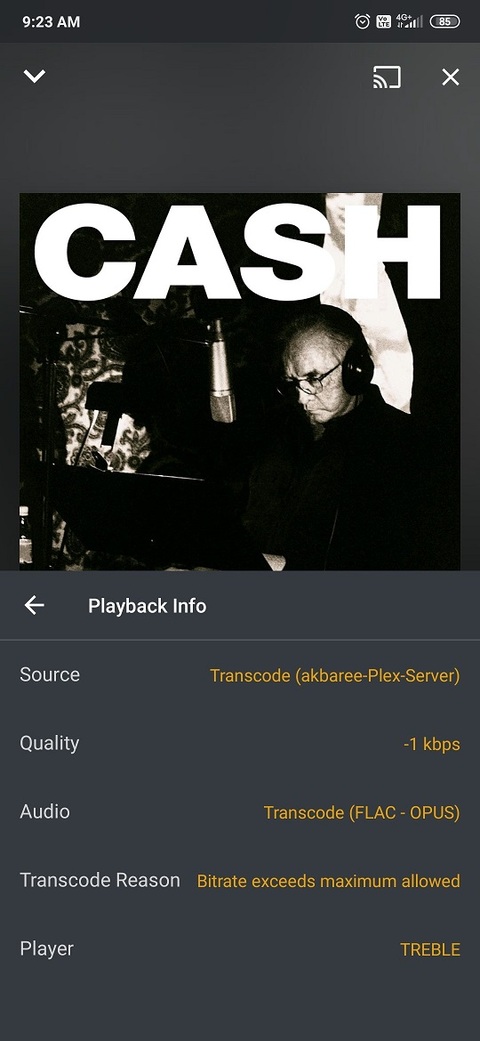
I have this issue too. Now the first song plays transcoded at 128 kbps and all the rest of the songs play transcoded at -1 kbps on cellular regardless of quality settings.
You are right jebrossard. On home network, 2nd song onwards, it indeed plays on direct play. But this is true if play an album, playlist. Like me if you are playing songs at random by selecting the song to play (instead of queuing) then it will continue to play on a transcode.
Right now on cellular I can get the first track in an album to direct play and then the rest transcode at -1 quality. I noticed that caching matters so if other people try this use a new album each time. I’ll attach logs later.
That’s a different and previously reported issue. On cellular the first track plays direct and the rest transcode regardless of the Use low quality on cellular setting.