Please play the file with a desktop video player, like VLC to verify what kind of subtitles are actually embedded.
Hi @OttoKerner! I’ve done so. But by default, there isn’t a subtitle embedded. I use the “choose file” and still get an English subtitle. I then took your advice of using the raw file against VLC and was coming with the same results.
Should I remove the sub files individually then re-scan to let the plex system use the agent give subtitle choices. Then see if choosing Chinese would work? Thanks
Do you actually have chinese subtitles as separate files?
If so, which file format do these have?
The best way to add subtitles is to put them beside the video file.
Hi @OttoKerner. As you can see from the pic, files are in the same directory and renamed according to the support article.

Any chance you could show me the complete file names?
Hi @OttoKerner! Sorry for the delay. Here is what you asked for. Hope its clear. I did try other files too and some work, while others don’t as well. So I’m really a bit confused
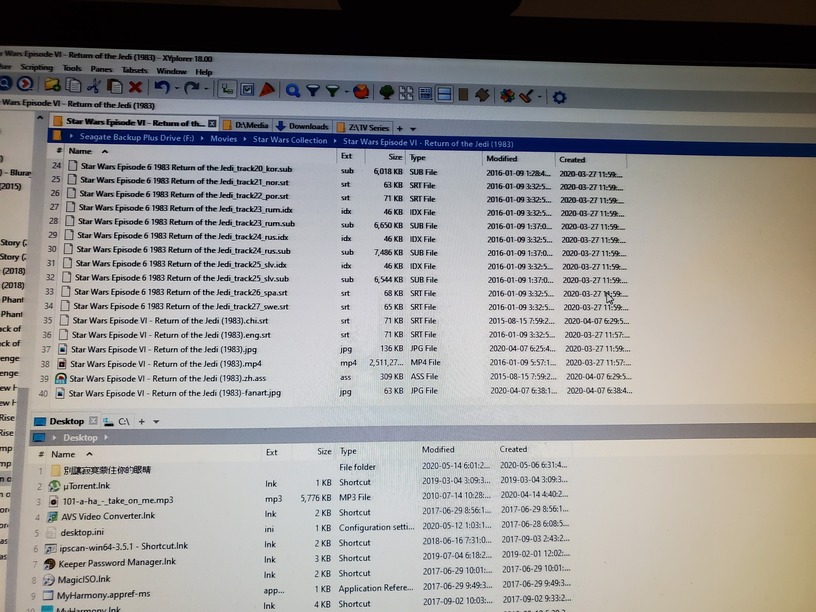
Hmm. I don’t think you can do that with vobsubs (the idx and sub files). Typically it is 1 set of files with all the different languages included inside.
You also have the wrong naming. You need to use a period not the underscore. Also, the names need to be identical to the movie file.
Star Wars Episode 6 1983 Return of the Jedi_track24_rus.idx
-> Star Wars Episode VI - Return of the Jedi (1983).rus.idx
It definitely should recognize the .chi.srt file which is named just like the video file.
Please take a look into the Plex XML info of this movie.
Copy the content of the guid="... property into here.
Hi @anon18523487! Thanks for the reply. The name that was placed with a different format was actually on purpose as I haven’t decided if I was keeping or taking off the other subtitles. But thanks for pointing that out. Been busy fixing my music area that I totally forgot I still had those there waiting
Hi @OttoKerner! Thanks for the tip. I haven’t figured out the code on the XML file you mentioned. I learned quite a bit on the behavior of Plex though and that a subtirle with a .ass suffix wasn’t working well and needed some conversion. Also I finally understood why the .chi fes were showing English. Thats because some of the subtitle files from Opensubtitles.org are fakes. I mean, they label it as chinese when the content inside is in English. Making me look around with my head cut off.
Anyways, I was able to repair a majority of this subtitle mess I got into. A new challenge is, with Chinese simplified and Chinese traditional, I note that the system seems unable to get a distinct separation. I mean, I used .chi (traditional) and .zh (simplified) to make both appear hopefully. I’ve tested each files to make sure they work. But the problem appears when watching a movie. The system seems to choose the .chi over the .zh unless the prior isn’t available. I’ve noted as well that some raw subtitle file have a .chs and cht distinction, but I can’t find such codes used for the ISO639-3 standards, so I was reluctant to go that direction. Any wisdom on this? Thanks
Do they work in Plex? If they do, use them.
Another new question in preparing my migration to a NAS. So, I have my data on a old NAS right now, but space constraints have prompted me to move to a larger NAS. I have the PMS on my win 10 machine now. What I’ll do is hohse both the PMS and media into the new NAS.
So, the question is/are do I just restart a new PMS and parallel migrate themed and library or do I do it another way. If another way, what ways are there. Media, i have a copy, so I’m not worried, its the users and the process of movement that I’m more concerned of.
Thanks
Unless your NAS can run PMS and that is your intent, I would not run Plex from your Windows PC with the Plex data moved to your NAS. PMS uses a database and having that accessed over a network connection can lead to data corruption.
Yes! Your media is fine on a NAS or on a pooled drive but the Plex data directory or anything else that is dynamic and subject to real time changes should never ever be placed in such a location.
In fact the StableBit’s DrivePool documentation specifically warns the Plex’s data directory should never be in the pool and that goes for any network storage as well.
Some time ago I tested both situations just to see what would happen on a temporary server and I found that with the Plex data directory in a pool Plex crashed within a few minutes of starting and with the Plex data directory on network storage Plex stayed up longer but either crashed or developed a corrupted database within an hour or so.
Plex’s data directory should be directly on a drive connected to the computer that is acting as a server.
I do move Plex’s data directory to the root of my C: drive (C:\Plex) for ease of access for me but that is as far as I go.
One more thing: I tested Plex (and Emby) by moving the database to an SSD and found that with over 3000 movies and 700 TV shows that the improvement in Plex’s functionality was, at best, marginal. The slight speed increase was just barely noticeable and produced unnecessary complications of having to worry about the database’s size growing too big for the SSD. My main drive is 2tb (and pretty fast but it is a regular hard drive) and I run nothing but Plex (or Emby) on my server so it will be a VERY long time before the database gets too big for the drive,
The main effect I have seen from having a SSD is much faster start time for my computer. But I only reboot my server very rarely and I have not found that the somewhat slower boot makes much difference.
Hi @anon18523487 and @Elijah_Baley! Thank you for both your advices. Actually, my point and ask of advice is on mivration, weather manually from one server to another, or should I be transferring the database and such.
I will be using a Synology NAS and I am sure plex can run on it. So those aren’t actually my concerns really. Both media data and server app will exists on the NAS. Just a matter of not wanting to rebuild the users I have sharing my media and seeing what I can save time in while migrating to a new hardware
on a separate note, I have not had problems with my media on a NAS while the server is on my PC. The only hicup has been the network path recognition on startup. Once I go into just reading the network mapping set, it flows with no issues. But updates of changes sometimes are a few seconds delayed. I only have less then 100 movies for now as well so maybe I’m not seeing a hit yet.
Still my question is qith migration. Thanks
If you’ve already put in a lot of work and don’t want to start over, then the answer is pretty straight forward.
Keep in mind that switching PMS to a different OS is not straight-forward. Settings for PMS on Windows is stored in the registry, for the NAS it’ll be in a file. You’ll need to recreate these settings on the NAS manually, there is no conversion.
Also the database holds the paths to your files. So you will need to make sure the paths are identical. I’m not a NAS person so I’m not sure but I believe Linux uses ‘/’ while Windows uses ‘’, so you may need to manually edit the database to get these correct.
Seeing the above limitations, depending on your willingness to fuss with this migration, it might be easier to start over with a new server. Any shared you’ve created are tied to you account, so you won’t need to re-invite everyone. You will need to change your sharing permissions to use this new server instead of the old one.
Thanks @anon18523487! Just as I imagined it to be. Good I’m still stuck with organizing my previous medias so not much customizations yet on PMS.
Just to clarify, so for the users, I’ll have to add on new library shares then from the new server and gradually remove the old shares?
And as for the old server, I log out of it, and how do I remove it from my account before u installing the PMS app? Thanks
Once you setup the new server, if you view the sharing you’ve already made for a user, you will see the new server as another available thing to share. Turn on what you want to share and turn off sharing form the old server.
Once you are sure you don’t need the old server, you can delete it form your authorized devices, then uninstall PMS. You’ll need to remove all the metadata and the configuration info in the registry manually. See https://support.plex.tv/articles/201941078-uninstall-plex-media-server/ for details.
I’m curious to ask, is there a way to set a live YouTube stream onto Plex as a TV channel? My intentions is so I can say combine like a live news channel into the UI and not need to get out of Plex to use YouTube and still look on my list there
No, not youtube. There are Plex News and Webshows.
