My server is actually opened on a certain port and so, accessible from the outside. My understanding of the login system lets me think that, only the users that I created myself can connect to my server. Recently, I realise with a friend, that he was connected and was watching something from the new Movie section of Plex, through my server, or at least, through my IP. But I never created a user for him. I don’t really understand how that’s possible ? Am I missing something ?
Plex’ video on demand content is linked to everybody’s accounts… not your server.
That is unless you’re actually talking bout a library of yours and had signed in on his end with your account (in which case he’d still be using your account).
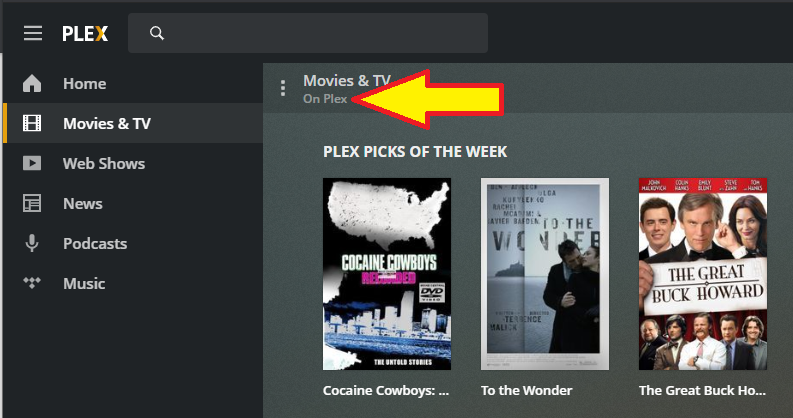
Do the Movies & TV appear from “On Plex”? See screenshot below for example.
If so, as @tom80H mentions, that is the part of the ad-supported on-demand service from Plex.
Anybody with an account at plex.tv has access. It does not require a server. The traffic flows from Plex servers directly to the client.
The screenshot below is from an account I use for testing. The account is not a Plex Pass account. It “owns” no Plex Media Server. No libraries are shared with it from any Plex Media Server. It still has access to the on-demand services.
If I understand correctly, the fact that someone is connected through my-ip:32400 does not mean he’s connected to my server. But he’ll still have an access to all the On Plex services because they’re not linked to my server. But that user is still using my-ip:32400 to see the On Plex services without any permissions no ?
Let’s get more specific… we’re currently like talking around the essential parts.
Are you in the same network as your friend?
Did you share your account with him?
If you did and he is… yes, then he could indeed be using your account and see your server (messing up your watch history).
If you’re worried about that, you should never have logged in with your account on a devices of his in the first place (no offense).
If he’s on a different network – using your local IP will do no harm as that is… local to your network.
Long story short…
Let’s get specific, then we won’t need to guess.
I have a Synology running at home at 192.168.1.42
In that NAS, I installed a Plex media server, so now, I can access the interface (the web client ?) at 192.168.1.42:32400.
I exposed that local IP to the outside at the port 3000
I also have a domain name that I’ll call blacksqd.com for now
So now, I can access the local 192.168.1.42:32400 from http://blacksqd.com:3000
But that means that anyone going to http://blacksqd.com:3000 will see the Plex login page. So what my friend tried, is to login with his Plex account. He’s not using my account, he doesn’t have it, he only knows http://blacksqd.com:3000. And he’s able to connect and see the web interface. He doesn’t have access to anything on my server but still see the interface.
That means that http://blacksqd.com:3000 has become a public web client for any Plex user ?
If the user is watching some content with the on-demande services, that means that the traffic is passing by my NAS ?
When you say he sees the interface…
does he see any of your content or just the bare Plex Web?
As you made it publicly available, that part is to be expected.
Currently, everybody can open your URL – if they know your router’s public IP and the port you set for remote access, this will do the job just fine as well.
If your server is however properly claimed, it means that they cannot access your actual content.
All he will see is the “on demand” part (“Movies & TV on Plex”) – that is made available to them through their own Plex account. No traffic of that is going through your server (unless he keeps refreshing the web app, which will cause it to be reloaded from your server – not however the content or any stream).
Edit:
For comparison… from your friend’s perspective you’re just another http://app.plex.tv/desktop – a hosted version of Plex Web through which he can access the online services. If he/she have an own Plex Media Server that is available remotely, they should even be able to run their content through the web app.
As for traffic… they’re loading the web-page from your server and running it in their browser. All streams etc. run from their respective source (e.g. Plex on Demand video) to their browser.