Hang on… Live TV. Are you talking about Terrestrial TV or Plex Channels? I know all my own content works perfectly.
Live TV from a TV tuner. I’ve never used plex channels.
I did not know it was possible to Time shift Local TV ( Terrestrial). I have never been able to do that task from a over the air TV Channel, IP or Streaming TV definitely works via the channel own app
I have a Silicon Dust HomeRun which I normally use for recording Live TV, that resource I can rewind and fast forward.
So at this stage, I can not figure what is happening. Unless your talking about recordings.
MediaInfo says 8 channels (i.e., 7.1). E-AC-3 (DD+ with Dolby Atmos)
(BTW, I know I won’t get Atmos to pass through. But again the odd thing is that if played as a video, when the file extension is .mp4, is does play in 7.1).
I’ve had this issue with my recorded live tv files (mpegts).
Skips fine when I convert them to MP4 - though you obviously can’t do that when the channel is playing live.
My recordings are also ts ( Transport Stream) files and if I intend to keep, I just re-mux them into a mkv container with MKVToolNix and add to my TV Library. Those can be << or >>
@Deihmos : To add if you have your DVR setting for Transcode, it will time shift with Experimental player 8.41
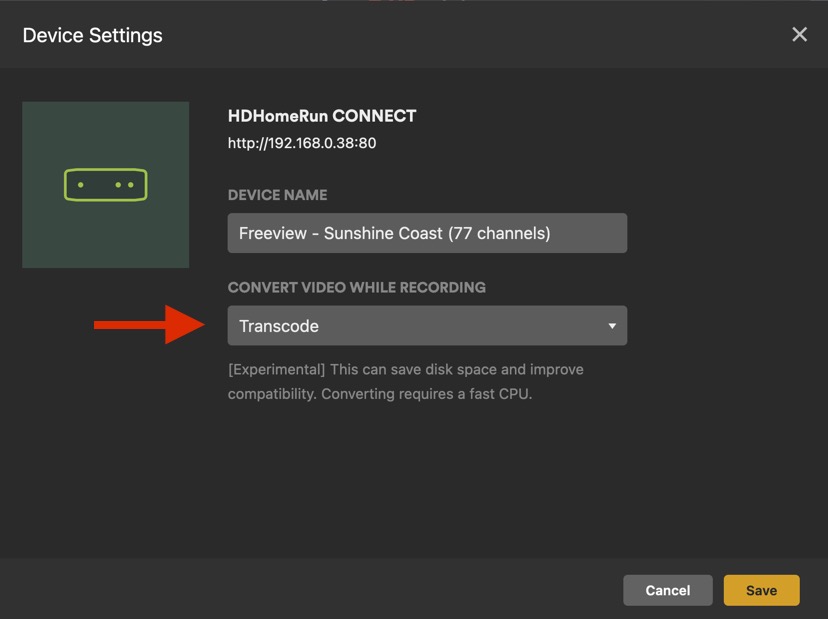
I hope that resolves your issue Deihmos
Remuxing post recording to another format (like mkv or mp4) does make FF/RW work correctly.
I also tried to enable transcoding for DVR recordings like you mentioned and this did not let me timeshift live Tv.

Hello,
I was invited to the beta and have been doing a little testing. It seems like the audio sync issues have been resolved for me. That is encouraging. Thanks.
I was recently added to the ATV beta as my 2022 4K unit has always had stuttering issues with a variety of content in plex but never infuse. The experimental play has fixed some stuttering issues but somehow more for 1080p H264 now. Large movement (pans, fireplaces) seems especially triggering.
The slow pan at 12 seconds and the pan across the fireplace at 20 seconds are especially taxing
I have not personally seen this behavior, could you please post some samples demonstrating this discovery. It is possible that the source material is too blame, yet may not. Please include the Titles names and release year and approx timeline position. I believe this will be interesting to the beta discussion group.
cheers
yeah its very curious, sample link added to original post
Hi, lets go through a few checks first. From the Touchpad scroll down ∨, go to Technical details. Can you confirm your using the Experimental player and it is mentioned in Technical details. I also have my ATV set to Dolby Vision, can you check if your TV is compatible?
I can not reproduce what you have mentioned, look forward to your reply.
Cheers
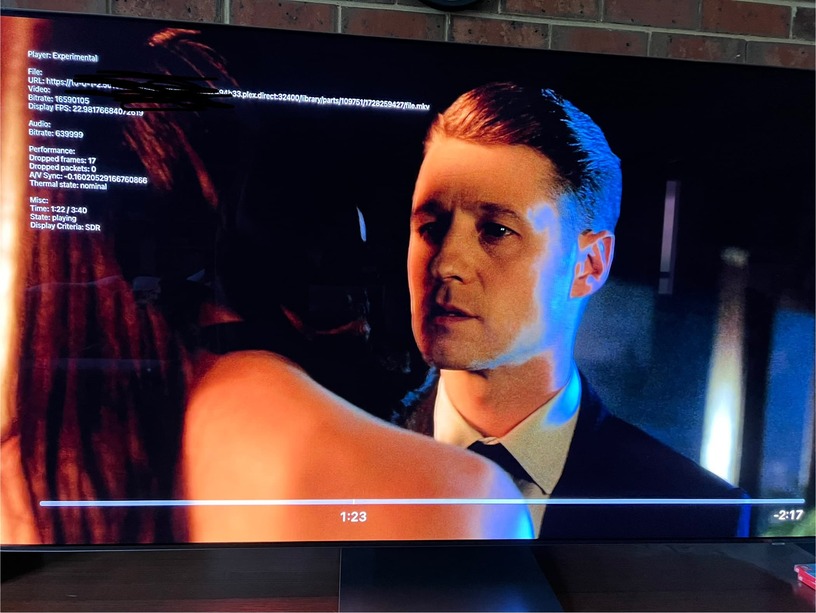
Yep experimental in use and using player overlay to confirm dropped frames being experienced. I’ve tried the sample file itself (instead of the one its cut from) and sometimes it played with no drops and sometimes it exhibited the same amount as the original file, especially after playing the original file, possibly a memory leak/pressure issue?
Original file name is Gotham.S04E09.Let.Them.Eat.Pie.1080p.WEB-DL.DDP5.1.H.264-CasStudio.mkv
Note I experience over other files too, this one has just the most consistent amount of scenes for testing
Setup info
ATV 4K 2022
Samsung S95B
Sonos Amp via ARC
ATV Display setting 4K HDR10+ - match range and frame rate enabled
ATV Audio setting - Dolby Digital output (Sonos amp can only do DD 5.1 surround)
Are you connected over Wifi or Ethernet?
Gigbit Ethernet from Mac Mini Pro M2, no dropped frames. Curious about the Frame rate FPS displayed in your previous attachment of 22.98
Sorry, @readerr0r is the AppleTV connected via Wifi or Ethernet?
ethernet, actually shares the same switch as the plex server
Is your Switch / Wifi Router configurable? If so, can you run a Diagnostic Check on Network for RX and TX errors for the ATV Connection. I have seen strange things happen even on Ethernet.
Can we get the Enhance Dialogue option implemented as well. It makes a very significant difference for me!
Plex already has reduce loud sounds. Enhance Dialogue seems like the logical next step.
Also: old player could be renamed to Native Player or Apple Player to be more descriptive.
Thanks
