Infuse may work better but it’s not a plex replacement, it’s way worse at almost everything but the actual playback.
Which is the most important function. You need your apps most important function to work best before concentrating efforts elsewhere. Plex is failing at this.
Infuse may work better but it’s not a plex replacement, it’s way worse at almost everything but the actual playback.
Good thing Infuse is primarily intended to be a front-end client for various media servers and not a replacement then, huh? 
Infuse is doing the most important job of Plex better than Plex can. Really only use for Plex at this point is a backend metadata manager and skipping intros/credits.
It will be a miracle if this company actually starts to care.
I really appreciate the testing that everyone has done with me this year. I know it has take a long time but hopefully everyone understands that I am also putting a lot of focus and work on this because I care about the experience for this group of users.
A player is a difficult project with a lot of moving parts.
In a lot of cases the stuttering and thermal issues have been fixed.
We are looking at bugs and feature parity now because we cannot replace the old player otherwise.
The most recent updates have been in an effort to fix cases with HomePods, receivers, or other more complicated setups.
Infuse is a great product. They have been able to focus on this specific set of platforms with a great team since 2013 and I commend them for that.
It is not feasible for Plex to purchase Infuse. That is even if they wanted to be purchased since it seems they are doing well regardless.
Anyone is welcome to use Infuse over Plex with no hard feelings from myself or anyone else on the team.
In my opinion, the Plex Server has always been the best and most robust part of Plex.
It isn’t helpful to try and teardown myself or Plex for any reason.
It is more beneficial to just not reply and move on.
I continue to appreciate those in this thread committed to helping in a constructive manner.
That being said.
I just pushed 8.45 (9649).
Which should fix the regressions in the last build.
There may be some issues with subtitles but I am trying to get SRTs with formatting to work properly. Still let me know if you see anything specific.
Thanks @Craig_Holliday! Well said.
for 9649(with newer audio engine turned on):
- using stereo HomePods, the video/audio still jumping all over the place(all media types).
- using stereo HomePods, the audio play/pause/seek delay I reported a few days ago is fixed/much less noticeable.
- LiveTV(OTA/CableCard) loads, however same experience as #1, above.
- LiveTV(OTA/CableCard) is always Transcoding with “App cannot direct play this item. No direct play video profile exists for protocol has, with container mpegs, video codec h264, and audio codec ac3.”
On-screen player Info for 4K/HDR
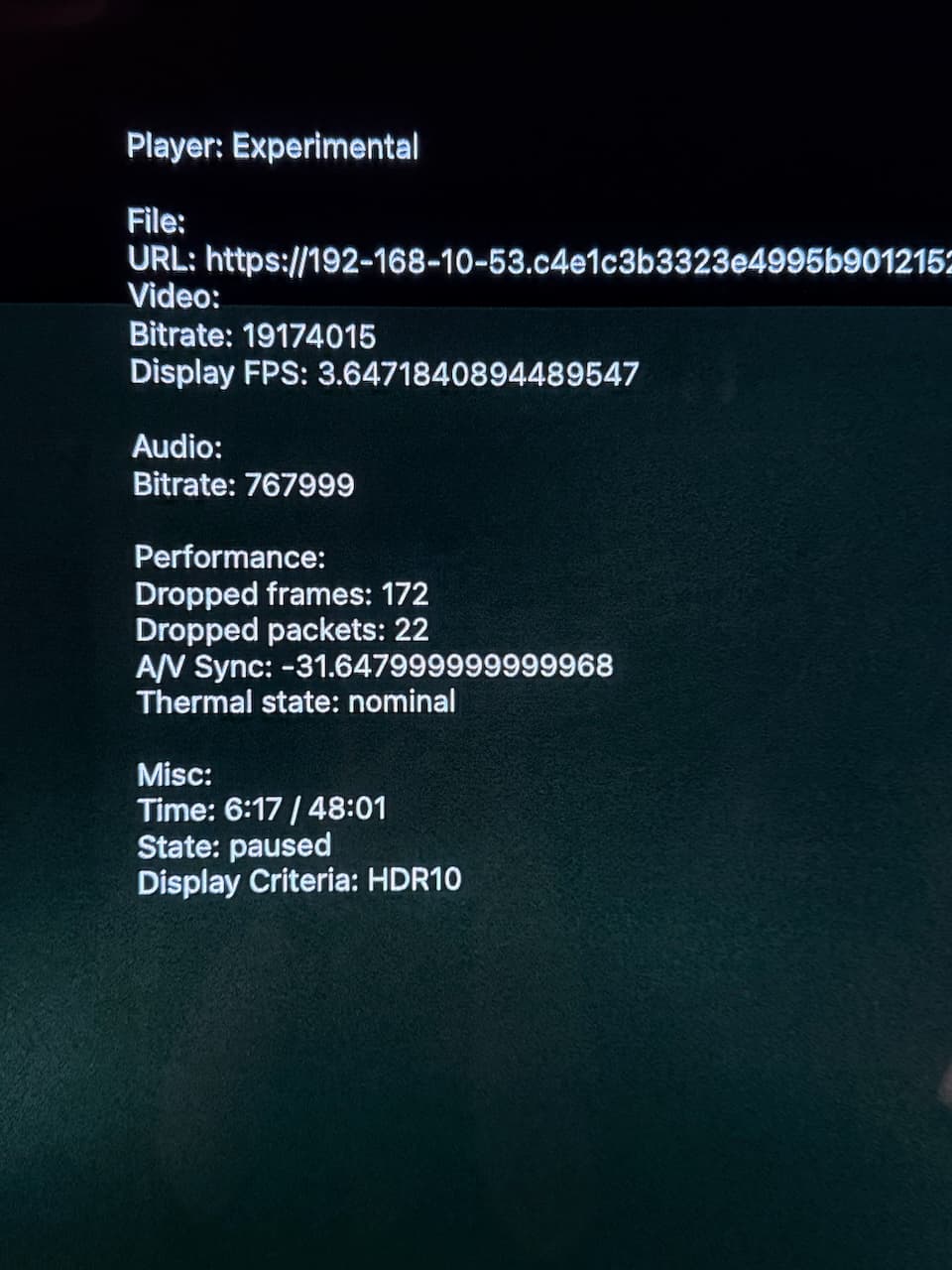
On Screen Player Info for LiveTV 1080/H264/AAC

for 9649(with newer audio engine turned OFF):
- Audio/Video plays as normal
- Stereo-paired HomePods still have audio delay on play/pause/seek
- LiveTV(OTA/CableCard) is always Transcoding with “App cannot direct play this item. No direct play video profile exists for protocol has, with container mpegs, video codec h264, and audio codec ac3.”
edit: attached AppleTV logs
logging-3.zip (1.0 MB)
I just quickly tried the new build, same issues remain but it seems to be getting worse. No combination of the settings works with the HomePod minis now. Even turning the new features off and turning the old audio engine on doesn’t work now.
Have to switch to TV speakers to get anything to play properly.
As there was mention of this in other replies my server is up-to-date on Unraid (binhex-plexpass), verbose logging has never been turned on on this device.
Could you turn on verbose logging and share your logs?
It doesn’t make sense for it to get worse and turning off the settings should still be working. It was a very minor change I made. 
Build (9649) all previous issues with (9644) now resolved with internal TV speakers /audio output. New Renderer and New Audio Engine at default
ON
Thank you
Previous…
Just tried (9644) build.
Results with my use case: Direct to LG OLEDG4 internal speakers from ATV Gen 3
Video Regression. FAIL
Audio Regression. FAIL ( Would not have Audio and or Still Video.)
This did not matter with Newer Audio Engine or NEW Renderer On or Off.
At this point, rolled back to (9616) build, Problem resolved.
Audio DTS -HD, DTS. AC-3, EAC-3 - PLAY with Variety of 4K HEVC
Please instruct if this behaviour is not intended with (9644)
I’m giving you some major props for directly responding to criticism for the first time. That takes a big man, even if the criticism isn’t what you’re looking for.
Aside from this, you and your colleagues need to understand that this isn’t acceptable despite any of the reasons you’ve given. Users have every right to be upset and not be “constructive” being that they pay for the product. Also, please remember that while this beta has not really made much progress in a year, the stuttering issue existed for YEARS before it was even acknowledged.
There is no “nice” way to say this. The results and time to get them is not acceptable.
At your request, I will refrain from commenting in this thread.
We spent literally years talking amongst ourselves and getting nowhere fast over these issues. The fact that @Craig_Holliday is actively engaging with us and trying to make progress is great. I have been as frustrated as any over the years with Plex, but it might be good to cut him a little slack.
I don’t have too many issues personally now with the current client, but am waiting patiently for DV and EAC3 Atmos support. Happy to just watch the steady progress.
I thought EAC3 Atmos was already supported in the current ATV app.
Nope…
@Craig_Holliday havent been able to do any in-depth testing, but in testing my few issues.
- Live TV with new audio engine still does not work at all with AirPods
- No seeking in live tv or mpegts recordings with any audio engines
- Live TV does not work with iOS pip
- webvtt does not appear as subtitles when transcoding
- Mov_text subs no longer appear
- Varying results when a video finishes. Sometimes goes to OnDeck screen, sometimes goes black, sometimes loops on credits, sometimes goes back to episode select. No clear reason as to why each scenario happens.
Just to echo some other people’s comments. Not a coder but I think @Craig_Holliday has done an incredible job on the new player in such a short time.
Apps with great players such as ChannelsDVR and Infuse have built there app around their video player from the ground up since early early Apple TV with the same core group of coders who also seem to be the owners, so the situation for these apps being developed is vastly different.
100%.
These problems are super tricky to solve, as they are so setup / environment / input file dependent. As a developer, it’s really tough to have to work through them – your testing locally might be perfect, but to have it go to the real world and get a barrage of issues back can really suck.
I do applaud @Craig_Holliday for his determination to make this work – other devs might just be all ‘it’s good enough’ and move on to other things, but getting this working matters.
It’s also super great that Craig is as engaged here – these things don’t get solved well if there’s a high wall between us and the dev team… we need to keep the feedback going, and hopefully Craig will stick with us till the end 
Latest testing notes with 9649.
Test Results - Simple File:
With a pretty tame AAC/H264/SDR/2-channel file, it stutters at the start and then gets going OK. It’s mostly in sync.
Here’s log data for that view session:
first-data.zip (1.1 MB)
Note: I did spot a bad http request to the timeline / playstate mechanic:
2025/01/05 13:32:33.347 (4661416) ❌ PMKServerTimelineGenerator.m:370 | Error sending timeline: Error Domain=PMKHTTPResponseError Code=400 "Response error" UserInfo={NSLocalizedDescription=Response error}
The equivalent PMS log for that request looks like this:
Plex Media Server.1.log:Jan 05, 2025 13:32:33.339 [137323605928760] DEBUG - Request: [10.0.52.171:59792 (Allowed Network (WAN))] GET /:/timeline?bufferedTime=0&col=8&context=preplay&duration=2638040&key=%2Flibrary%2Fmetadata%2F312733&location=lan&playQueueItemID=2254579&playbackTime=0&ratingKey=312733&row=0&state=unknown&time=0 (70 live) #6f093c TLS GZIP Signed-in Token (imajes) (Apple TV) / Accept => text/xml,application/xml / Accept-Encoding => gzip, deflate, br / Accept-Language => en-US;q=1 / baggage => sentry-environment=production,sentry-public_key=edccd7b2b39b4e018e0afed13e092791,sentry-release=com.plexapp.plex%408.45%2B9649,sentry-trace_id=2f5fbb646bd74b95bcccb98bda184f4a / Connection => keep-alive / Host => 10-0-40-6.c9edefdb7f3149e99ef96d1bc9f2c726.plex.direct:49374 / sentry-trace => 2f5fbb646bd74b95bcccb98bda184f4a-cf7414c1d904435c-0 / User-Agent => PlexTV/8.45 (Apple TV; tvOS 18.3; Scale/2.00) / X-Plex-Client-Capabilities => audioDecoders=mp3,aac,ac3{bitrate:800000&channels:8} / X-Plex-Client-Identifier => 6C41CC69-D739-4CB4-A62D-F79DCBBF9348 / X-Plex-Device => Apple TV / X-Plex-Device-Name => Apple TV / X-Plex-Device-Screen-Density => 2 / X-Plex-Device-Screen-Resolution => 3840x2160 / X-Plex-Device-Vendor => Apple / X-Plex-Drm => fairplay:video / X-Plex-Features => external-media,hub-style-list / X-Plex-Http-Pipeline => infinite / X-Plex-Language => en-US / X-Plex-Model => 14,1 / X-Plex-Platform => tvOS / X-Plex-Platform-Version => 18.3 / X-Plex-Product => Plex for Apple TV / X-Plex-Provider-Version => 7.0.0 / X-Plex-Provides => client / X-Plex-Session-Id => 3BBF2EF4-CAE2-4FA2-95D1-2A4727287AAE / X-Plex-Supported-Commands => abort,changeQuality / X-Plex-Sync-Version => 2 / X-Plex-Token => xxxxxxxxxxxxxxxxxxxx / X-Plex-Username => imajes / X-Plex-Version => 8.45
Plex Media Server.1.log:Jan 05, 2025 13:32:33.339 [137323605928760] WARN - [Req#6f093c] Could not convert "state" ("unknown") to the correct type
Plex Media Server.1.log:Jan 05, 2025 13:32:33.339 [137325013117752] DEBUG - Completed: [10.0.52.171:59792] 400 GET /:/timeline?bufferedTime=0&col=8&context=preplay&duration=2638040&key=%2Flibrary%2Fmetadata%2F312733&location=lan&playQueueItemID=2254579&playbackTime=0&ratingKey=312733&row=0&state=unknown&time=0 (70 live) #6f093c TLS GZIP 0ms 384 bytes (pipelined: 22)
Test Results - More Complex Media File:
However, once I go back to 4K/ HDR / more complex audio, it gets completely out of whack.
I took a HEVC/DCA/4K/HDR/8-channel file, and experimented with various audio outputs.
As before, when I play via the tv speakers, it streams fine – no drops, clean play.
When I push audio to homepods or my mac, it buffered like crazy and had so many frame drops etc that it couldn’t catch up:
hevc-dca.zip (932.7 KB)
It’s worth noting that my tv seems to be playing just PCM, whereas i know the homepod is showing as Atmos compatible – hence i wonder if that’s related. I’d be curious for a build that just forces all audio to standard stereo and see if it can play that cleanly somehow.
With one of the other players, I’m pushing audio out via optical directly into a sonos soundbar, and that works correctly- it really does seem like streaming audio is problematic.
Thoughts:
- Is it possible that you’re not allowing enough time for the audio stream to be ready to start during preplay? So it starts going, but as the audio isn’t ready, it has to buffer back and restart?
- I wondered if the ‘seconds to replay on unpause’ setting had anything to do with it. So I disabled that, and found no difference. Still not 100% sure it’s unrelated though, as you never know without looking at the code.

- My biggest tip/thought is this though: I’ve noticed that PMS seems to think it’s playing when it is not actually playing yet – or, similarly, it has issues where PMS thinks there’s still an active play session when the media has in fact ended. I wonder if there’s something to do with play state / media being out of sync between PMS and the player, therefore it’s causing it to stutter on the playhead, (so to speak).
Next Steps:
Craig, it might be useful for us to know what your lab is setup like, and, if possible, what sorts of acceptance criteria/regression tests you might have?
If we had, for example, the same test media you all use, then perhaps we could run that in our environment, and generate a more useful report so that you can look at some kind of known state + all the variable environments, and compare the log output for baseline changes?
More succinctly: If you aren’t seeing these issues, then lets know what environment actually works, and more importantly, ways to reproduce the same tests.
Again, hope this helps, and let me (us) know of any further tests you’d like for us to perform.
Actually having the same test media sounds like a good idea. Maybe a 1080p clip with dts/eac3 and a UHD clip with TrueHD/dtsma?
Then we could at least eliminate the media as the cause, and see if it’s a code/network/setup issue?
Y’all are right, it’s probably time to be more systematic since we are tracking down these specific bugs.
I’ve got a few ideas and some things I’ve been working on. Let me write those up and we can go back and forth on these ideas.
This will definitely help us test faster.
Could you send me a sample of the mpegts recording and media with mov_text subs that aren’t playing?
I have some samples previously that still seem to be working so I’ll review this again with your new samples.
And if you could provide verbose app logs after you play some Live TV that would be really helpful.
Yep will try get you a sample and run those tests tonight.
There is a small circle at the bottom of the video when subs are meant to appear, as though the player knows there is subtitles at that time but no text is actually being displayed in the box (hence why it’s just a small circle).
Sorry with the live tv I meant with homepods*, but yes will get some verbose logs on that Apple TV tonight if I get some time.
Have deleted all my recordings but will record a random program to send you.
Edit: Logs from live tv with HomePods and new audio engine
PlexMediaServerLogs_2025-01-06_20-24-24.zip (4.0 MB)
