Issues with Live TV OTA Channels from HD Homerun Quattro on iOS 18.5
Client version: 2025.17.0 (1082)
Server version Version 1.41.7.9799
iPhone 14 Pro Max & iPad Pro (M1)
Whenever I try to watch live (Freeview/DVB-T) TV channels on my HD Homerun tuner I either get no picture/sound on HD channels (sometimes it’s picture with no sound others times it’s no picture but sound) and on an SD channel an error message:
“The operation couldn’t be completed.
(CoreMediaErrorDomain error 1718449215.)” It’s also worth noting in settings, whilst there are controls for Video in the Video and Sound section there are no settings for sound. The server is running on an M4 Mac mini. Please DM me if you want logs etc.
It is worth noting this is a physical HD Homerun Tuner not a virtual one in XteVe.
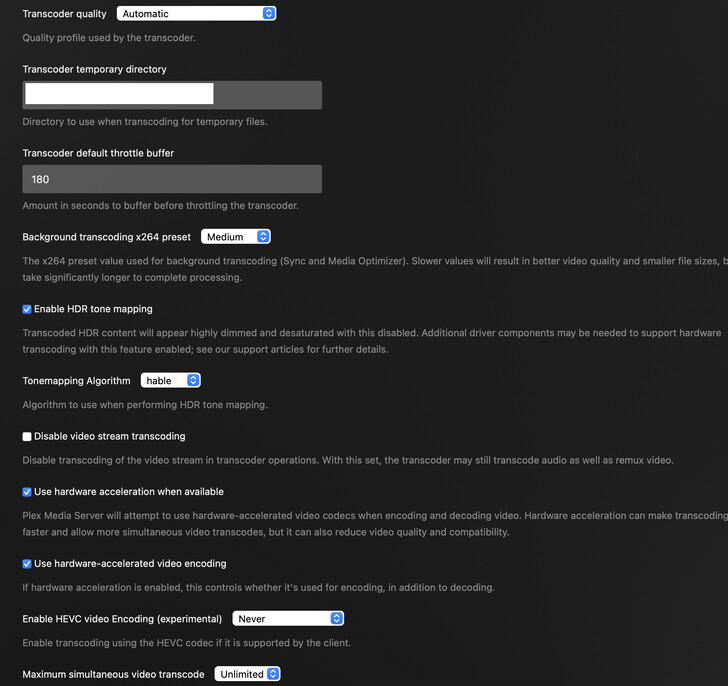
Do you have HEVC transcoding enabled on the server? 2025.17 is supposed to default to h264 for live tv, but I’m still seeing HEVC transcodes on my clients and that causes issues with live tv.
Through troubleshooting it myself I got as far discovering that turning it off enabled me to sometimes get picture or sound on HD channels but still no SD channels. Alas if I select “Disable video stream transcoding” then I can’t watch anything as I get the message “Not enough CPU for the conversion of this item.” on TV channels only but no issues with media from the media library.
Would be really good to get this sorted. I have gone through every permutation of setting I can see that could be causing this. One thing I have noticed which I am not sure if it’s related or not but on the iOS/iPadOS settings>Video & Audio, there are no Audio options. I am not sure if this is related but it’s the only thing I can think…
When will this be released for the Apple TV? The last update for the Apple TV app was in January. It has been unusable for over 3 years due to video stuttering issues. This is unbelievable to me. If there is a fix for the video stuttering then that should be addressed ASAP and all other issues should be deferred. Infuse releases updates monthly. If money is the issue then charge us a monthly fee. I’d gladly pay a monthly or annual fee to ensure that the software functions as expected and is supported by a professional development team.
Is Dolby Vision ever going to work properly on this, AppleTV version, when it’s eventually ready for prime time?
And why can’t you just press ‘Play’ to play an item, like every other service? Is that ever going to impremented, as it’s such a basic requirement, I am surprised it wasn’t there from the start.
I Really would not want this on Apple TV as it would render my setup completely useless! It is so slow, there’s no sound / picture (it varies) on Live TV from a local HD Homerun Quattro and Plex don’t seem to be paying any attention to the issue, or, at least if they are, they aren’t saying anything or providing any updates.
Agreed, right now the only viable use case for Plex in my life is on Apple TV of the family to watch Live TV and shows. I’ve turned off auto-update on my Apple TV in the hope of keeping the “New Experience” away from it until Live TV (and a few other things) are resolved.
As a life long tech enthusiast, who wants to play with the new stuff, this situation breaks my heart. We should be excited about new releases, features and capabilities. Instead we are concerned…not great.
To be clear, I’m not asking when a beta version will be in Testflight. I’m asking when the newest version will be released to production so I can download it from the app store on my Apple TV. Furthermore, I don’t care about the UI. I’ve used many apps with poor UI’s such as Peacock and Amazon Prime Video. All I care about is that I can play my movies and TV shows without any stutter.
If Plex wants to win back some AppleTV fans, here is a suggestion: Release a version of the AppleTV client that supports audio pass though on the day tvOS 26 releases:
First, nothing has changed since January because that’s the last time the Apple TV App was updated. Second, I checked and the option is still there but not apparent. If you press the down arrow while playing a video and go to Playback Settings then press down again, under audio settings if you scroll down you will see it at the bottom of the list. You wouldn’t know it’s there because it’s hidden until you scroll down.
I thought this was the thread for the Beta Testing, however I haven’t seen any updates in this thread about beta testing for over two weeks. Can anyone provide an update on when the new version will be release to the App Store? What is the status?? This app has numerous flaws and there hasn’t been any updates for over 6 months. WTF???