We added everyone on this group to the Public Beta track as well, so you’ll have access to all beta builds, not just playback ones.
If you want to opt out of this, send me a message and I’ll take care of it. 
We added everyone on this group to the Public Beta track as well, so you’ll have access to all beta builds, not just playback ones.
If you want to opt out of this, send me a message and I’ll take care of it.
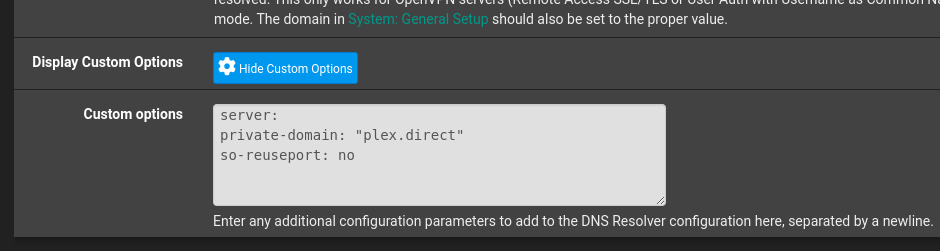
For those of you with your own local DNS resolvers (those which impact DNS Rebinding Protection), the optimal solution is to create a rule which allows plex.direct without disabling DNS Rebinding Protection as a whole.
Most DNS solutions, as well as many ISP modem/routers, have such settings
Below is how it is implemented on PfSense
What this does is to allow Private Domain “plex.direct” to be created for the local LAN segment.
This type of custom configuration is only necessary if the PMS DEBUG logs show errors resolving plex.direct naming between server and client(s).
… and now we return to your normal player beta testing 
Folks, please stay on topic. Loving the chat, but if you want to keep that going please start another thread for it. 
Hey everyone!
Few things to address the above questions:
That’s all for the moment!
Here’s the version that should be released: 8.41 (9333)
For some reason tvOS took longer to go through Apple’s review.
@Orko HDR10+ should be supported. If you’re seeing some issues could you send me a sample file?
@dklein I’ll be fixing and adding a few things for subtitles in the next build. Not sure why they’re all over the place now though, but it’s on the list.
@gmcinalli Like @SE56 mentioned, these builds are different than the normal betas. I’ll keep the versions updated on this thread but look in the Technical Details when playing back is any easy way to determine that the build is using the Experimental Player
@SE56 I’ll investigate that crash.
@rcork That’s interesting. I don’t think we should get to a serious state but it is possible depending on the content. I’ll send you a DM so I can reproduce the issue.
@rcork @dklein Is the audio track changing during playback and only not updating server side?
Hey y’all,
This release was a bit behind but I just released 8.41 (9408).
This build includes many fixes for subtitles that were brought up in the past weeks like:
And the big one:
Full ASS/SSA Subtitle Support!
This build is also rebased onto the most recent public beta which includes some OS18 fixes and a couple crash fixes.
Let me know if you have any issues with subtitles in general.
All feedback is good but if you try out ASS subtitles that would be great!
If any SRT or PGS subtitles look too small or too big, let me know since that was an issue previously.
Two more things:
Thanks!
I’ve got a list of audio fixes to look at next.
Same as Infuse we won’t be able to do Atmos until Apple adds an API for us to use but I’d like to get us have something workable.
The quiet audio is on my list 
I believe this should be fixed now that we’ve updated.
Could you let me know if this is still an issue?
Hey y’all,
Just pushed another build: 8.41 (9420)
This should fix:
I’ll still need to fix the sizing weirdness with PGS subs but SRT (etc) should be much better.
I have the live tv issues in my queue.
Still adding issues to my queue, so y’all know
Yep we’re using Metal for video and now ASS/SSA subtitles!
I’m very proud of this and it is what is supporting the performance improvements.
Another new build for everyone:
8.42 (9470)
I’m continuing to note down issues that are reported above.
TL:DR
We just released a new version: 8.44 (9572).
This version has two main things:
TL
Hey everyone!
It’s been a while since we’ve pushed out another build.
This was obviously because of the Preview released a couple of weeks back.
Going forward, the Experimental player will be the main player in our application!
I really appreciate all the bugs that have been found so far because we were able to fix many of them before the preview.
That being said, I’ve continued to work on improvements for us to test in this group.
We just released a new version: 8.44 (9572).
This version has two main things:
Both settings are under Advanced in the Settings menu for tvOS and iOS.
There is still some weirdness with starting playback, like starting in a paused state.
This may only be an issue with the current app, so I’ll try my best to fix it. However, it is more difficult to spend time on these issues. My hope is that we can test with the Preview more in the coming months.
Let me know how the new settings are working for you.
I’m curious if there are still stutters with playback and what content is having issues.
Thanks y’all!
Craig, Thanks for the update and improvements! Not the most urgent request; however, are there any pending requests for testing in the queue? I believe I had stopped testing and filled out the form again and don’t see the update in TestFlight. Thanks!
Thanks Craig!
I’m definitely now seeing multichannel Spatial Audio with a majority of codecs on both tvOS and iOS (AAC, AC3, EAC3, DTS). The one standout seems to be TrueHD audio on iOS. TrueHD 5.1 and 7.1 is transcoding down to FLAC Stereo on iOS instead of FLAC 5.1 or 7.1 with the “new audio engine”. This is not an issue on tvOS, TrueHD 7.1 transcodes to FLAC 7.1.
SRT and PGS subtitles look good on both iOS and tvOS. (Edit: Including at different transcode resolutions with the HEVC transcode preview, thanks!).
One thing I am noticing on iOS is that resuming content from the main screen, especially UHD content with PGS subtitles enabled, can hang and pinwheel. Then it will start and play for a few moments and then pinwheel again, almost like there is a buffering issue.
@Craig_Holliday, just had a chance to test out HEVC content on the AppleTV HD, and it looks like it is defaulting to h264 for transcoding now, even with the HEVC server preview! Thank you!
However, some HEVC content is still trying to direct play on the client if it is 1080p or less in resolution. Is it possible to force an h264 transcode for all HEVC content on these older devices?
Craig, some initial findings:
playback/start of media files/live tv seems much improved and is FAST! However, I feel like something changed with the buffering period. on both start AND forward/reverse, it’s taking upwards of 8-10 seconds to normalize playback(this is on a hardwired AppleTV 4k 3rd Generation).
when using the ‘newer’ audio engine with stero-paired HomePod 2 speakers, I am sometimes seeing a 1-2 second delay in audio syncing.
after 5 minutes of playback I see ‘Thermal rate: serious’ in the overlay and streaming of any source seems to be dramatically effected (my AppleTV is in an semi-open cabinet with exhaust fans).
I still can’t rewind live tv with the new build.
AirPlay audio (to a Sonos speaker) works great with Use Old Video Player enabled. Seeking is fast, video playback resumes immediately, audio sync happens quickly.
AirPlay audio is janky if Use Old Video Player is disabled.
Seeking is slow, video playback pauses for a few seconds after seeking, audio sync takes 5+ seconds, and when it eventually happens the video “speeds forward” to catch up.
On the Apple TV HD (4th generations) some videos, even low-bitrate H.264 720p AAC 2.0, won’t work if Use Old Video Player is disabled.
It can also be reproduced on both the 1st and 3rd-gen Apple TV 4K, but requires more demanding videos. The 2nd-gen masks it pretty well until 40-50Mbps sources, but the Old player is still faster.
None of the other settings (Use Old Audio Engine, Use Newer Audio Engine, Use New Renderer) appear to make a difference.
I don’t think AirPlay was this bad before the Player Update Beta. I’ll try to confirm later.
I wonder if that’s the same thing I’m seeing with a single AirPlay target, especially on slower ATVs.