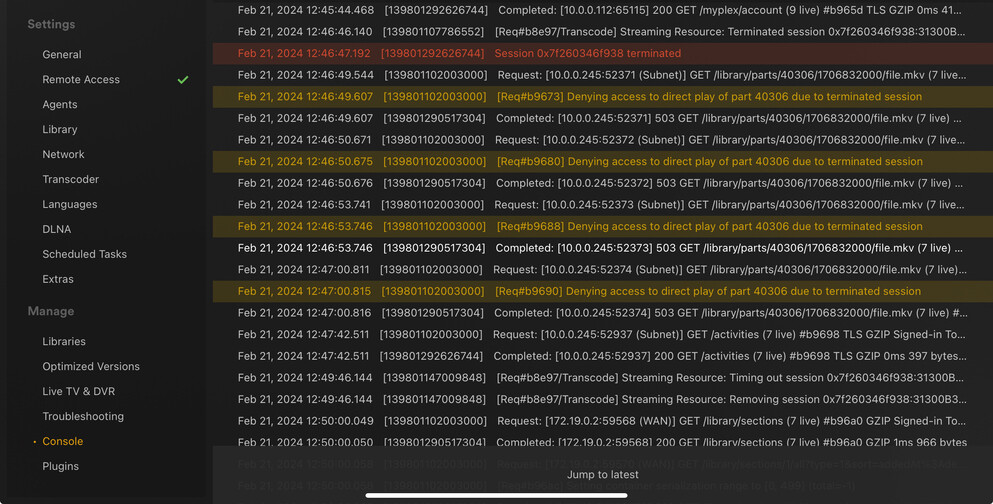
Apple TV and Synology Issues After Latest Update

Synology Server: 1.40.0.7998
Apple-TV Plex: 8.31

I have been having issues since the latest server update. All of the following occurs on Apple TV locally from Synology:

  1. Any video file (thats long enough in duration) will stop playing at random locations.
    For example, a 2hr movie will stop playing ~ 40 min in. Starting movie to just after that time mark, movie stops playing ~ 20 min later.
    This also happens to TV Shows. (30 min in total length). Playback stops around 15-20 min.

  2. Playback location not saved in Plex. When playing a video in Apple TV, leaving playback, then resuming, the location was not saved and video starts from beginning.

  3. Apple TV is not shown in Plex Server Dashboard during playback. See below. Note local bandwidth.

Error Shortly before playback stops on Apple TV-

This seems to only happen when its scanning.
Plex says it has nothing to do with that and are able to replicate it.

See my topic and tell your friend

I want to start a group demanding an on and off button :joy:

Updates-

  1. I singed out/removed Plex app from Apple TV. Reinstalled and signed in.

  2. I remotely played a video from a different Synology model.

Both times the video stoped mid play through.

Dashboard for both local and remote server did not show Apple TV during playback.

Playback mark was not saved.

iOS, iPadOS, Android, and Windows have had no issues. All of them show up on Dashboard during playback.

This topic was automatically closed 90 days after the last reply. New replies are no longer allowed.