Hello is the same issue i’m seeing here?
Sounds similar yes. Irritating isn’t it!
Yes, if I turn the enhanced player off, my server then has to transcode the audio. As my Apple TV won’t play content recorded by the server… which it did before the app update!!! Grr.
Now when I play any content, the picture freezes whilst the audio plays, then after about 10 seconds they get into sync and play OK. Right pain.
Just adding my 2 cents in here too…
Since upgrading my fourth gen AppleTV running tvOS 13.4 to the latest Plex TestFlight beta, 1080p Content stutters like it’s dropping frames. Content is in mp4 wrapper (both HEVC and H264) and has aac stereo audio. Using the “old” player the content plays back fine.
My second device, an AppleTV 4K, does not suffer from the same issue and plays fine with the enhanced player.
I have this issue also on my AppleTV non-4K with the enhanced player on. Had to disable it to get smooth playback. Happens with 1080p content.
I had a second Apple TV, a 4K model, and it plays everything fine with the enhanced player. Both are running the latest Plex client version which updated a couple of days ago. Both Apple TV’s are running version 2.16 according to my Plex Server > Authorized Devices.
I also have an Nvidia Shield which is also updated to the latest build of the client and it plays without issue. This client is version 7.30.2.16712 according to my Plex Server.
I am running version 1.19.1.2645 of the Plex Server, which is running on my Synology DS918+ NAS. Since other clients playback fine with the enhanced player I dont think it’s a server issue. I’m only seeing it on my Apple TV non-4K.
It’s a shame, as without the Enhanced Player the client has to transcode a lot more content than I’d like. Usually it’s the audio that gets transcoded, so at least that’s easier on the NAS CPU mostly.
2 Likes
Thanks God I found this thread. I noticed this starting yesterday that the video was basically unwatchable. It would be fine, then it was dropping frames like crazy. Turned off enhaned video and it is now fine. Was this a plex app update or a server update that caused this? My Apple TVs automatically update, but my plex server does not.
3 Likes
I believe its the client on the Apple TV that’s the problem. My Nvidia Shield has no issues, nor do my two iPads or iPhones. Must be the app. I’m sure it’ll get an update again soon and it’ll be sorted.
1 Like
Thanks everyone for your reports. So far I’m unable to reproduce the issue in my Apple TV (non-4K as you describe) 
Out of curiosity, do you know if it happened in 2.15 and 2.14? I would love if someone could confirm when this problem started. In 2.15 we had to upgrade mpv (our enhanced video player) and I wonder if that’s what caused the regression to you.
@ben_levine can you compare the Performance A/V value with and without Match Frame Rate? That value indicates the difference between audio and video, so it should show higher values when you notice the audio delay.
I did not notice the issue on my AppleTV 4 (not 4K) until upgrading to the beta for 2.17. But it’s possible I went right from 2.14 to 2.17 as I’ve been traveling and did the update after we got settled.
Also, do you use your TV speakers or some other audio equipment?
So I’ve been doing some testing (uk here). If I set my AppleTV to 1080p 60hz, disable match frame rate and use enhanced player, content at a frame rate of 23.976 (essentially 24 - US content) and content at a frame rate of 25 (uk content) both drop frames.
However if I set my AppleTV to match frame rate (and still using enhanced player) US 24 fps content looks fine (my TV, a Sony Bravia) switches to 24 frame mode BUT UK 25 fps content still drops frames.
Also, looking at all the same content with Infuse (via Plex as a backend) all content looks fine.
Hard to say exactly when this issue started to occur - I think about a week?
Setup:
macOS Server (mac pro 2013)
Plex server 1.19.1.2645
AppleTV 4 with the latest beta
Sony Bravia with no external sound system (ie using the tv speakers)
Please let me know if I can provide any more infomation or run any specific tests
Built in speakers on tv, stereo. HDMI connection.
First image is the enhanced video player.
This is enhanced video player with Apple TV Match Frame Rate enabled. 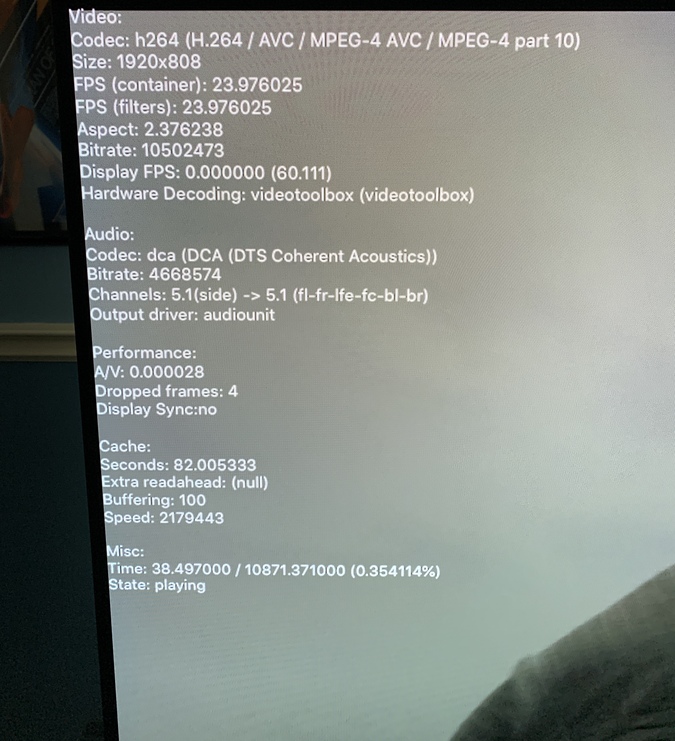
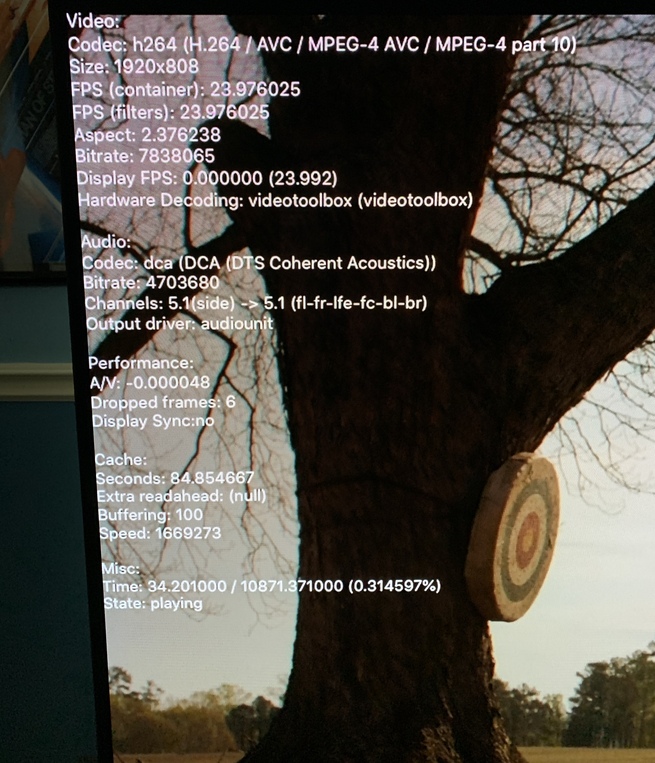
I use external 5.1 via a Pioneer Elite receiver. Apple TV HDMI > Pioneer Elite > TV
Thanks @ben_levine  I think the dropped frames when playback start are expected and harmless. Interesting that A/V difference, but still shouldn’t be noticeable (it’s seconds, so we’re talking about less than 1ms, in theory).
Just curious, if you play through the TV speakers instead, do you notice the A/V sync issue?
@sergiou87 Just as another data point, I’m seeing dropped frames throughout playback and the debug mode doesn’t show any dropped frames in the overlay. But just by looking at the content you can see it. It’s almost like it’s playing back 25fps at like 18fps for me. Juddery if that makes sense.
1 Like
I am seeing the same thing. Cant say when it started as I am a new Plex user that has been struggling to pinpoint this problem. Thought it was something wrong with my server or encodings. It definitely only happens on my Apple TV though, no problems with the web player or iOS apps that I can see.
I switched back to the last beta of 2.15 and haven’t had the issue at all.
How were you able to downgrade to 2.15? I absolutely would if I could.
Beta releases via TestFlight include access to previous builds.
@zackotronic smart! I just rolled back to 2.15 and it resolves the issue here too.
@ben_levine in the test flight app, you can look for previous builds and install them
So whatever changed, pretty please Plex gods, roll back the player to 2.15 version
2 Likes
