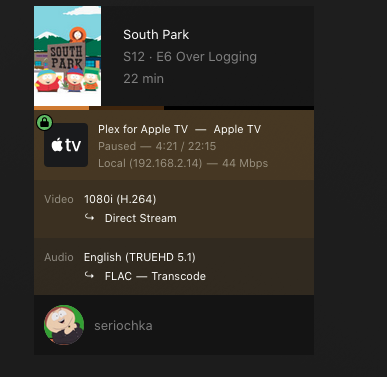
Server version #1.30.6486-0000
I made these comments under a similar thread in the Mobile Devices category, but posting here for clarify.
I can confirm that I am experiencing a complete drop in audio after 10 seconds with this build (recently updated from the release channel). My environment is a MacOS server (Mac Studio device, Apple M1 Max chip, 64GB RAM, Thunderbolt 2/3 Direct attached Storage devices from Areca and OWC.
This problem has never come up before. Media is all in .MKV container format, but in H264 compression. Attached is a sample of what I am running, same behavior across the TRUEHD5.1 and 7.1 media, movies and TV shows alike. The client I’m running from here is the Apple 4K TV device, but the same behavior is seen on my Samsung Q80NA TV, as well as various other “app” versions on my Sharp TV’s in my house.
I was able to capture part of the console error log pieces that happen when the audio disappears as I noted above. The number of entries continue at a significant rate of increase until changing to a non-transcode audio option…which then marks the session as “Direct Play”:
TimeDec 19, 2022 13:18:03.502
LevelError
Thread0x16e6b7000
Message: [Req#e37cc8/Transcode/6E9A6DBE-9DF8-47EF-81A6-975482A99030/2dc9eda9-6a54-42bb-a467-1afae218b658] Error while decoding stream #0:1: No space left on device
I can also confirm that for TV Series episodes, as noted above, this behavior exists. However, changing to a lower audio-stream during the episode DOES NOT carry forward for any future episodes. Plex WILL recognize and show you that you’re playing the 5.1 channel option, not the TRUEHD…but you’ll get 10-15 seconds of audio and then it will cut out again. Going into the playback settings and clicking on the AC3 - 5.1 option will start the stream again.
However, not something I want to have to do on an episode by episode basis each time I watch content!