did your fresh install of windows not make any difference?
Hi Dan
I didn’t end up doing a fresh install because the dropouts started on the NUC as well which is fairly new.
I’ve also recently (for a few months now) experienced the random and very brief sound drop out on my NUC (Windows 10). It’s annoying. It is interesting to note that if I play any of the files through VLC, they play perfectly with no drop outs at all. Not sure if it’s the Media Player or the Server which is at fault. Either way, please can someone get this niggling issue resolved? Thanks.
3 months now with no resolution 
2 Likes
you have a nvidia shield but posting in the Plex Media Player app forum, it is not the same problem, they are very different applications, you should be posting in the android/shield forums.
this forum is for the app literally called Plex Media Player which is available on windows/osx/linux/embedded
it is not the same as the android based app used on the nvidia shield, they have their own
“forum”
But I can confirm that under Windows10. Since 2.19 I also have drop outs.
I’m back to 2.18 and all is fine.
Same issue here. Every few minutes the audio cuts out for a second or less. All files. local streaming
My desktop plex server -> xbox one x plex app
I have the same problem - desktop plex server (linux), tivo roamio plex app. It has been this way for months.
Brad
Can you tell me where to get this older version? and do I just delete my current version and load 2.18?
Same problem, random audio drops for less than a second.
I’m using plex media player on a Windows 10 HTPC (gtx 1070 output to my AV Onkyo receiver) connected to my dedicated Win 10 Plex server. Passthrough is enabled and this problem happens on all my mkv movies using DTS/Dolby/…
I started having this problem since I installed the dedicated gtx1070 gpu on my htpc. This problem never happened when I was only using the cpu and the motherboard Hdmi output.
Same problem, random audio drops for less than a second. MP3 files, 128-320kbps.
The issue appears with several players:
-
Xplay & Plex on LG
-
Plexamp on Windows
-
Browserbased playback
-
IOS app
-
Chromecast
Sometimes several tracks will play without any issues, other times several drops will occur in the same track.
I share your frustration. I’m putting together a thread summary of all the roku issues I’m facing, found your thread.
Some of my discoveries while we wait on the devs…
Just so you know, the reto version works nearly flawlessly for live tv, but still has the audio drop outs. At least for now.
Now I realized you need to check the settings on the client on the main page to enable mpeg2 and allow original on the preview Plex. ONLY this gives me no audio drop outs, so it seems ANY transcoding that plex does causes this issue? but I’ve given up and switched this back to 12mb to get the glitches to go away…so try preview both ways, and retro capped at 12 or less. Then in back to just the audio drop outs.
Here is the retro link : [[https://my.roku.com/add/PlexRetro ]
I have PLEX server on a Windows 10 laptop. The laptop is connected to HT receiver using HDMI cable. When listening to music files on the laptop, I don’t use the large 65" plasma TV connected to the HT receiver. Instead I use the PLEX app on my iOS iPad. On the laptop, I open a Chrome browser window and go to the PLEX server IP address. On the iPad I then “cast” to the PLEX app running in the Chrome browser on the laptop. I then start listening to music files that are on the Windows 10 laptop. The laptop transmits PCM to the HT receiver via HDMI. I have set the Intel sound card to only send stereo across the HDMI.
It all works perfectly except for random audio dropouts that last for one or two seconds. They can appear near the start of music file playback, in the middle or near the end. I can get two or three dropouts in one 4 minute track or i can go 20 minutes with no dropouts. Also it doesn’t seem to matter if mp3, Flac, wav and the resolution of the music file doesn’t seem to matter either (I will double check tomorrow).
When I hear a dropout i will wait for music to start playing again and then I will hit the little “go back (rewind) 10 seconds” in the PLEX iPad app. The music then starts playing again. The dropout NEVER occurs a second time at the same spot after using rewind. Is Windows 10 laptop getting busy or is PLEX server getting busy? It is a pretty nice laptop with Intel i7, SSD, 8GB RAM etc.
Tomorrow I will also try using iPad PLEX app to cast to the PLEX Media Player on Windows laptop instead of the PLEX app in the Chrome browser on laptop.
I have the same issue.
Fresh install of Plex Media Player on windows10 and fre install of Plex Media Server on windows 10.
No problem with VLC
I am still experiencing this issue, where does this stand?
Hi,
I have this exact same problem. Please help me to help you resolve this.
Problem description: Dolby TrueHD and other surround formats have “one second” drops every now and then, can be either quite frequently (every a couple minutes, or a bit more random). All the same, very frustrating.
Hardware: https://www.intel.com/content/www/us/en/products/boards-kits/nuc/kits/nuc8i5beh.html with 8 GB RAM.
OS: Windows 10 (version 1903, build 18362.239)
Drivers:
-
Intel HD Graphics (not DCH) version: 25.20.100.6519
-
Intel Management Engine: 1904.12.0.1208
Software:
- Plex Media Player version: 2.38.0.999-e14e4d74
- I’m a Plex Pass member.
- HDR is disabled from Windows..
Settings:
-
Audio: Passthrough enabled for all (Including True-HD)
-
Video: Hardware Decoding enabled
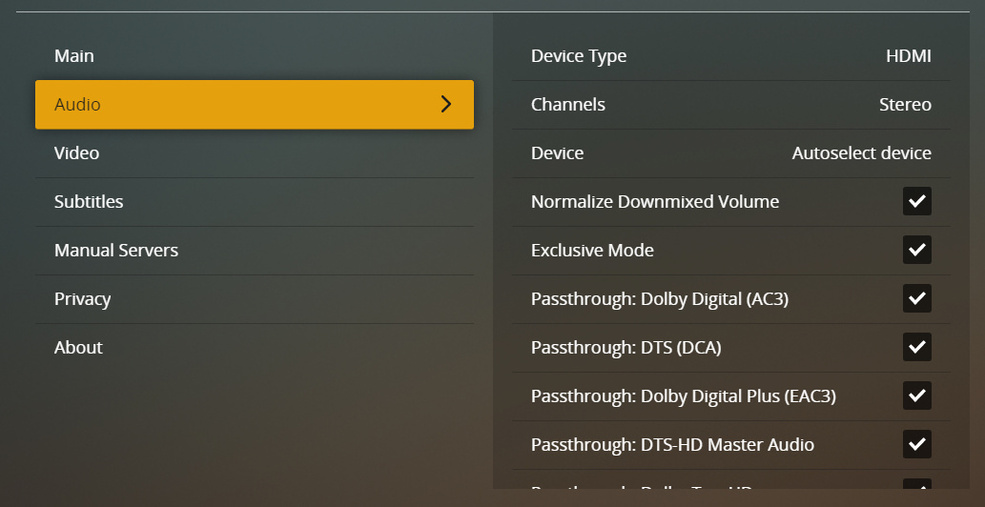

Log file attached. at 11.46 local time audio drop outs occured twice after which I closed Plex with ALT+F4.
PlexMediaPlayer.log (410.8 KB)
Let me know what else can I do to help resolve this.
Audio drop outs do not occur for instance with Kodi.
1 Like
How come this thread is not raising any eyebrows? I’d think this is concerning issue that would be in the radar quite quickly for a fix. Clearly this is not a problem with a single user, but with many users in quite common use scenario.
Is this bug reported the correct way? If not, then please advise how can we help to get this fixed.
Still waiting for instructions.
I stopped having this issue some time ago, but I can’t say if I did something that changed this? All I can say is I did change my hardware encoding, and tested my network, but I don’t recall what might have helped.
