Been using this guide successfully for audiobooks for a long time until recently where now it does not remember my location within a track (chapter). Not sure what happened but I have not made any changes. Anyone else having this issue? Looks like someone logged it here in December as well: Music Audiobook not remembering playback position. Starting over / Playback issues
What is the current proper naming format for books or radio shows consisting of multiple parts? I tried “Book Name - pt1.mp3” and “Book Name_part1.mp3” and neither one works. Every file is displayed as an individual album. Metadata is correctly reflecting the same album…
Edit: Metadata has to include track number in it. Fixed. Works now.
I label mine as ..\[author]\[series] [series #] - [book]\[track] - [chapter #] - [chapter title].m4b
with the series name/number and/or chapter title optional depending on if they exist.

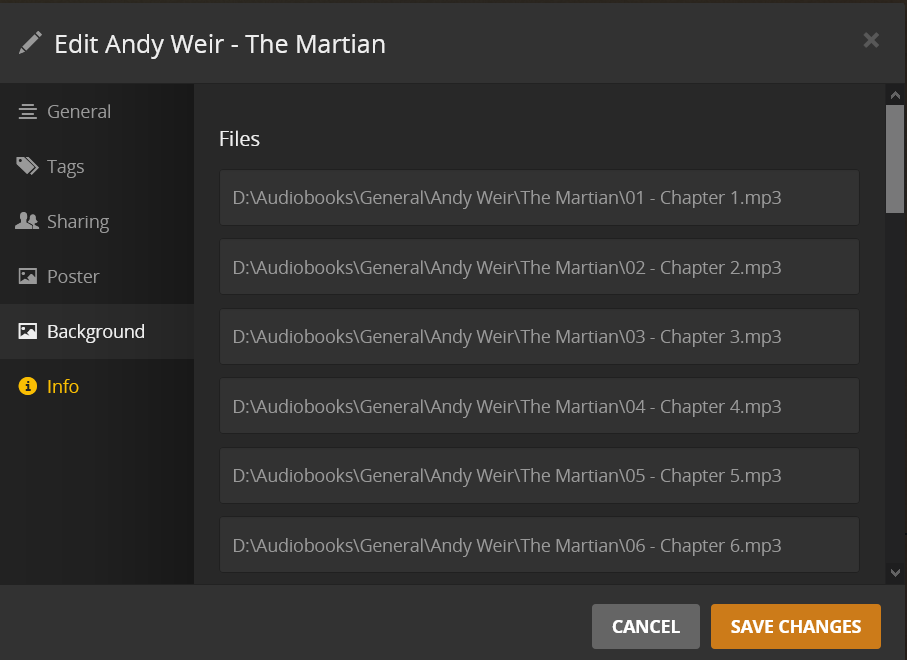
EDIT: In the above, it shows a “General”, folder for my content because of Emby’s ability to set different subfolder permissions for different profiles. In Plex, I mount all those arbitrary subfolders to the library rather than the parent “audiobooks” folder. So pay no mind to the “General” folder being there in my images because it’s actually at the top level.
I haven’t been back to this topic in ages. Kind of a bummer that Plex still hasn’t added first-class support, but I’ve got a working setup and thought it might help people…
I have simple drag-and-drop batch scripts to convert Audible books (aax) into single M4B with chapter markers, using ffmpeg. If I have a set of MP3s from a CD, I use fre:ac, which also creates M4B with chapter markers. I touch up the metadata with mp3tag, which only takes a minute. The result goes into a “music” library in Plex, but don’t really use that for anything. I have the same directories hosted as a dumb filesystem index in IIS (yeah, I know, but it’s already there…) and I can just visit the server in any browser and download a book with a click.
On Android, I use Voice audiobook player, which is super simple and works well. My only gripe is that the downloaded files have to be manually placed into paths like /sd-card/Audiobooks/Some-Book/bookfile.m4b – you can’t just dump all the files in one place. Otherwise, I’m pretty happy with the solution overall. (Of course, if Plex did add first-class support, I’d probably switch back.)
How did you use fre:ac to create a m4b with chapter markers? I am just starting to get around to ripping my audiobooks and am haven’t been able to find a good process for it yet.
I don’t think I’ve done a lot with the options in fre:ac, I just use the “add folder” button to load a bunch of MP3s, then click “start”, pick an output file name, and the resulting file has chapter markers. If the defaults don’t do that for you, let me know and I’ll dig into the settings I’m using.
1 Like
This is an important topic so am glad to see it still open. Is there a definitive way to get the book title to actually match to a database? Such as using a ID number like with The Movie Database?
Having just updated my Mac’s OS i’ve been hit with the split out of audiobooks from iTunes into Books. So was hoping that Plex would come to the rescue again, balls’d up my first go and decide to RTFM. Reading around the subject I keep hearing the Plex are about to get rid of plugins. Do we know if this is going to kill the Agent (which i still can’t get working) in the near future? Also, if i kill my library so i can set it up correctly with these instructions can i keep the same name?
Plugin support ended in 2018 (!), but you can still install the audiobook agent.
What is the current way to use the audible agent? Because the plugin has ended and can’t select the agent when making a new library.
Plex has not altogether ended support for plugins. Plex has only discontinued the use of accessing plugins through its in-app Plugin “Channels” directory. If a plugin—say the YouTube “channel” plugin—required the use of said directory, that plugin no longer works. The Audible Agent does not require that, and therefore is not affected by this change.
Now, with that being said, the current way to use the Audible Agent, assuming it is installed correctly, is to open your audiobook library’s settings (Mouse over library name → click 3 dots to right of library name → Manage Library → Edit… → Advanced) and change the agent for your audiobook library to the “Audiobooks” option.

The Audiobooks Agent should also appear in the Agents submenu in your server’s Settings menu.

On my Debian-based server I cloned it into my Plugins directory, changed ownership and permissions and then restarted PMS:
cd /var/lib/plexmediaserver/Library/Application\ Support/Plex\ Media\ Server/Plug-ins/
sudo git clone https://github.com/macr0dev/Audiobooks.bundle.git
sudo chown -R plex:plex Audiobooks.bundle/
sudo chmod 755 Audiobooks.bundle/Contents/Code/__init__.py
sudo systemctl restart plexmediaserver.service
If you’ve copied it into your Plugins directory, restarted PMS and it’s still not working then it’s likely to be owned by root or __init__.py does not have execute permissions.
Recently set this up and wanted to suggest a few notes:
Notes on metadata: MP3TAG is a nice gui one, but for a cli option you can use mpgtx. Alternatively, once Plex has loaded the files you can just update the metadata through plex.
Notes on installing plugin: The following two links can help you find the right directory for where to install the plugin
Once you know where to install the plugin, you can follow this guide to install the plugin manually
Do not suggest this for two reasons.
- More time consuming than using MP3TAG.
- The metadata is not captured natively in the file, it is in the Plex database. You lose that database and you start all over.
3 Likes
Add another one to the list of wishing Plex handled audiobooks better than it does. 
While I have installed the “plug-in” mentioned up thread I’m finding it is inconsistent on pulling in some of the audiobook’s information. Namely the “release date” and “publisher summary” from Audible.com and populating the fields “original available” and “review” fields in Plex. Anyone have any better workarounds to this? Manually editing each audiobook (due to shear number of books in my collection) in Plex would take waaaaay too long to be worth while.
Prior to using this plug-in I’ve been manually tagging (which I still do) the audiobooks using MP3Tag but that is limiting due to the limited metadata tags that Plex reads for music/audiobook files. Plex doesn’t pull in some of the metata fields with it’s metadata option that I’d like it to display. Namely the correct date and comments (book summary) that I’ve been tagging my audiobook files with (using MP3Tag).
I downloaded an audiobook from Audible to my PC today, and it downloaded as .mp4. I don’t know what Audible means to accomplish by doing this, because it still contains the same encrypted AAC content.
Your decryption software of choice may be confused by this file being labeled as .mp4, but if you rename it to .aax, it should decrypt as per usual.
3 Likes
Well, I downloaded The Hobbit by Andy Serkis from Audible just now because apparently I never added it to Plex or Emby. And it downloaded as .aax. So whatever Audible did to change audiobooks to download as mp4 on the site, they changed it back.
EDIT: Apparently they download as .mp4 in Firefox, but as .aax in other (Chromium?) browsers. In any event, if you rename the .mp4 files to .aax, decryption software works as normal.
Feel like I’ve set up Plex properly following Seanaps guide, but this Bookcamp and Chronicle don’t see my Audiobooks library. Looks fine as best I can tell in the Plex app, and in Prologue on IOS, but I really need Android to work… Any ideas?
@SoCalLonghorn Can you get to your Plex server while outside of your network (eg. on mobile while using data)?
Absolutely. Just can’t get Bookcamp or Chronicle to show libraries because they require mobile access to be enabled, even though Prologue doesn’t.
