Hi,
I have enabled Apple ID authentication and access to Plex works smoothly on the Apple devices I own. The problem I have is when other person of my house wants to have access using their iPhone to the Plex server. Since Apple ID is enabled, they cannot sign-in since their phone is using their Apple ID instead of mine. Can you let me know how I can grant them access? I have been trying unsuccessfully several options. I tried to stop using Apple ID but then I realised that I don’t have other means to authenticate.
Also, I have a pass subscription so I would like to ensure that I don’t loose that when making changes.
Thank you for your help!!
Thanks!!
Have them create their own (free) plex account.
You then share your server with their specific Plex account.
You lose nothing in this. Their free accounts gain access to your server (controlled/limited by you)
To do this you go to Settings - (upper left corner) Manage Library Access.
There, you’ll see where you can invite them to your server and grant access as you deem appropriate.
https://support.plex.tv/articles/201105738-creating-and-managing-server-shares/
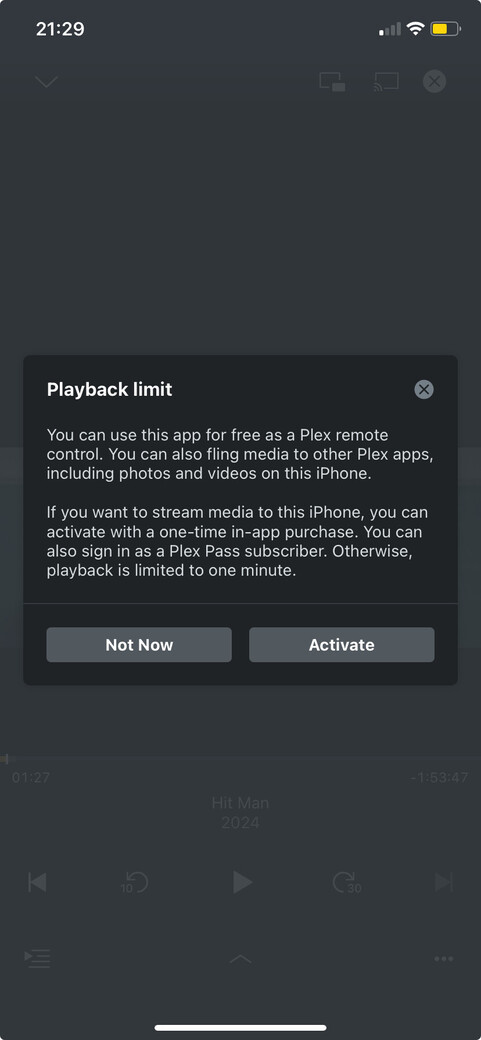
Hi, thank you! I did that but then realised that they cannot benefit of the Plex pass features like transcoding and I have to pay on their devices for accessing (transcoding) our contents. Is there a way where I can disable the Apple ID and create and account to share with them?
Big thanks!!
You have to pay for the app somewhere along the way.
(app development & maintenance isn’t free)
Whether it’s part of your PlexPass
-or-
as the one-time $5 unlock for their account.
Adding to ChuckPa’s response…
While you’re right about account/player focused Plex Pass features, the given example is not correct. The fact that your server will use hw-accelerated transcoding if necessary, depends on your Plex Pass… not that of a user.
From the related support article:
- The server owner must have a Plex Pass subscription
I am already praying the Plex pass, why I also should pay the in-app? I just want to share my username and password but since I am using my Apple ID I don’t know how to do it. How can I disable de Apple ID and being able to authenticate on my Plex server from my phone? Last time I tried I realised I didn’t have a user account to access since I was using only Apple ID. Is thanks!
Have you considered making those accounts Managed Accounts (within the confines of your server itself)
I appreciate your help.
I have created one but the doc states that a managed account ´Cannot sign in directly themselves (a full/regular member of the Plex Home needs to sign in first, before switching users)´.
If that is the case I am back on square one. My wife has a Plex account created from the iOS app to access the server but cannot use the managed account to sign-in.
Is it possible to change the Apple ID authentication to a normal user/password one so I can share it with her?
