Server Version#: latest Linux and latest Raspberry Pi
Player Version#: latest Android app
We have two servers, one on a Linux NAS and one on a Raspberry pi.
Both have a Plex Pass.
We want to be able to access both servers from the Android app, choosing which one to watch from.
I can’t believe no one else has this problem, but other people seem to have the problem of adding two servers to one account/Plex Pass.
I have a number of servers used locally and remote.
I have only one Plex Pass but that’s not required, none of my other users have one.
What is the problem you are having.
Are those servers linked to 2 different Plex accounts (2 accounts with 2 different Plex Passes) or are both of them using the same account?
If you’re using multiple accounts, you might need to share the libraries of the 2nd server with the primary Plex account in order to see its content.
If you have access to the libraries of both servers (after sharing them or because they’re all linked to the same account) can find all libraries by clicking the More > item in the Android app’s main navigation. From there you can also pick which libraries you want to “pin” (so you can access them right on the main navigation without clicking on More > first).
See:
I have a server with a Plex Pass.
My parents have a server with a Plex Pass.
I can’t see how to get to see the other server once you are logged into one using the app.
My parents are users on my server and have always accessed it via the Android app and Chromecast. Now I’ve got their own server up and running again, as they had a Plex Pass, I can’t see how to get access to it from the other app, which is logged into my account to access my server as a user.
I’m still not clear about your setup… currently seeing two scenarios.
Scenario 1
| Server | Plex Account |
|---|---|
| Yours | Yours |
| Theirs | Theirs |
In this scenario, your parents need to share access to THEIR libraries with YOUR account for you to be able to see them. They can do this using this URL while being logged into THEIR account.
Scenario 2
| Server | Plex Account |
|---|---|
| Yours | Yours |
| Theirs | Yours |
In this scenario, you will obviously see the content from their server. This is of course assuming THEIR server has remote access enabled and properly working.
Thanks for that. I’m obviously not explaining myself very well. Being too concise I guess.
It is
Scenario 1
| Server | Plex Account |
|---|---|
| Yours | Yours |
| Theirs | Theirs |
OK so I’ve logged into both accounts from a laptop and sent a non-home user invite to each alternate part.y:
From my parents’ server to my email address.
From my server to my mother’s email address.
Both report “ïnvite pending”.
An hour later and I’m still waiting for emails.
The history might explain what I’m trying to do.
Years ago when we only had very slow ADSL we had a server at both locations as streaming between premises wasn’t viable. Mine is on a QNAP NAS and their’s was on a Win10 PC (a subset of the QNAP’s collection).
Then along came NBN and with the wonders of 20/5 (sometimes 20/10) Mbps we gave up on the smaller collection on the Win10 and just used the QNAP’s much larger collection.
Now I’m moving to where there will only be internet by sketchy, intermittent 3G so I’m resurrecting the parent’s collection using a Raspberry Pi. On local PC it is fine, until I try and connect via the mobile app so that they can stream using Chromecast to their tv. The app is logged in using my id and their home user account. They need to have the app see both collections - at least up until I move.
I just looked at your account and from what I can tell you entered the wrong thing for an email for your mom. I suggest using the her username. Assuming the same thing or similar happened on from her account sharing with you.
When the correct username or email is entered the sharee doesn’t need to wait for an email you can accept directly on the users&sharing page by clicking the checkmark.
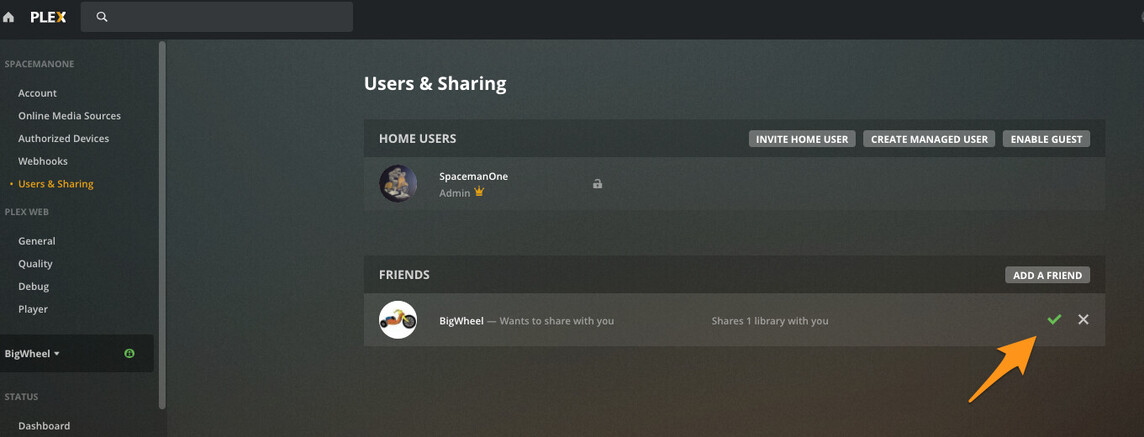
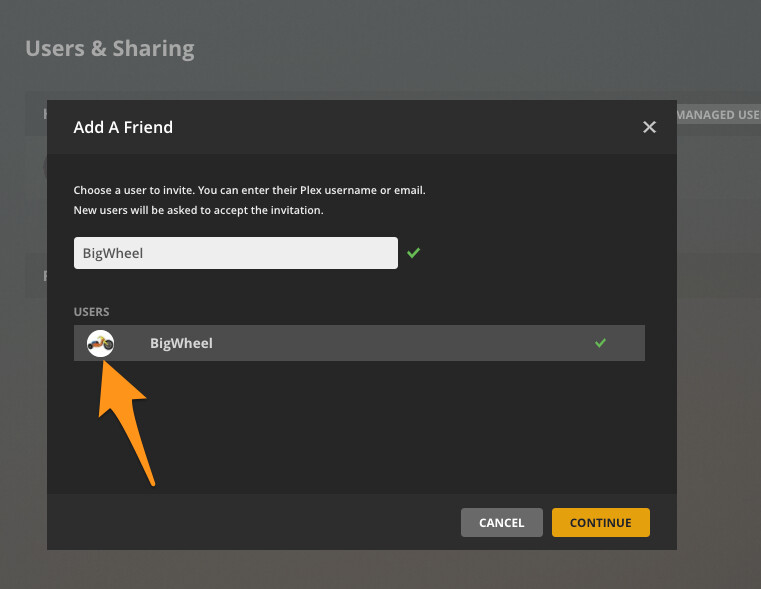
Also adding an avatar image to your/her account on the account page will help when sharing because if you type in the correct thing their avatar will show up in a second or two next to their username as it populates matches to make sure you select the right one and you know it is real. otherwise it just shows a generic person icon or a letter.
This is much harder than it should be.
I’ve it working, at least in one direction.
The problem is changing the log-in on the app. I can’t find any way to do this,
Use your web browser’s “incognito” / “privacy” mode to log into a different Plex account than your own.
Thanks. I’ve tried this. Doesnt help change the account the mobile app (android) logs into.
to be fair… you usually work with 1 account and don’t have to switch between yours and that of your parents
Except it doesn’t work.
I can log is as account owner on the QNAP server and also see the RaspberryPi server that is shared with me.
However, my mother that is logged in with the Android app as a managed user to the QNAP server can’t see the RaspberryPi server that she owns.
You cannot be a managed user / home user of one server and a server owner on a different one.
If you want her to own that server, she needs her own “full-fledged” account.
Both Plex accounts are Plex Pass Lifetime accounts.
All we want to do is be able to see and access both servers from the Android app.
I can on my phone.
But initialy both phones logged into 1 account.
Now we want to change the account the Android app logs into.
- Open Plex on the Android device
- Open the settings and go to
Account - Click on
Sign Out - Then, sign in with the other account
Thank you. I’ll give that a try.
