Server Version#: 1.22.0.4163
Player Version#: 1.29.1.1974
I’ve been manually splitting my movies that have multiple versions because Plex only shows the bitrate and resolution when merged, which makes it impossible for me to identify which version is what. The splitting work-a-round is okay, but the issue is when I add another one later on. PMS automatically remerges them and I have to go split them again. To make matters worse, it even renames them so I have to manually edit the names again to.
Is there anything I can do to stop PMS from remeraging them?
I haven’t been doing that for some time.
You could try matching the split version with different agents (e.g. Plex Movie, Plex Movie legacy, The Movie Database) so Plex considers them actually different movies – no guarantees but worth a try.
Would this idea be worth a shot even if there’s 4 or 5 versions or a movie? Sometimes special features don’t get a “play all” option and I end up with several playable files, plus the main movie, that go into Plex.
Do you have your own work-a-round for having multiple version of a movie? I’ve seen a few threads here about it before.
Personally I still have my hopes high on the related feature suggestion to provide better support for different cuts/editions (vs. different quality versions).
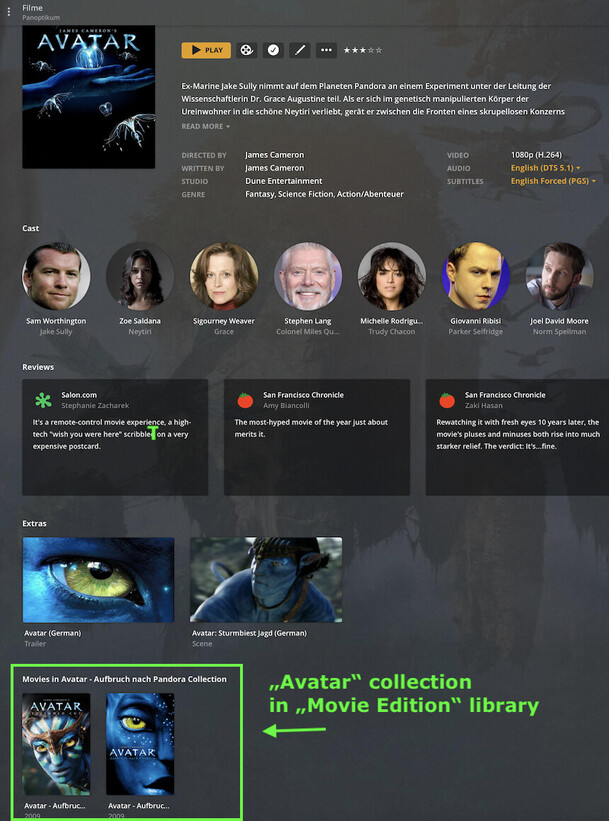
Right now I have moved my alternative versions into a dedicated “Movie Editions” library so they’re not getting in the way.
As for the workaround… the idea is to match the split versions to an agent different from the standard agent of this library to avoid re-merging them by accident. Then again – not sure if you might run into the same trouble by matching multiple editions with the same agent.
Thanks for the tip. I’m trying to figure out how you set it up like that though?
I made a new library called “test” and put a movie in there that has 3 versions. But I’m not sure what you do to get the screen like you have there in the screenshot?
I looked at that thread you posted and gave it an upvote. It’s been there since 2012 and it’s in the top 5 most requested. At least they haven’t said they won’t, but I don’t have my hopes up…
main library has 7 X-Men movies grouped in 1 collection
“editions” library has 1 X-Men movie tagged with the same collection name
It’ll only/best work for actual collections. In theory you can also assign single-movies to a collection for the same effect but it’ll look a bit weird and clutter your collections tab Example:
Main movie (here „Avatar - Extended Collectors Edition“) is part of the „Avatar“ collection; collection is „Disabled“, so the movie shows as individual item in the main library
Ahhhh, I gotcha. Thank you. So, both libraries will end up with a collection then? Because when I tagged them each library ended up having a collection in it.
Well, I was starting to like that work-a-round you showed me. But now that the extra versions are in the 2nd library, they just end up merging there instead. The collection stays in place, but only shows 1 movie until I go split and rename them again.
I did learn something else from that last screenshot you posted though You have an “extras” tab that I didn’t know was a feature. I found the Plex documentation that explains extras and I wanted to see if there was a way to utilize that somehow. So, I made a subfolder called “other” in my test movies directory and placed the other versions in there. Now, only 1 movie shows up and if I scroll down I can see the other version listed under “extras”. This isn’t really a proper place for alternative cuts, but it prevents auto merging at least.
I guess this will be my way of storing multiple cuts in Plex for now. Hopefully, Plex will address this issue and stop making it a pain in the butt to do this.
I’m glad you said that. I wasn’t sure if it was considered “normal” behavior or not. If it is indeed a bug, I guess I’ll create another topic to address it specifically.
Speaking of bugs. There seems to be one with the “extras”. Forced subtitles don’t seem to be respected when playing content from “extras”. You have to start the video, then manually turn on the forced subtitles.