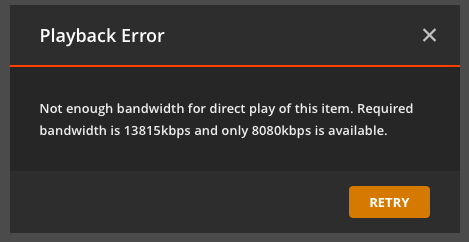
The movie file was created by me using handbrake (constant quality: 18). It not the only one with that problem I have, but they are a few within a large number, and this is the most drastic one.
And it is not Uma Thurman whirling with the épée.
PS: I did not intend to hijack a thread, but wanted to point the discussion at the bandwidth requirement.
A file created with ‘constant quality’ cannot have a constant bandwidth.
‘Bandwidth’ has only indirectly to do with ‘quality’. If you want to learn about that a bit more, it is explained in a great way in this video:
With ‘constant quality’, the encoder uses whatever bandwidth is necessary to achieve the desired quality. And this varies very wildly over the course of the file.
That’s why Plex performs an in-depth bandwidth analysis, which provides a much better way to determine the real bandwidth of a file.
What you see as the file’s bandwidth with ‘mediainfo’ and the like is simply a mediated file size/runtime calculation. This cannot reflect the ups and downs in bandwidth of a real-world video.
Here is a real-world bandwidth graph of a ‘constant quality’ video file
Either you create your videos with ‘average bitrate’ instead or you provide more bandwidth reserve from your server to your clients (if that is possible).
Thank you very much Otto for the detailed information, which however is not new to me.
I still would be surprised if this movie had a bit rate 4 times the average one over a time window as large as what is typically buffered.
Or I can put his into a question, as I originally did: What are the details of the “in-depth bandwidth analysis” that Plex performs? Can I read these numbers from the data base? They are not part of the xml info as far as I can tell.
call up the Plex XML info of the file in question
take a look at the URL bar. It contains a parameter &includeExtras=1
change this to &includeBandwidths=1 and press Enter
You will get the detailed analysis results for the overall file and also for each substream. requiredBandwidths="27166,26312,24247,22347,21003,19838,15765,14563"
The first number is the required bandwidth in the worst case, if your Plex client has only a tiny network buffer.
The various numbers are the required bitrate for 5,10,25,50,75,100,250,500MB network buffer sizes.
You can export this info with ExportTools. Just make sure to use the latest version of it and a detail level of at least 5 (for movies).
If your source file is in the HEVC codec, plex will add a safety supplement to its bandwidth, because it transcodes the file to H.264(AVC) which is less efficient than HEVC and so needs more bitrate to maintain a certain visual quality.
So for my example that is: requiredBandwidths=“13026,12377,10608,7730,4974,4142,3483,3483”
Btw, it is a (boring) h.264 file. The total file size is 2.7 GByte. For a 75 MByte buffer, i.e. ~3% of the file size, already twice the average bitrate is requested. 3% correspond to 3 minutes in this case. There are no rapid sequences of cuts, no fast motion scenes etc. in this movies. It is really old fashioned slow in camera motions. Interesting.
Thank you for the insight.
Addded:
I had to do this. I have a copy of Kill Bill. That works out as: requiredBandwidths=“4786,4551,4015,3179,3013,3013,3013,3013” The average bitrate is 2115 in this case. The variance is much smaller here, what lets my 1st example look even odder.
It is not only motion. Also when there are rapid changes to visual detail, the bitrate goes up.
At which ‘speed’ do you let Handbrake run? (called ‘Encoder preset’ in my screen shot of Handbrake above)
The ‘slower’ speed you choose, the harder the encoder will try to find the most bandwidth-effective encoding approach for a given scene. Running the encoder at a fast speed will result in higher bandwidth being used.
This could (at least in part) be responsible.