There are already myriads of threads about this. I myself cannot give any particular recommendations.
If I had to get a new server nowadays, I’d still build it myself (or get a store to build it for me according to my specifications).
I agree.
I am pretty fluent in Linux but I can “think” in native Windows. I tested in both when I was upgrading my system a few years ago and the final decision came down to “what if something weird happens” and can I recover quickly and easily.
The answer was simply that my greater comfort in Windows made my choice easy and I have never looked back.
Linux has some advantages and puts less overhead on the system BUT it loses out, for me, because there are so many little things that can, and often do, cause issues.
Of course I might feel differently if I were as fully fluent in Linux as I am in Windows.
BTW: For greatest reliability servers should never have any duties that are outside their duties as a server. This applies to any operating system and any robust server system.
I just bought a new synology 420+. Now my files are on the 415+ and plexserver on the NUK.
I want to move my existing files (used in Plex) to the 420+.
Now for plexserver as I understand I have 3 options
keep it on the existing NUC (but I need to buy a new SSD as my database is getting bigger)
upgrade the NUC or buy a new machine to host plexserver
put Plexserver on the 420+
If I do 1) , do I have to do anything as database is concerned ? (change of IP maybe somwhere for the existing files)
If I do 2) I am not sure yet what to buy, as I understand I better avoid Linux if I am not familiar with it but should I stay with a NUC ?
3) If I choose this solution not sure if it is relatively easy to migrate the database (movies seen/unseen etc…)
Thanks for your help
Z.
PS:
So I guess if I do 3) maybe I should/could invest in SSD cache ?
I found this link to migrate my plexdata to another system:
I wonder if anyone knows if there is a tutorial or post dedicated to migrating to synology from Windows ? (I found one from Mac on Google)
Also is it possible for instance that I just migrate the files and then import my “viewed films” (which is one important data for me), and recreate my libraries from scratch.
Will it be easier you think ?
Before I move plexserver and database, I had an idea :
first move all my library files to the new NAS and then associate those new located files with the actual server.
Therefore when I will move plexserver it will be already associated with the right files.
Does that make sense ?
Now does anyone know the right way to process when you want to move librarys to a new location ?
Now my files are on a NAS1 with IP1 and I want to move them to another NAS2 with IP2
Thanks in advance
Z.
PS: files will on NAS2 will be the clone of NAS1
Before I batch process all my files taken with my camera I wanted to know if their were other parameters you recommend besides the 30 fps like maybe codec, sound etc…
I created a new thread for this.
for plexserver I am now taking the path of installing a fresh install on the Synology NAS 420+ so I will get rid of the NUC. Files and server will both be on the NAS.
Will let you know how it goes when I finish installing it.
I think I won’t try to migrate any data since I alreday have a headeach thinking about making it work ahaha
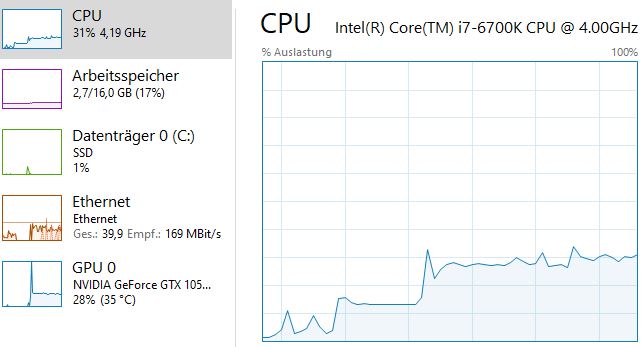
I have build a mini itx pc on windows 10 to run plex. The good thing is the high performence and that i can put in my old cpu, ram and whatever else from my desktop pc in it. Its now running in a node 202 case with an 6700k and in a few month gets upgraded with a 9900k. The nvidia 1050ti gets upgraded when needed…
Its cheap compared to a nuc maybe (im not sure)
Hello everyone,
Still havn’t find my replacement hardware to use Plex.
@plexmei was it complicate to build ? Is it silent when you use it ? What parts exactly did you have to by to build it ? Do you use your phone as a remote ?
On my hand, Plexserver used to be hosted on my NUC device and now I reinstalled it but as a service on a Synology 420+, so it’s a new server with the files being on the same NAS.
Now here is what I try using
I start the NUC but it is making more and more noise (scary) and I don’t know how to fix this so generally I end up stopping it. The videos display well
I was using my phone to start a video with a Chromecast key but now I am having issues with Chromecast that can’t connect to my newtork so doesn’t work anymore
I discovered I had a Plex player app installed on the box of my internet provider. I started to use it find it quite easy but now for some reason I can’t play any video at all, they are all freezing when they start. I try modifiying different resolutions in the settings but none of them is working.
Can anyone give me an idea , I’m really missing playing plex … and I end up watching TV … Noooo !
it is not difficult to build. with the help of youtube tutorials and reading the manuals everybody can do it.
can hear the system only under load. i could change that with a new graphic card (now a have a ‘low profile’ 1050ti card which i think is “loud”. used it before in my nas), underclocking and fan profile configuration. i could make it completely “silent”, but not need it now.
you should try to always direct play videos. just pushing through the data to your tv for example needs not much power. almost nothing.
Really, thanks for sharing your interface it helps me seeing something else is possible.
I typed “Fractal Design Node 202” and got a video tutorial from 2015 So I was wondering if there are some new hardware maybe in this area.
What should be the query I look for ? “mini itx pc” ?
I tried that but found devices that people say around 2000$.
That seems a bit too much…
Still not sur what is my best move now.
I am familiar with the NUC but seems I can’t use it anymore because for whatever reason it’s making a lot of noise now and I don’t have enough knowledge to fix it . Don’t know if it is a fan problem, a hardrive problem or anything else
i would clean up the nuc, test the system with a benchmark software and compare it to other nucs with same hardware on the internet, test harddrive/ssd with benchmark or try to play something from a usb stick or something and also test your network
you could buy any mini itx case if you want to have a very small machine. you could also go with the bigger micro-atx or normal atx. bigger is better for cooling
CPU Cooler (you need also NM-AM4-L9aL9i mounting kit)
42 €
Fractal Design Node 202
Case
75 €
Corsair SF600 Platinum
Power supply 600Watt
115 €
Samsung 970 EVO 1 TB NVMe M.2
SSD
130 €
Noctua NF-A12x25 PWM
Fan
30 €
1.177 €
i never had a nuc, but i think with the gpu in play the build above would have 2 or 3 times the power, with complete flexability to make it silent, upgrade it later and so on.
thanks @plexmei for your reply. I will compare all that and let you know what I have chosen.
In the meanwhile anyidea why the plex app inside my internet box can’t play at all any of my videos ? Is it a network problem ?
I tried modifying all the video settings it always freezes