First off apologies if this is in the wrong spot. I’m a total noobie when it comes to Plex.
I’ve been ripping Blu-Ray movies and have been able to watch a few movies no problem whereas others buffer a tad perhaps once or twice in the whole movie but then there’s others that are totally unwatchable.
The movies are stored on my PC for now. AMD Athlon Phenom 2 2.6Ghz, 16GB RAM, 8TB Seagate HDD for the movies, Windows 7 64bit Pro on a 256GB Samsung SSD and the PC is connected to the router via cat6 as is the TV that is being used to watch the movies on.
The TV is a Panasonic of some sort (i can find the model number if required) with its own in built Plex app.
For now the movies are in full version ripped straight from the disc, so about 20-30GB per file using MakeMKV.
Any advice on where to start with this?
Server Version#: 1.14.1.5488
Player Version#: 3.77.4
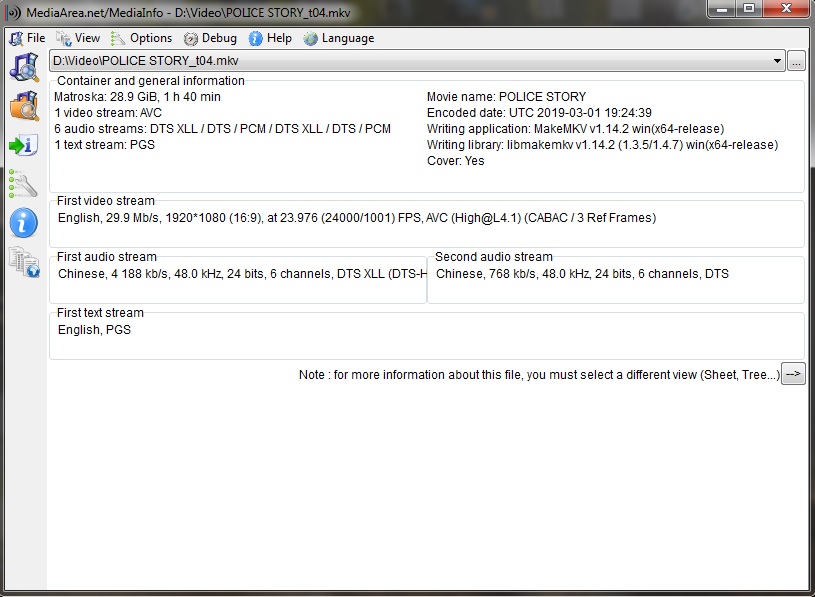
I’ll firstly list the movies i’m having problems with. Jackie Chan’s Police Story is perhaps the worst one i’ve had for buffering. It’s just totally unwatchable.
I have also tried Jackie Chan’s Dragons Forever movie. Obviously i’ve had other non-Jackie Chan movies that have buffered but these have been the worst two. Dragons Forever wasn’t quite as bad as Police Story (i think) but it wasn’t far behind…
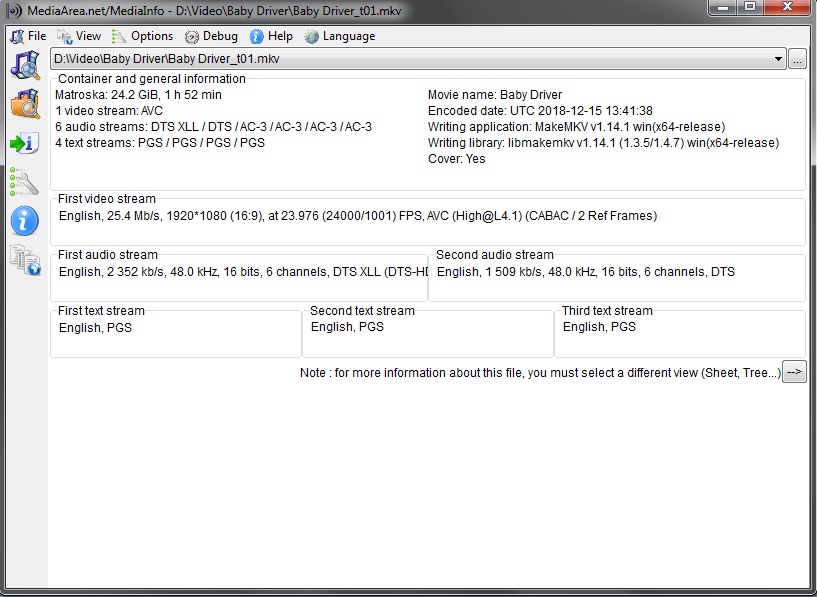
I have watched a few movies that had absolutely NO issues whatsoever. Baby Driver and Dragonball Super Battle of Gods would be just two examples where there were no buffering.
EDIT: Sorry i had to remove some pictures as i’m only allowed to post 5 images but i at least kept in a movie that plays perfectly fine vs a movie that is unwatchable for comparison.
This cpu is ancient and quite slow. If the TV is triggering a transcode (for instance because you activated subtitles or because it has to transcode the audio) then it might not be fast enough to do it. It has less than 2000 passmark points. https://www.cpubenchmark.net/cpu.php?cpu=AMD+Phenom+II+P650+Dual-Core&id=322
Yeah i built the PC in about 2010 if i remember right so while it does everything i need so far, it seems this is one thing that it doesn’t.
My first question is really - why is it happening on some movies and not others? They’re all Blu-Ray’s that i’m trying so it isn’t a case of DVD vs Blu-Ray.
The second question (which should probably be the first really) is how do i get round it? Or how can i try and get around it? I guess a new processor may be one avenue to see if it’d help with things but this is a costly one.
Is there anything i can try in the meantime? I’ve read of people using Handbrake to shrink the size of the file with 'no loss in audio or picture quality.
Now while i don’t believe for a second that there’ll be literally no loss, if it can be shrunk with no noticeable loss AND stop the buffering then it could be a win-win situation. I’ve just never used Handbrake before so don’t even know if that could work.
Videos can be encoded differently, even on Bluray. And there are movies which do have bitrate peaks and movies which don’t.
Those which don’t have bitrate peaks (or have only minor ones) are playing alright.
Prepare your movies for optimum compatibility.
There is a feature in Plex, so you don’t necessarily have to deal with Handbrake.
The downside is: it will require additional storage space, because it won’t replace the original Bluray rip, it will only add an optimized version of it. https://support.plex.tv/articles/categories/plex-media-server/media-optimizer/