Server Version#: 1.30.1.6497
Player Version#: Plex Web 4.98.2
While viewing my music library in Tracks view, I clicked on the Library name at the top.
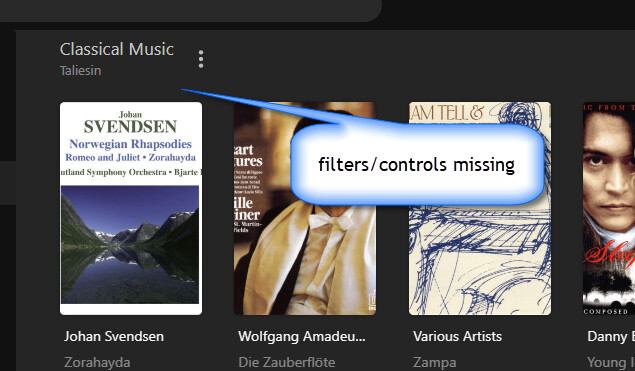
In MS Edge, when I do this, the bar with the Filters and View Mode dropdowns disappears. I’m still in Tracks view, but now it’s in a grid style, with square cover art forced into a non-square, movie-style format:
All it takes to clear this problem is to refresh the page (F5) or click away from the library and come back. Then everything is back to normal. But it’s a disturbing little surprise.
Addendum: I just discovered that this happens in all view modes – Tracks, Albums, Artists, even Folder views. Clicking on the Library name forces the tiles into non-square movie poster format, and the filter/view bar disappears.
It also only happens after changing the View mode. So open the library, change the view mode, then click on the Library title.
Yep. I spoke too soon. I was in some sort of weird edge case where it was working as expected. After exiting and re-entering Plex Web, the issue has returned.
Along with this issue, when trying to create rule groups with the filters, as soon as a rule is created, the filters ungroup. Issue is only present when accessing Plex through https://app.plex.tv/desktop, and not through the local IP access.
Reloading the page does restore the button toolbar, but it also cancels the creation request, so I am prevented from creating Smart Collections / Smart Playlists.
The only viable workaround for me to successfully create them has been to run the Plex client from my NAS which doesn’t exhibit this problem.
Yes, it appears to be working in Plex Web now, however it is now broken most of the time in Plex app for Windows. It works sometimes but not others. I can’t find the reason for why it is only sometimes broken.