it seems that I run into a bug wich I can’t locate exactly. It could be on the server or the iOS client.
Here is my issue and why it must be a bug.
I tried to run a file through the internet which needs to be transcoded to the lack of support from the iOS device. Either the satellite is circling forever or I got the message that my internet connection or my cpu isn’t powerful enough. When I check my network it seems that the upload is limited to 1 MBit or below.
If I connect due to VPN all runs fine. It transcodes of course and the stream is fine. Oh, of course my server is reachable and a frönend of mine can access my content on his shield.
I doubt it’s a bug so let’s figure out what’s how it should be.
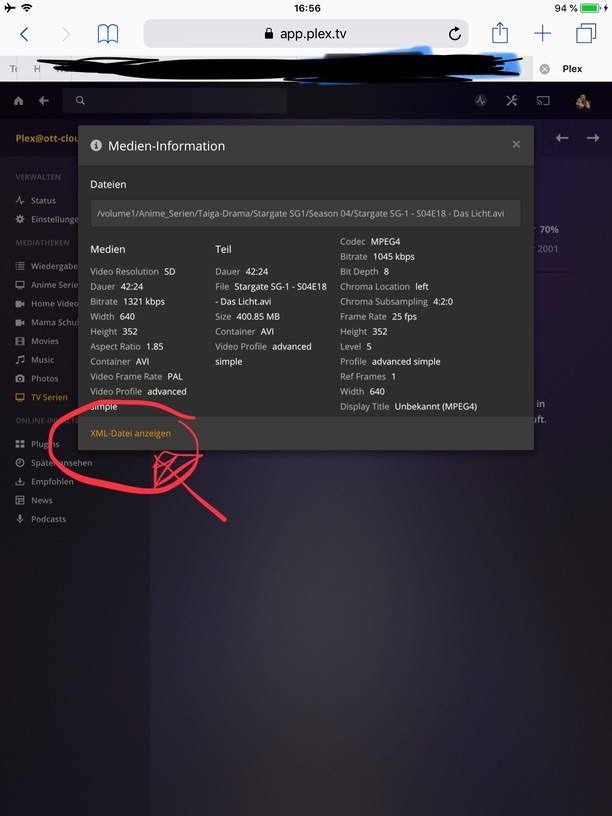
Can you provide the XML for the video item you tried to play so we can figure out what’s going on?
Also, are you running the 32 or 64 bit PMS version? If you downloaded from Synology, you get the 32 bit version only which can’t support HW transcoding. Plex.tv/downloads will give you the 64 bit version.
Hi there. Unfortunately I only have limited access to my server now so i couldn’t catch the xml. ,But I tried different files.
I use the 64Bit version because the Transcode information shows hw Transcode. and I take my Updates always directly from Plex. It shows the same, if I play it trough VPN or without. So Transcoding seems to work well.
Edit:
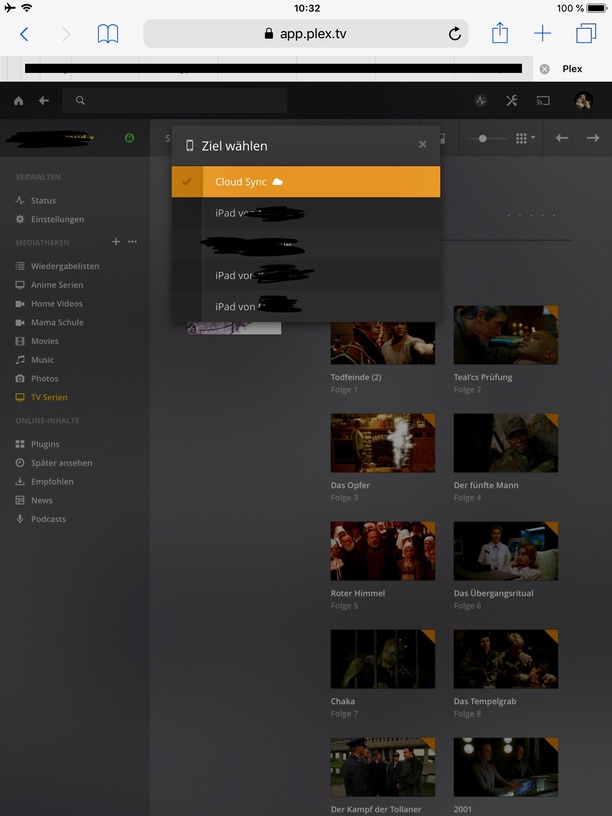
Meanwhile I encountered the same issue through VPN sometimes, too. As workaround I started cloud sync and this was really strange. While I watching one file of the series, approximately 45 min, I synced further three files to the cloud. So the PMS have clearly the capacity and bandwidth. The funny part comes now, as I start the synced file I got a message that the server, the cloud, isn’t powerful enough and I was asked if I want to continue with the original file. I agreed and it run fine. So I conclude that there must be some issue in the remote settings in the iOS app.
I tried this before, but as I mentioned, I have only limited access. This means I only can acces trough my iOS device and when I click there on the xml option it shows me only a blank screen.
I tried safari and it shows only a blank tab, as I said. Nothing else, meanwhile I fired up a virtual remote machine in my network and gain through VPN and this machine to the requested information.
I added the requested information in my last post by using an VM.
I did it like trumpy mentioned and it didn’t work. It just shows me a cryptic link only with a blan k tab. I tried this with safari and chrome, boath on iOS. I believe this is some typical Apple issue, so it’s annoying but nothing Plex can do. But i will give it a further attempt and post the results.
I used a VM to fetch the requested xml informations, because i have an issue to get trough a browser on my iOS device.
The VM has nothing to do with my origin issue.
I wrote about the VM, because all the given instructions to get the xml via my iPad didn’t worked and I have to do a workaround.
So I copied almost the whole xml file. BTW, the forum reacts to this < symbols and hide the following text if it entered at the beginning of a line without a space between the next letter. So I had to add some spaces to the infos below.
Meanwhile the steam through my VPN stutter, too. I am syncing the files no to cloud sync and use this stream. In the time I stream one file from the cloud sync, I can sync up to three further file to the cloud.
No, the PMS and VPN are not initiated through the VM.
Obviously I expressed myself, due to my lousy English, not well enough. Sorry for that. I used the VM only to fetch the requested information, xml file, because on the virtual windows I had access to desktop based Webbrowser. I couldn’t access the xml info by using any iOS based browser.
I repeat, the VM had nothing to do with my issue.
The PMS runs nativ on my Synology in the LAN.
The Client always see the PMS, either VPN or WAN, every time I could connect to the server.
I am trying to connect over the WAN to my PMS. If I use the native connection on my iOS app I get the message that the connection or my cpu is to weak. If i connect through my vpn, sometimes all running well and sometimes nothing works.
The VPN runs on my syno, so every vpn Traffic is routed to the NAS.
Maybe is this information helpful, too.
As soon as I try to stream from cloud sync I got a message that this server isn’t powerful enough for Transcode and it will be tried to play the original stream. Obviously the cloud sync haven’t any transcoding capabilities and the file in the cloud was transcoded previously. So, I guess the Plex is trying to transcode the file to the remote access quality setting and ignores that the origin quality is beneath this settings and no transcode is needed.
Sorry again for my shabby English and the misunderstandings which occurred based on that.
Please do not apologize for your bad English. My family and friends tolerate my “night ganz rightig” Deutsch If we need help, serveral of the Ninjas are German and can help also.
If you are using the iOS player at home, It uses your wifi?
I think you have this correct but wish to ask:
The LAN IP of the Synology is the same subnet as the WiFi ? (192.168.x.x, 10.x.x.x, 172.16.x.x - 172.31.x.x) ?
Do you use 2 ports on the Synology; One for the Internet and another of the LAN or everything on the same network adapter ?
Now about streaming and ‘not strong enough’…
The DS916+ can use hardware assisted transcoding for all MPEG2 and H.264 video. The DS916’s processor does not have the ability to process HEVC.
Also, I have seen some PAL video which is interlaced. Your file above is interlaced scan method.
Some of your files work and others do not.
Do the “progressive” scan file work but the “interlaced” do not work ?
I ask this because I think I see what is happening better now.
In some situation, PMS attempts two conversions in the CPU instead of one and fails.
Convert Audio/Video to MP4 progressive scan for the iOS app
Convert interlaced to progressive for the iOS app (Apple is only progressive)
If this is true, Do you have any fims which you can play at Original quality which are Progresive scan (720p / 1080p) on the iOS app? Do they play correctly?
Yes, my Synology and my WiFi uses the same network and subnet mask. Your, layout of my structure is almost completely correct. All my devices, my access point and the router also, are connected to a switch. I use UniFi equipment for my whole network.
The both port of my syno working with a link aggregation. So every traffic have to run to my switch and then to my router.
No, unfortunately is there no difference. After you mentioned it, I tried several files and all show the same result. Also is it very confusing that my server can transcode and transmit three files from the same series to the cloud while I am watching one via cloud sync. How can this happen? I can’t stream directly but I can do the work for three files, conclusion three times faster then necessary, in the background in the time one file plays.
Also I don’t understand why he want to transcode the file in the cloud. Every time I start a file the app tells me that the server haven’t the power, of course it’s true due to it is just the cloud, to transcode the file. Then he asks me if it should be tried to play the file in original, I think it means the version stored in the cloud, version which playing flawless. So you see I get a lot question marks. Why want the system transcode something what the app can obviously play without any kind of problem.
Your media is stored on your Synology.
It reads media from your Synology and transmits the data either local on LAN, local on WiFI, or remote to other devices via the internet.
My Media is stored on my Synology. But due to the actual issue I was searching for a workaround to watch my content at my actual location.
To do so, I started syncing the content with cloudsync to google drive and stream it from there. Before the content will be uploaded to googledrive it must be transcoded by the PMS (Syno) Itself. As soon one file is transcoded it will be uploaded to googledrive and the next queued file will be transcoded. So while I am watching on file of this series three queued file are transcoded and uploaded to googledrive.
Hi there today i made a further test. Due to the fact that all my content is stored on a Synology, I’ve access through the dsfile app for iOS, too. I tried to play on of the mentioned file with the app and it starts flawless. So the connection drops definitely out.
I tried to access on fire tv stick, too. Unfortunately a similar issue. The requested stops every 20 sec. So I checked the transcoding process with plexpy and it shows me that the transcoding process is far ahead of the time index wich I was watching.
It seems that there is something wrong. Hope this further information helps you, too
One more info. It seems that Plex always think that I don’t have enough network performance so I ran a check again. I have on the server site 35 MBit Upload and on my actual location > 100 MBit Download capacity. Due to WiFi still remains 56 MBit. Plex tries to transcode to an 0.1 MBit stream. So, Plex doesn’t fetch the correct network capacity.
 If we need help, serveral of the Ninjas are German and can help also.