Server Version#: 1.22.1.4228
Player Version#: iOS 7.15
Trying to play anything, including files that are in SD quality, results an error that the server “Could not transcode because: Not enough CPU for conversion of this item.”
My understanding is that a Synology DS920+ should be more than capable of transcoding several streams, let alone one. Any idea what could be going on?
Plex Media Server Logs_2021-04-07_18-48-52.zip (4.4 MB)
Thank you for your response! I ran a speed test form a docker container on my NAS and got 600/600Mbps. Does this help diagnose things?
Please be patient with me.
I do not know how to test LAN connection instead of a WAN connection. I assumed that if I was able to run a speed test on my NAS at high speeds, that would imply that there were no bottlenecks in the system. Checking settings on my router show no indication that there is any speed limitation on any of my connected devices. I’m not sure how to proceed. Any help you can give would be appreciated. Thanks.
Hey @capt_crunch, I see that you’re trying to watch a movie on your cellphone using your 4G connection. By default, Plex app will limit your mobile data usage to 700Kbps, hence
Apr 07, 2021 18:46:50.782 [0x7f2af1bae700] DEBUG - [Transcode] Streaming Resource: Calculated bandwidth of 15385kbps exceeds bandwidth limit. Changing decision parameters provided by client to fit bandwidth limit of 720kbps
You can change that going to Settings > Quality and set a new value to Limit Cellular Data or connecting your phone to a Wifi.
And since your server has a very good upload speed, I would also recommend you changing the Remote and Local quality on your TVs to Original. That will make your server transcode much less often and give you a better video quality.
I hope that helps
I’ve narrowed things down even further… after doing what you suggested I still run into various issues: On native applications on my network (iOS and my smartTV) things run fine unless I need subtitles. Plex.tv does not work (says my server cannot transcode) even when I’m on my network. Outside of my network, nothing works.
That’s another problem. What’s the audio format you’re playing?
Thank you everyone, I think I am narrowing it down further. One thing I have noticed is that when I access Plex via Plex.tv it says the connection is indirect. Sure enough, when I try to play something it complains that the 2000 kbps (the relay cap for plex-pass) is insufficient and that the server is too weak to transcode. If I try to play something with image-based subtitles on the local network, it craps out as well.
So I think I have two problems:
- My network is borked so that I have indirect connections and;
- My Synology can’t transcode anything in any circumstance. I tried doing this: Synology NAS PLEX DRIVER FIX for H.256 / HEVC – DS920+, DS220+, DS720+ and DS420+ – NAS Compares but I didn’t get anywhere with it.
Hi Trumpy, here’s what happened:
- I forgot to tell you I check my network settings. My router reports 1000 Mbps Full-Duplex for my NAS
- I unselected “Enable Relay” and put in my LAN IP address and, for 5 minutes, everything seemed work (although I’m unsure of my NAS was transcoding or now). Then, things stopped working where my phone on cellular couldn’t connect to my server at all.
- Reverting the change results in an endless spinning wheel when I try to turn on remote sharing. I refresh the page and PMS says it is fully accessible outside my network, however it says “Unknown IP” internally and externally below.
I think I have two issues:
- Some kind of time-variant wonkiness with my FIOS router.
- Plex cannot transcode anything on my Synology.
Your external devices lost connection because they were finding your server through the relay, which is now disabled. (Don’t re-enable it yet)
Your Synology can transcode, don’t worry. You just need to fix the remote connection now.
Usually Plex uses Relay servers when they can’t connect directly to your server due to double nat.
Go.to your router status page and check if your WAN IP starts with 100.
My WAN IP starts with a 96. This is what my router says under “IPv4 Address” and what https://whatismyip.host says. Does that help?
It does. Those are good news!
Go to Settings > Remote Access > Disable / Enable remote access.
Do you get the green message below?

If not, go to the LAN settings of your router, enable UPNP and try the procedure above again.
I get the green message when I access Plex via my local IP. When I visit it from app.plex.tv it cannot even see the server. Doh!
Now that you have a green message, can you play anything on a remove device?
If you don’t see your server on app.plex.tv it’s probably because you’re using a different account to log on the website.
Go to Settings > General on both and make sure the account match.
The accounts match. I was able to connect “indirectly” before unselecting “Enable Relay”.
I see the following from my internal Plex site:

But this from app.plex.tv
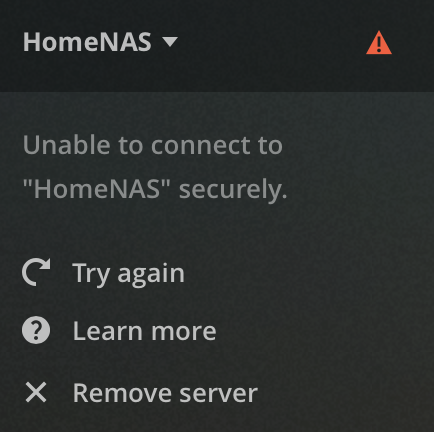
So I disable rebinding and used googles DNS and now Plex.tv connects securely! Hooray! However, whenever I need to transcode something to stream to my phone, it gives me an error message. For example, if I limit cellular data at all, the movies will not play. If I remove any cellular limit, then the movie plays fine and the info reports that it is direct streaming.
So I’m having the same issue with playing stuff on my cellphone and I saw another user complaining about it too.
Strangely, my server is connecting and disconnecting randomly without me changing any settings. I’ve attached my logs, but the only thing I can think of is my router being stupid.
Plex Media Server Logs_2021-04-20_08-25-57.zip (4.7 MB)
That sounds about right.
When’s the last time you gave it a full power cycling?
My router, or my NAS? I’ll do both and report back.
