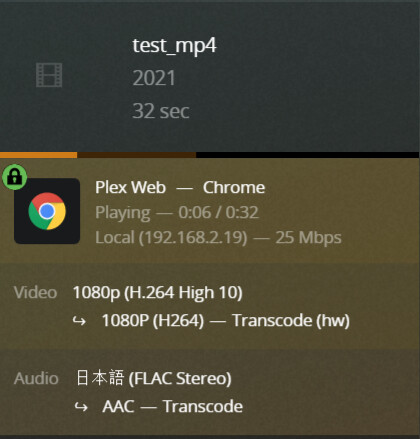
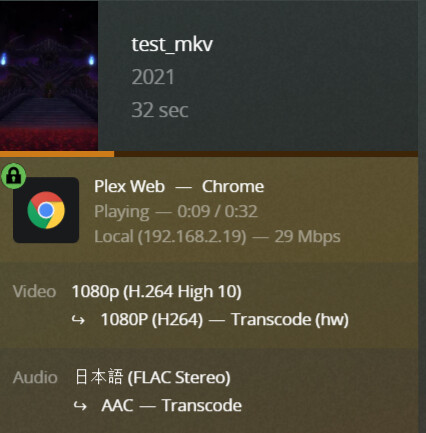
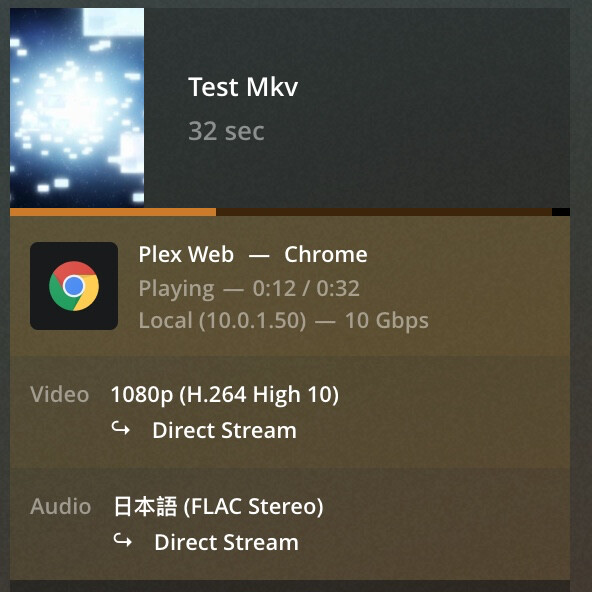
[Bug] [Open] Webbrowser Playback of H264 10 bit requires unchecked Disable video stream transcoding

Server Version#: 1.23.3.4707
Player Version#: 4.57.4
Hello,
currently it is needed to uncheck “Disable video stream transcoding” to play H264 10 bit in browsers even though plex does no transcoding and plays the file just fine.
My plex Server is not fast enough to handle a single transcoding attempt without killing plex for CPU and RAM load, so it is crucial to keep “Disable video stream transcoding” enabled. But I still want to be able to play H264 in browsers.

This is to me a bug since transmuxing is in plex no transcoding or else playing h264 8 bit in browser should fail too.

Thanks for help

You can already play h264 10-bit without needing to modify the profile. Keep in mind Chrome only supports this for mp4. If your file is mkv, that wont’ work.

image

That is nice to know, but I don’t understand it, mp4 and mkv are just containers and no codecs and because DASH is used, the container shouldn’t matter at all because the client will never see it?

@anon18523487 Ok now I’m even more confused, how did you get that to play? I converted my file to mp4 and it still refuses to play, same filestructure but instead 8 bit plays fine.
Test file 8 bit mkv works https://filehorst.de/d/dsttxpsB
Test file 10 bit mkv doesn’t work https://filehorst.de/d/djwmhgoz
Test file 10 bit mp4 which should work but doesn’t https://filehorst.de/d/dIhmiJAI
Logs:
Plex Media Server Logs_2021-06-24_11-13-18.zip (29.8 KB)

DASH is not used when direct playing a file. The container also matters.

I grabbed that file and it has 16 ref frames. That is out of spec and why it isn’t direct playing. These may or may not work, but Plex can’t detect when it doesn’t so anything above 8 is not allowed.

(Everything about anime encodes seems designed as an obstacle for playback. I don’t understand that community at all.)

@anon18523487, is that a hardcoded limit on reference frames? Or is it linked to Level?

Level 5.1 allows a crazy number (16!) of reference frames for 1920x1080 video.

But lower Levels can exceed 8 at moderate resolutions, too. I have a few SDTV and 720P shows encoded with 9 and 10 frames. They’re not particularly exotic encodes.

1 Like

There is a formula based on the exact parameters of the video. However, on average, a max of 8 ref frames for 1080p h264 video is right.

I wouldn’t say it’s only the anime community. As ripping and encoding videos have become easier, the knowledge of what it actually does has been diluted and most people just pick from defaults and presets. I’ve seen files that are 720p, h264, 2 Mbps, 16 ref frames, level 5.2, 12-bit HDR. This is just overkill for this type of file.

Sure, because encoders don’t apply this limit, when they should. Instead users are allowed to set the value themselves. Some devices don’t care, they’ll just try playing the file anyways. It may work, it may not. If it fails, it will fail hard and could lead to device crashes. Plex can’t prevent a crash should it happen, but we do try to avoid it by setting a ref frames limit.

No, but just because everybody is wrong, doesn’t make it right.

So how do I tell Plex to stop preventing me from watching files?
I added

        <UpperBound name="video.level" value="52" />
        <UpperBound name="video.refFrames" value="16" />

But that seems to get ignored
Also is there somewhere a overview which other hidden limits are in place which are not listed in the profiles?

Painfully accurate. They always seem to be the ones to push quality levels and adopt features before anybody else (MKVs, ASS\SSA, x264, 10bit, etc). I think it’s the fact fansubs were pretty much exclusively computer playback only for so long (I was swapping VHS tapes long before trying to watch .ra files with subtitles on my TV somehow).

Also accurate. As technical functions become easier to manage the why gets lost and the how remains. I don’t need to know why my car works, just need to know how to work it.

Sorry for the tangent here - but it’s an interesting topic so I’m watching. :slight_smile:

You might not be able to. Some things are hard coded into the app. Some clients will make the decision themselves if a file can be played or not. The profile is only used to determine what to transcode to. I can’t remember if Web works this way or not. I’ll have to get back to you.

Ok thanks for that. I understand why you did introduce limits, but on the other hand I would not understand why you would hardcode them. The decoder of browsers get from time to time updated, so there is a need to adapt that. For example they decode x264 very slow encoded files fine and that up to level 5.2, maybe even more but I first have to create test file to test 6.1 and 6.2.

ok I can confirm that chrome does playback h264 10 bit up to level 6.2 fine

General
Unique ID                                : 84211607453415962628984889361045158512 (0x3F5A90CE2C4FBA17C469B3D759B87A70)
Complete name                            : 4320p_60fps_16_ref_8b_level6_2_test_2.mkv
Format                                   : Matroska
Format version                           : Version 4
File size                                : 200 MiB
Duration                                 : 30 s 14 ms
Overall bit rate mode                    : Variable
Overall bit rate                         : 55.9 Mb/s
Movie name                               : Japan in 8K 60fps
Released date                            : 2019
Encoded date                             : UTC 2021-06-24 23:04:25
Writing application                      : HandBrake 20210611104544-7086ec31e-master 2021061101
Writing library                          : Lavf58.76.100
ErrorDetectionType                       : Per level 1
ARTIST                                   : Armadas
SUMMARY                                  : https://www.youtube.com/watch?v=zCLOJ9j1k2Y

Video
ID                                       : 1
Format                                   : AVC
Format/Info                              : Advanced Video Codec
Format profile                           : High 10@L6.2
Format settings                          : CABAC / 16 Ref Frames
Format settings, CABAC                   : Yes
Format settings, ReFrames                : 16 frames
Codec ID                                 : V_MPEG4/ISO/AVC
Duration                                 : 30 s 14 ms
Width                                    : 7 680 pixels
Height                                   : 4 320 pixels
Display aspect ratio                     : 16:9
Frame rate mode                          : Constant
Frame rate                               : 59.940 (60000/1001) FPS
Color space                              : YUV
Chroma subsampling                       : 4:2:0
Bit depth                                : 10 bits
Scan type                                : Progressive
Writing library                          : x264 core 163 r3059 b684ebe0
Encoding settings                        : cabac=1 / ref=16 / deblock=1:0:0 / analyse=0x3:0x133 / me=umh / subme=10 / psy=1 / psy_rd=1.00:0.00 / mixed_ref=1 / me_range=24 / chroma_me=1 / trellis=2 / 8x8dct=1 / cqm=0 / deadzone=21,11 / fast_pskip=1 / chroma_qp_offset=-2 / threads=24 / lookahead_threads=4 / sliced_threads=0 / nr=0 / decimate=1 / interlaced=0 / bluray_compat=0 / constrained_intra=0 / bframes=8 / b_pyramid=2 / b_adapt=2 / b_bias=0 / direct=3 / weightb=1 / open_gop=0 / weightp=2 / keyint=600 / keyint_min=60 / scenecut=40 / intra_refresh=0 / rc_lookahead=60 / rc=crf / mbtree=1 / crf=20.0 / qcomp=0.60 / qpmin=0 / qpmax=81 / qpstep=4 / ip_ratio=1.40 / aq=1:1.00
Default                                  : Yes
Forced                                   : No
Color range                              : Limited
Color primaries                          : BT.709
Transfer characteristics                 : BT.709
Matrix coefficients                      : BT.709

Audio
ID                                       : 2
Format                                   : FLAC
Format/Info                              : Free Lossless Audio Codec
Codec ID                                 : A_FLAC
Duration                                 : 29 s 988 ms
Bit rate mode                            : Variable
Channel(s)                               : 2 channels
Channel layout                           : L R
Sampling rate                            : 44.1 kHz
Bit depth                                : 16 bits
Compression mode                         : Lossless
Title                                    : Stereo
Default                                  : Yes
Forced                                   : No

Test File https://filehorst.de/d/dCBzErJz

Ugh. I wanted to say “encoders generate conforming files!”. And they do by default … unless they’re told not to. It’s easier to foot-shoot than I thought. :confused:

Handbrake does get it right. It uses Level as a maximum, and automatically conforms ref to comply. If a too-high ref is given, it’s automatically reduced. :+1:

FFmpeg and x264 and x265 are reasonable by default, and the appropriate Level is automatically detected. But if level is provided, it isn’t used as a constraint, it’s just passed to the output file. So it’s easy to generate nonconforming files. :frowning:

My point was that 16 ref frames isn’t wrong - it’s perfectly valid for the L5.2 example given here. I have a number of conforming files with 10+ ref frames.


BUTTTTTT I don’t think that’s the issue here anyway.

Jun 24, 2021 18:05:39.000 [0x80b0bcd00] DEBUG - [Transcode] Test Mkv - video.bitDepth limitation applies: 10 > 8

@Big, try removing this entire section. Works for me.

    <VideoCodec name="h264">
      <Limitations>
        <!-- Chrome does playback h264 10 bit so allow that -->
        <UpperBound name="video.bitDepth" value="10" />
      </Limitations>
    </VideoCodec>

Then restart Plex Media Server.

image

That doesn’t do it for me. I even have completly removed my profile and it still won’t play without transcode
image
image

Don’t forget to restart PMS after making profile changes.
(Profiles are loaded into memory when PMS starts)

I did restart and i see that my profile is not used anymore because else it would stream flac instead of transcoding that to aac.
I can provide logs of that session if that helps?

In which log file did you find that so i can look at that myself?

image

I added FLAC, and get that Direct too now. I didn’t try with your .xml.

Look in Plex Media Server.log.

<?xml version="1.0" encoding="utf-8"?>
<Client name="Chrome">
  <!-- Author: Plex Inc. -->
  <TranscodeTargets>
    <VideoProfile protocol="hls" container="mpegts" codec="h264" audioCodec="aac,mp3" context="streaming" />
    <VideoProfile protocol="dash" container="mp4" codec="h264" audioCodec="aac,flac" context="streaming">
      <Setting name="ForceTranscodesForLive" value="true" />
      <Setting name="SkipAudioBeforeStart" value="true" />
      <!-- <Setting name="BreakNonKeyframes" value="true" />  -->
    </VideoProfile>
    <VideoProfile protocol="http" container="mkv" codec="h264" audioCodec="aac,mp3" context="streaming" />
    <MusicProfile container="mp3" codec="mp3" />
    <PhotoProfile container="jpeg" />
    <SubtitleProfile container="ass" codec="ass" context="all" />
  </TranscodeTargets>
  <CodecProfiles>
    <VideoAudioCodec name="*">
      <Limitations>
        <UpperBound name="audio.channels" value="6" />
      </Limitations>
    </VideoAudioCodec>
  </CodecProfiles>
  <!-- When transcoding a multi-channel audio stream inside a video transcode, downmix the audio stream to stereo. -->
  <TranscodeTargetProfiles>
    <VideoTranscodeTarget protocol="*" context="streaming">
      <VideoAudioCodec name="*">
        <Limitations>
          <UpperBound name="audio.channels" value="2" onlyTranscodes="true" />
        </Limitations>
      </VideoAudioCodec>
    </VideoTranscodeTarget>
  </TranscodeTargetProfiles>
</Client>
1 Like

Thank you Volts
I copied your config and it does work, it seems like I have something in the config file that I provided which doesn’t get parsed right because with that it doesn’t work.
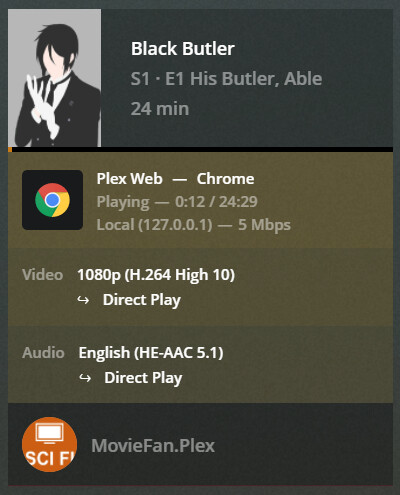
1 Like

Nice!

Small moves, Ellie. Small moves.

1 Like

I tried now the 4320p video and it seems like there is a hard limit of 4096 Pixels for h264 defined in plex

[Transcode] 4320p_60fps_16_ref_8b_level6_2 - video.width limitation applies: 7680 > 4096

I tried to get rid of it with this

    <VideoCodec name="h264">
      <Limitations>
        <UpperBound name="video.width" value="8192" isRequired="true" />
        <UpperBound name="video.height" value="4320" isRequired="true" />
      </Limitations>
    </VideoCodec>

but no success.
The values are the current specified limits of h264 at 120 fps see H.264 : Advanced video coding for generic audiovisual services