I’ve noticed that Personal Media Files using the “Video/Other” library section have a bug where the metadata fresh collects and displays the correct metadata and date, however during Plex’s scheduled tasks when it completes the media analysis periodically as scheduled task, it will go against the set metadata date and instead change the videos to a random date.
This is very annoying as I then need to constantly go “Refresh Metadata” for Plex to then update and display the correct date again on each video file.
Can this bug please be fixed so it’s not going against the set metadata date.
Sure, here’s an example of one of my home videos, but it happens with all personal/home videos. I have the Plex Personal Media Agent set with “Local Media Assets (Movie)” as first priority in the list, so it will always read the local media files metadata to get the title, description and year.
Image 1: This shows my metadata editor, which shows the date as 2007 for this particular home video. When Plex indexes this, it creates it as a 2007 movie.
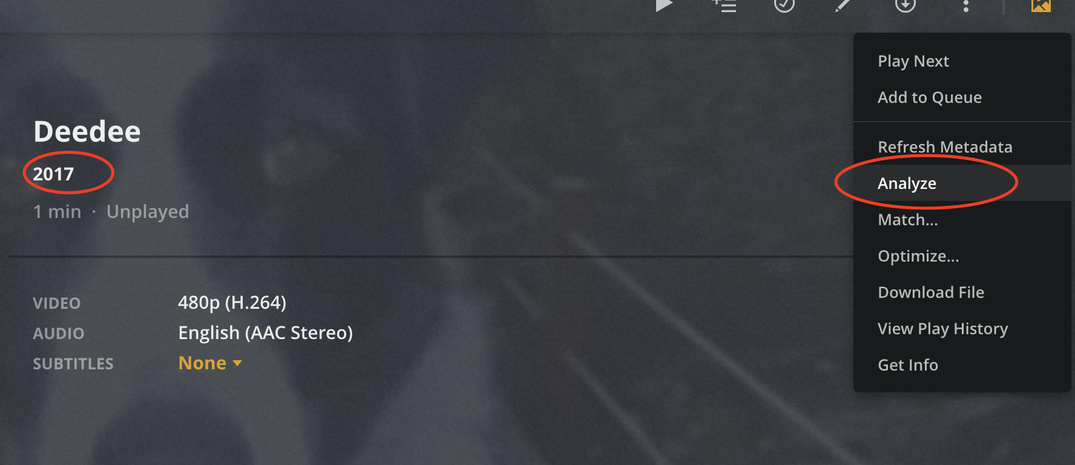
Image 3: This shows that when you select “Analyze” (which happens every couple of days as a scheduled task) for some reason Plex changes the year to a random date, in this case it changes it from 2007 to 2017 (it changes to other years for some of my other home videos).
Image 4: This shows that if you select “Refresh Metadata” it will then read the files metadata date and correct the home video back to 2007. However it just gets reverted back to 2017 when the scheduled task runs and does analysis.
@ChuckPa, I find if I uncheck/turn off the following in Scheduled tasks, it doesn’t change the dates of my home movies to random dates:
“Upgrade media analysis during maintenance” and “Perform extensive media analysis during maintenance”
Unchecking/turning these off fixes the problem of it changing the dates of home movies. But this then means my other libraries such as Movies and TV Shows are not getting the benefits of media analysis during scheduled task maintenance windows.
Let me know if you need any additional data to resolve this issue.
Thanks
Is it possible for you to recreate this one more time,
DEBUG logging on, VERBOSE logging off,
and setting the number of retained log files to 10
( add LogNumFiles="10" to “Preferences.xml” when PMS is stopped – use vi / nano / gedit)
If this is on the WD, I don’t know much about it. I don’t know how to effect the change above. (would you please correct the thread tagging? )
Hi @ChuckPa I’ve done this, can you please let me know how I can send this to Plex team securely? I don’t want to upload publicly as it contains a lot of PII.
(I don’t see any option to change the thread tags)
I don’t install the Plex pass beta releases, I always just update with production releases on my two servers as I had an issue in the past when I installed a beta. Currently running 1.18.6.2368.
Will Plex engineers add this fix in the release notes? as I always read the release notes prior to installing, so once I see it fixed in the release notes, I’ll re-enable analysis.



 expect to see that in the next PlexPass beta release (1.18.8 ??)