[BUG] Plex iOS - Transcoding instead of Direct Playing Version

Server Version#: 1.41.4.9463
Player Version#: 8.45

Hi,
I discovered a bug in Plex iOS that’s extremely disturbing.

Situation

I have a movie in 2 versions:

  • 4K 60 Mbps HDR10 with TrueHD 7.1 Audios and PGS Subtitles
  • 1080p 4Mbps HDR10 with EAC3 5.1 Audios and PGS Subtitles
    My PMS max bandwidth for WAN is set to 12Mbps.
    iOS Player is set to Maximum for LAN ; 10 Mbps for WAN (but setting the maximum bandwidth doesn’t help).

v → When trying to stream from LAN, the 4K is direct played successfully with the player as intended.
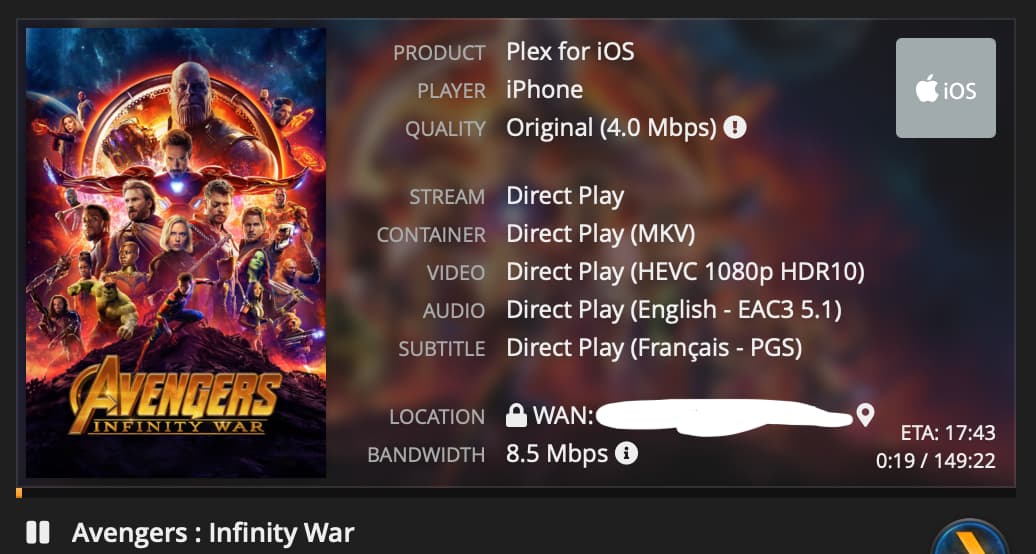
v → When trying to stream from LAN/WAN the 1080p version manually, the 1080p version is direct played successfully, as intended.

x → But when trying to stream from WAN, the 1080p version is transcoded towards the maximum bitrate specified in the iOS Player.

The logs (attached) says that Direct Play is disabled while it’s not.

I would expect that when on WAN, the 1080p version is direct played because enough bandwidth is available and all codecs (video, audio, sub) are compatible with the mpv player. Something must be broken in the decision making from PMS and/or the player.

FYI, when using Infuse Player, the 1080p version is correctly selected and played when on WAN.

Can someone investigate and hopefully correct this ?
Many thanks,
Gecko


If you look a few lines down from the one you highlighted you’ll see it says analyzing bandwidth of >100Mbps. Keep on mind that the bitrate shown for your file is the average.
When you add a file to pms, it analysis the file. So either your file has something in it telling pms the bandwidth was higher than what you thought or pms actually detected variations in the bitrate requiring a greater bandwidth.

If you set the local quality to 10Mbps, you should see the same behavior. If that happens, it’s the file. You’ll need to re-encode the file and set a maximum bitrate to prevent spikes.

Thank you for your reply.

I re-encoded the original media with a hard limit of 10 Mbps and forbid metadata to be copied over so that I’m certain about the bitrate of the smaller version. Plex even reserve less than 10Mbps when direct playing it as you can see in the screenshots below.

Here are my ffmpeg parameters :

ffmpeg -loglevel error -y \
-hwaccel vaapi -hwaccel_device /dev/dri/renderD128 -hwaccel_output_format vaapi \
-i "/movie/1917 (2019)/1917 (2019) - Blu-ray 4K.mkv" \
-map 0:v -map 0:a -map 0:s -map_metadata -1 \
-c:v hevc_vaapi -vf "scale_vaapi=w=-1:h=1080" -maxrate 9M -bufsize 10M \
-c:a eac3 -b:a 640k -ac 6 \
-c:s copy \
-copyts -start_at_zero \
"/movie/1917 (2019)/1917 (2019) - Streaming FHD.mkv"

The same >100Mbps bandwidth is showing in the logs and the same behaviour occurs. (I manually re-analyse the media after each encoding ; I tested with 2.0 audio, no subtitles, with and without metadata, … same situation)

I even got a step further and splitted both versions in separate media items. When playing the now standalone 1080p version, it direct plays. Merged together, it is transcoded.

Something is wrong somewhere but I don’t understand where exactly.

Current setting:

iOS Player
No automatic adjustment of the quality
Mobile limit deactivated
WAN Streaming : Maximum
LAN Streaming : Recommended
Direct Stream : ON

Server
Internet Upload Speed: not set
Limit remote stream bitrate : 40Mbps (4K)
Disable video stream transcoding: ON

I’ve also set a non existing subnet as my local network to treat everything as WAN and eliminate any network bottleneck while testing on my WIFI and Ethernet.

The messages in the logs are quite clear :

Using the Resume button on movie A

[Req#b08c1/Transcode] Streaming Resource: Original decision doesn't fit bandwidth limit of 40000kbps. Checking direct play of other media
[Req#b08c1/Transcode] Streaming Resource: Calculated bandwidth of **118753kbps** exceeds bandwidth limit. Changing decision parameters provided by client to fit bandwidth limit of **40000kbps**
[Req#b08c1/Transcode] Streaming Resource: Determining preferred transcode encoders through transcode only decision.
[Req#b08c1/Transcode] Streaming Resource: Reducing playback quality for **38095kbps** stream bitrate: audio channels to 2, quality to 54, disable video DS as **2147483647kbps** is > the **37701kbps** available
[Req#b08c1/Transcode] Streaming Resource: Reached Decision id=29600 codes=(General=2000,Neither direct play nor conversion is available. Direct Play=3000,App cannot direct play this item. No direct play video profile exists for protocol http, with container mkv, and video codec hevc. Transcode=4002,Not enough CPU for conversion of this item.)

Selecting specific 1080p version

[Req#bdcbf/Transcode] Streaming Resource: Adding session 0x7d2c042f4808:E2040F18-BE62-432D-BC4D-D4C29129B995 which is using **9612kbps** of WAN bandwidth. Used is now **9612kbps**
[Req#bdcbf/Transcode] Streaming Resource: Reached Decision id=29600 codes=(General=1000,Direct play OK. Direct Play=1000,Direct play OK.) media=(id=39666 part=(id=39668 decision=direct play protocol=http streams=(Video=(id=139408 decision= width=1920 height=1080) Audio=(id=139409 decision= channels=6 rate=48000) Subtitle=(id=139411 decision= languageCode=fra location=embedded))))

Using the Resume button on movie B

[Req#c2a82/Transcode] Streaming Resource: Original decision doesn't fit bandwidth limit of 40000kbps. Checking direct play of other media
[Req#c2a82/Transcode] Streaming Resource: Calculated bandwidth of **115865kbps** exceeds bandwidth limit. Changing decision parameters provided by client to fit bandwidth limit of **40000kbps**
[Req#c2a82/Transcode] Streaming Resource: Reducing playback quality for **38095kbps** stream bitrate: audio channels to 2, quality to 54, disable video DS as **2147483647kbps** is > the **37701kbps** available
[Req#c2a82/Transcode] Streaming Resource: Reached Decision id=256 codes=(General=2000,Neither direct play nor conversion is available. Direct Play=3000,App cannot direct play this item. No direct play video profile exists for protocol http, with container mkv, and video codec hevc. Transcode=4002,Not enough CPU for conversion of this item.)

From my understanding, the logic behind the version selection when trying DirectPlay seems broken as it seems to use the calculated bandwidth of the original 4K version (which are above 100Mbps) instead of the one from the 1080p version (which is 9612kbps) to take his decision to directly the lower resolution version.

I don’t know who I can ping from the staff to look into this ? Maybe @chris_decker08 could you be kind enough to analyze my issue and eventually send this to the proper people ?

Thanks!

You have your WAN setting set to maximum. That means the client will request the 4k version. Since your server setting is set to 40Mbps, it transcodes. This is correct. Although, if you have the disable transcoding enabled, it shouldn’t transcode. I’m confused on that part.

Can you set it to 10 again in the app and get me the actual log from the app? The parts you provide don’t tell the entire story.

Hello,

Here are the logs :
plex.log (390.3 KB)

As I don’t have any mobile data left, I did the test on LAN. Here are the settings:

iOS Player
No automatic adjustment of the quality
WAN Streaming : 20 Mbps
LAN Streaming : 20 Mbps
Direct Stream : ON

Server
Internet Upload Speed: not set
Limit remote stream bitrate : 25Mbps (4K)
Disable video stream transcoding: OFF

I don’t know why the logs are written twice, hope you’ll find what you are looking for :slight_smile:
Many thanks for looking into it!

Your logs show that it is still choosing the 4k version as being the best version. Can you post the xml info? The only thing i can think is that you have chosen the subtitle that is in the mkv of the 4k version. Since only this version has the subtitle, it has to choose this versus being able to choose the 1080p version. I don’t think Plex can play from different versions.

Well the 1080p version is a downgrade I did myself from the 4K version.

  • Subtitles are copied over and available on both versions (PGS SUB)
  • Audio tracks are converted to E-AC3 down to 5.1
  • Video track 10 times lower bitrate on average

Here is the xml from the media I used for my last test.
29600.xml.zip (20.6 KB)

Thanks !

Hmm. I don’t see the deep analysis info in there. Do you turn off your server at night?

I believe Plex can’t properly select the version to play without that info. It will just automatically pick whatever version is listed first, in this case the 4k version. Hit analyze on the movie and see if the info gets added, then see if the behavior is different when playing.

The server is awake 24/7 and every media should have been fully analyzed. The library and plex server is brand new as I migrated back to Plex after years using Emby. It ran for a week to analyzed all my media without interruption.

I even tried to split both versions apart and analyze them separately before merging them back again. Same behavior. :frowning:

What kind of xml node were you expecting to see exactly for the deep analysis output ?

At the end of each stream section sold be a line indicating the bandwidth required to stream the video. I don’t see this in your xml. Should look like this.

requiredBandwidths=“9896,9745,9343,9102,8914,8832,8832,8832”

Thanks,
After my holidays, I checked again and the requiredBandwidth is now present in the xml but the behavior is the same as before…

When splitting apart files versions, the playback works as I would imagine, meaning: Directplay a lower resolution if any is available and one matches both server and client maximum bandwidth (and the client is able to direct play it of course) ; otherwise transcode the lowest available version.

When split apart :

  • The 4K version is transcoded at the maximum bandwidth authorized :
    4K_OK.log (33.2 KB)

  • The 1080p version is direct played :
    1080p_OK.log (8.4 KB)

When merged, even with the required Bandwidth calculated, 4K or 1080p is being transcoding depending on the maximum authorized bandwidth in the client/server :
Merged_KO.log (71.7 KB)

Here is the media xml :
29600-with-bandwidth.xml.zip (20.8 KB)

Based on that, is there anything else I could do to improve the situation, except try to hail some devs ? Many thanks again.

I haven’t looked at your new logs but what you describe sounds like the expected behavior. When you have multiple versions, it can only direct play those other begins. When a transcode is needed, it will pick the first version listed in the xml. This is typically the highest quality one. Pms will not pick any other version to transcode. The only way to transcode a different version is if you select play version and something causes the transcode.

Thanks @MovieFan !

Indeed, PMS seems to always use the first listed Media version as transcoding source instead of the closest-but-above to the target bitrate of the client.

However, using the mac version of Plex as client, I noticed that limiting the bitrate to X, instruct PMS to try DirectPlaying the biggest bitrate version just below X. Same behavior on web client but more limited due to tighter constraints on codecs.

On iOS, with the same scenario, a transcoding session from the biggest absolute bitrate version is always happening. Only manually selecting a low-res version starts DirectPlay.

Maybe the « Play smaller videos at original quality » is missing from this platform…

@ChuckPa, maybe worth investing ?

1 Like

This topic was automatically closed 90 days after the last reply. New replies are no longer allowed.