Reinstalled plex on my Ubuntu 18.04 server and now i can’t claim it.
Moreover, i can’t claim plex on vps, that i’ve created for test.
It worked nearly for a year before this happened.
I tried different versions, but nothing helps.

(1) 1.9.3.4290 is very old. Please use a recent version.
(2) Usually, this means your server is unable to connect to plex.tv. Check DNS and the network.
dns resolves, but ping it doesn’t go
1 192.168.1.1 (192.168.1.1) 0.244 ms 0.199 ms 0.192 ms
2 * * *
3 5x166x254x25.in-tel.ru (5.166.254.25) 1.099 ms 1.082 ms 1.061 ms
4 ertelekom-ic-313399-mow-b4.c.telia.net (62.115.12.110) 4.278 ms 4.275 ms 4.241 ms
5 mow-b4-link.telia.net (62.115.12.109) 4.209 ms ae10-153.rt1.m9.msk.ru.retn.net (87.245.254.153) 8.746 ms 8.847 ms
6 ffm-bb4-link.telia.net (62.115.119.184) 39.078 ms 38.904 ms ae13-10.rt.lim.waw.pl.retn.net (87.245.232.190) 26.933 ms
7 prs-bb4-link.telia.net (62.115.122.138) 48.210 ms 48.366 ms 48.345 ms
8 * * *
9 slou-b1-link.telia.net (62.115.117.123) 56.311 ms 56.227 ms 56.309 ms
10 * a100-ic-316401-slou-b1.c.telia.net (62.115.145.5) 56.379 ms *
11 * * *
traceroute from aruba cloud vps.
traceroute to plex.tv (34.248.194.188), 30 hops max, 60 byte packets
1 host2-7-211-80.serverdedicati.aruba.it (80.211.7.2) 31.288 ms host3-7-211-80.serverdedicati.aruba.it (80.211.7.3) 175.328 ms host2-7-211-80.serverdedicati.aruba.it (80.211.7.2) 31.762 ms
2 it1-core-a.aruba.it (62.149.185.99) 0.873 ms it1-core-b.aruba.it (62.149.185.100) 0.808 ms it1-core-a.aruba.it (62.149.185.99) 0.884 ms
3 it101-edge-a.aruba.it (62.149.191.50) 9.109 ms 11.194 ms 9.204 ms
4 xe-11-1-0-141.bar2.Milan1.Level3.net (213.242.65.133) 10.839 ms 8.484 ms 10.827 ms
5 213.242.65.54 (213.242.65.54) 13.114 ms 13.101 ms 13.079 ms
6 52.119.155.36 (52.119.155.36) 16.962 ms 52.119.155.172 (52.119.155.172) 20.076 ms 52.119.155.36 (52.119.155.36) 19.633 ms
7 52.119.155.23 (52.119.155.23) 41.292 ms 52.119.155.125 (52.119.155.125) 35.029 ms 52.119.155.57 (52.119.155.57) 34.696 ms
8 * * *
9 54.239.46.201 (54.239.46.201) 41.134 ms 41.183 ms 38.962 ms
10 52.93.129.74 (52.93.129.74) 41.896 ms 39.391 ms 39.442 ms
11 178.236.3.76 (178.236.3.76) 39.088 ms 52.93.128.210 (52.93.128.210) 42.015 ms 52.93.128.51 (52.93.128.51) 41.250 ms
12 * * *
13 52.93.6.178 (52.93.6.178) 77.916 ms 52.93.6.132 (52.93.6.132) 40.671 ms 52.93.6.184 (52.93.6.184) 40.114 ms
14 52.93.101.11 (52.93.101.11) 41.396 ms 52.93.101.25 (52.93.101.25) 41.625 ms 52.93.101.61 (52.93.101.61) 38.870 ms
15 52.93.101.14 (52.93.101.14) 76.996 ms 52.93.101.23 (52.93.101.23) 41.095 ms 52.93.101.2 (52.93.101.2) 42.427 ms
16 52.93.7.71 (52.93.7.71) 39.501 ms 41.833 ms 52.93.101.38 (52.93.101.38) 63.623 ms
17 * * 52.93.7.55 (52.93.7.55) 41.916 ms
plex.tv does not pong  Please post the server logs:
1 Like
Your logs are full of entries like this:
Aug 24, 2018 00:39:45.432 [0x7f1b5bffc700] WARN - HTTP error requesting GET https://plex.tv/updater/products/1/check.xml?build=linux-ubuntu-x86_64&channel=16&distribution=ubuntu&version=1.13.5.5332-21ab172de (0, No error) (Unknown SSL protocol error in connection to plex.tv:443 )
There has to be a proxy or VPN in between that terminates the SSL connection. plex.tv is never reached.
Edit: Check the time / date of your server.
Date and time are right. I can use wireshark/tcpdump if you need more detailed logs
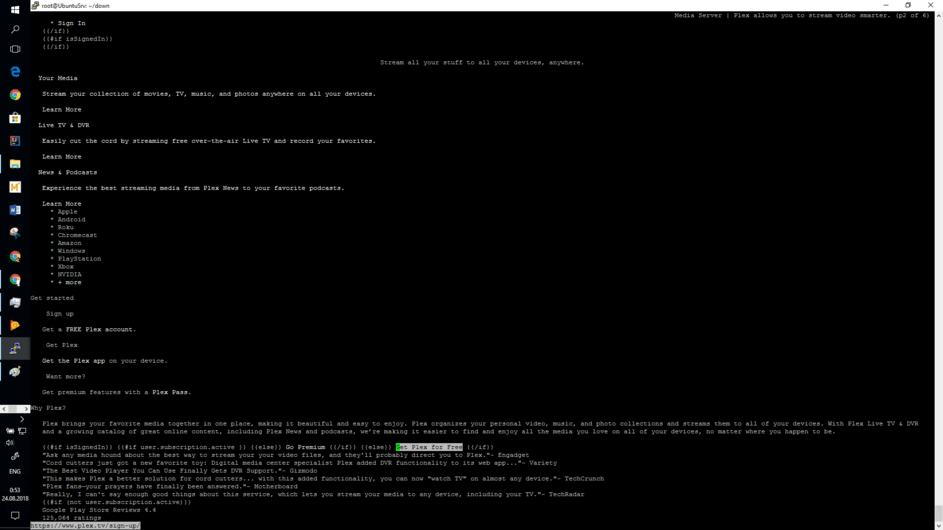
i can reach it through console browser.
Do you have multiple network interfaces? Please try to select the correct interface in the “Network interface to listen on” in the “Network” settings and restart PMS afterwards with sudo systemctl restart plexmediaserver. And also disable IPv6 in the same menu.
Done. Nothing new
Please perform the update check on the server and post the output:
curl "https://plex.tv/updater/products/1/check.xml?build=linux-ubuntu-x86_64&channel=16&distribution=ubuntu&version=1.13.5.5332-21ab172de"
curl “https://plex.tv/updater/products/1/check.xml?build=linux -ubuntu-x86_64&channel=16&distribution=ubuntu&version=1.13.5.5332-21ab172de”
curl: (35) OpenSSL SSL_connect: SSL_ERROR_SYSCALL in connection to plex.tv:443
Most likely an error with your kernel. Please read this solution and disable IPv6 on your server:
Thank you for help, it doesn’t solve the problem, but i know where to dig.
Solved this through the docker way. Thank a lot 
Please help future users and tell us about the underlying issue What’s going wrong? What docker image do you use now?
1 Like
It’s very strange, I installed official docker image, than stopped it, started lastest plex app and claimed it through Android TV app
I would like to add I faced the same issues and tried all troubleshooting steps in this article to reach a resolution, however I did not.
After further digging I found a solution in a different forum, which was to give your server a static IP (which is a good idea anyway!) and specifically add Cloud fares DNS at 1.1.1.1. After that I was finally able to log in and claim my server. Hope this helps someone!
This topic was automatically closed 90 days after the last reply. New replies are no longer allowed.
