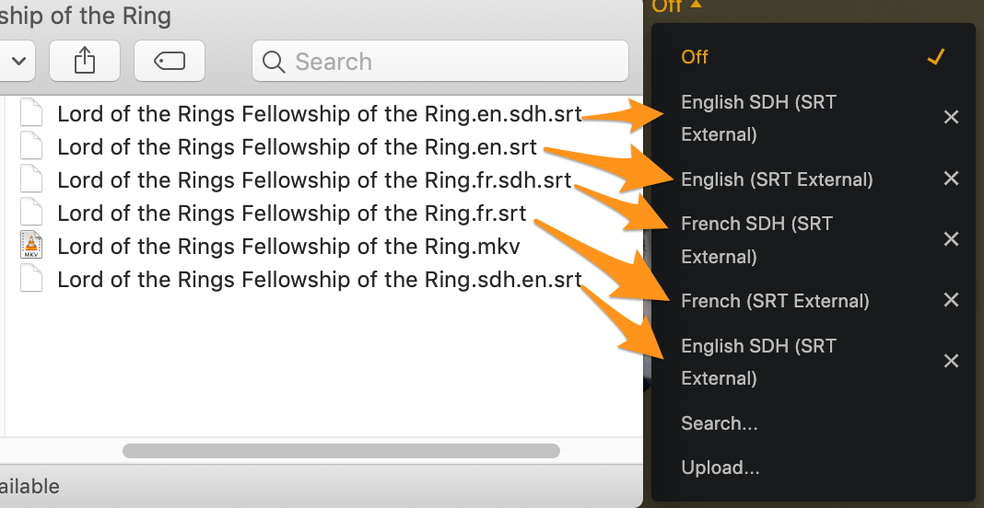
Can we pick an alphabetical order for subtitles and leave it please?

So when I first started using external subtitles with Plex, it would automatically default to the non-SDH subs if you tagged the SDH ones as *.eng.SDH.srt

Even though Plex can tell the difference between SDH and non-SDH subtitles, it doesn’t allow you to set a default preference. Or at least, it didn’t last I checked.

After an update, it flip-flopped, and in order to get it to list the non-SDH subtitles first, you had to start labeling the SDH subtitles as SDH.eng.srt

So, I’ve been updating my entire library with that scheme, just to get it to use the non SDH subtitles as default, and after the last server update, it’s flip-floped again. Can we please either get a default option or just choose one and leave it?

I’m not sure if I understand your question but what do you have set in your accounts subtitle settings? are you talking about the order they are in the menu or what is chosen by default? ( keep in mind that if they are manually changed then that manual change will stick)

When you tell plex to choose either SDH or non-SDH as default, it doesn’t listen. That’s an old bug. The old workaround was: if I want the non-SDH subs to be default, it used to be that if I named the non-SDH version “.eng" and the SDH version as ".eng.SDH”, then Plex would choose the non-SDH version first and I wouldn’t have to manually change every episode in a show. I’m assuming it was alphabetical.

Then it changed. It started pulling the SDH version first, but if I changed the suffix to “.SDH.eng" instead of ".eng.SDH”, it went back to pulling the non-SDH first. Then, for some random shows, it switched back. I thought it was all, but only some.

Requested resolution:
ideal - fix the default settings bug
less ideal - just choose whether SDH.eng or eng.SDH gets pulled first and don’t change it.

Can I get an update please

where are you choosing that?

the 4th and 5th setting there is only for what comes up in subtitle search, not what is preselected. We probably need to separate them.

I was just told there is an issue with the “auto-select subtitle mode” not working but that does not have an SDH option, but may be what is causing your issue

That’s like the third version of what I’ve been told is causing the problem. Could we please either add an option that lets us choose either SDH or non by default, or could we just please pick an alphabetical ordering and leave it. either one would solve this problem in perpetuity

So you’re asking it be alphabetical in the drop down? ( excluding the (SRT External) part I assume)

I understand you would like to have a way to prefer SDH subs be auto enabled first but that has never existed. but it seems as though it just chose the first english sub and if that happened to be SDH then that is what it chose.

How would you expect these subs to be ordered in the menu? it is is alphabetical by filename.ext currently.

The only way I could answer that question is by copying and pasting the paragraphs of text I’ve already provided.

I want it to choose the non-SDH file by default. It used to be that if you named an SDH file “eng.sdh”, it would automatically choose the other one first. So, to get my default preference, I just named all of the SDH files that way so that it would automatically select the other one.

Then an update came, and it swapped so that if you wanted it to choose the other one first, you had to label the SDH file as “sdh.eng” instead. So then I went in and I started switching all of the file names, and whenever I put new files in I would use the new naming scheme, and then another update happened and it switched back.

I have absolutely no idea how else to try to explain this

ok. if when files were named like

Lord of the Rings Fellowship of the Ring.en.sdh.srt
Lord of the Rings Fellowship of the Ring.en.srt

and it was displaying order of and auto-selecting #1

1. English (SRT External)
2. English SDH (SRT External)

then changed to currently displaying/auto-selecting this different #1

1. English SDH (SRT External)
2. English (SRT External)

I’m not sure why that might have changed but I will file it as a bug as it does makes sense that non-SDH would be chosen first to me since most folks would probably want that.

Lots of text warning

While it seems like @ipalm is referring to SDH vs non-SDH being selected by default based on how your subtitle preferences are set within your account, I would like to refer to your question 3 posts up and also the preference of SDH vs non-SDH.

1st, it would actually be nice if on the account level you can say whether you prefer SDH vs non-SDH subs for when subs are auto-selected based on the audio and subtitles settings. I would prefer non-SDH subs personally, but my mom his hard of hearing and she might prefer the SDH subs because of that. So having that as a preference would actually be really nice and honestly probably help with this issue for @ipalm.

2nd, about your question about how the subtitles should be displayed in the menu, I think displaying them alphabetically based on the language name and then type (regular, SDH, forced) would probably be the best. This would keep the languages together and not mixed like in your screenshot. While at the filesystem level it might be like that, I think from a UX perspective of a media platform, the same languages being together would make more sense.

Also, related to the menu for when there are a mix of internal and external subs, it would be nice if we could have a preference (server side as it would be based on what the admin of the server decides) to either have external subs listed first and then internal or vice versa. Right now, if you have both internal and external, the external subs are listed last. Emby, on the other hand has external subs listed before internal because they feel that those would generally be the preferred subs. In my opinion, it would be nice to be able to decide that as the admin.

However, if it were possible (and honestly I think it would be, just maybe a little extra coding needs to be done), I think the best option would actually be if the server admin could have a preferred subtitle language and have those subs show first and then the rest show alphabetically by language name, regardless of whether they are external or internal. However, even without that first part, I think having the subtitle menu sorted alphabetically by language name and intermixing internal and external subs would be the best. This way, if you have for instance, internal and external English subs, they would be next to each other. I have files like this where I have the regular subs and SDH subs that are external but also have commentary tracks and there are subs for those. The current setup would have the internal subs before the external subs, so if there were multiple subs for other languages, the first English subs someone would come up would be the commentary subs. Now in my case, I am pretty good setting the track name for internal subs in the MKV properties and so it would say audio commentary but someone could also see those subs first and think there aren’t any subs for the movie.

They are probably smallish improvements, but I think they would be nice to have and are those quality of life type things. Are they really necessary, not really, but it just makes the overall experience better. Plus, I know at least one of my users has mentioned how they dislike the fact that the English subs (in my case since I only make English subs external) are all the way at the bottom of the subtitle list.

-Shark2k

@shark2k thanks for the reply and feedback. I don’t disagree personally on any points you made I just know that asking for new behavior with new settings is generally a bigger ask (of the million other requests we have) than asking for the return of previous behavior which in this case seems like a regression. In any case this forum topic will be linked in bug report so may give devs ideas

@ipalm sorry it took me a bit to understand what you were asking for

1 Like

Completely understand and appreciate the response. Figured I’d give my feedback just because these have been some thoughts I’ve had and doesn’t hurt to get them out there.

Also glad you were able to understood the issue at hand and it would be nice to get the behavior back to what was previously happening.

-Shark2k

This topic was automatically closed 90 days after the last reply. New replies are no longer allowed.