I’ve been a long-time Plex Pass supporter. I have a modern QNAP NAS and a Sophos firewall.
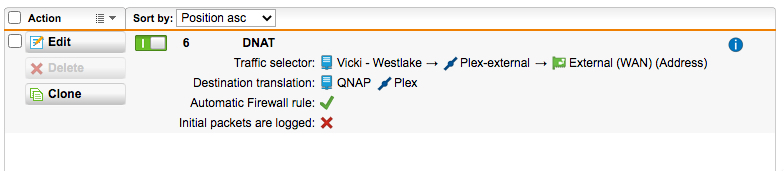
I’ve always been able to access my Plex media content remotely (via web browser) by creating a DNAT rule on the firewall translating external port 1234 (example) to internal port 32400 on the QNAP. So https://xxx.yyy.com:1234 allows me to watch Plex media remotely on a web browser. I never had to enable Remote Access.
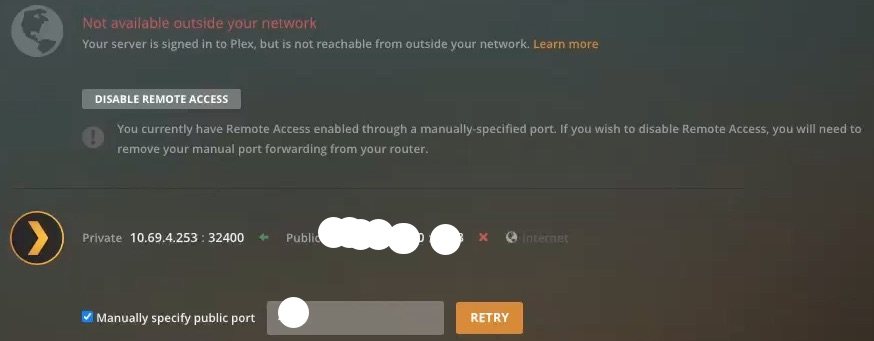
This approach does not work with the Plex mobile apps. I enabled Remote Access, but Plex said “not available outside your network”. I opened port 1234 from the QNAP to the internet. Still no luck. I opened 32400 to the internet. No luck. I created a DNAT using 32400…again, no luck.
I do not want to use Plex’s relay service due to speed limitations (2Mbps) since I have a 40Mbps uplink.
I’d appreciate help in getting this to work. Thank you.
Server Version#: 1.21.1.3876
Player Version#: Android 8.11.0.22186
In the screenshot you show:
- Assuming arbitrary WAN address
- DNAT (aka port forwarded) port (1234) to static IP:32400 of QNAP
- QNAP does not have an active internal firewall active (QNAP does offer this feature)
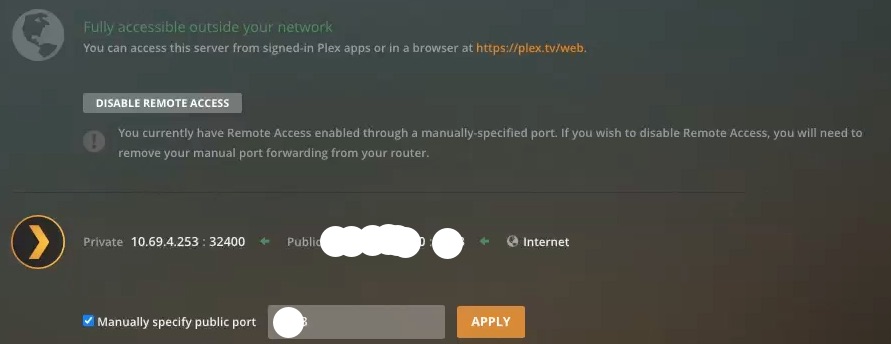
The one thing you haven’t checked is the “Manually specify public port” box.
In that field, you should have “1234” port number for Plex.tv to test reachability.
Checking the box tells Plex.tv which specific port to target
Unless you check the box, PMS will attempt to use UPnP and map its own port.
The rule should be WAN:1234 -> 10.69.4.253:32400
Is this what you have?
Chuck, many thanks for the quick reply. In the screenshot I posted, I was testing using Plex’s native port of 32400.
I’ve attached an example of a DNAT and firewall rule. With these enabled, I click Enable Remote Access in Plex and it thinks/spins for ~10 seconds. It then gives me a “Fully accessible outside your network” … but within ~5 seconds it gives me a “Not available outside your network”.
I have a static external IP. And I do not have any web filtering activated on the Sophos firewall.
Fwiw, the QNAP is a TVS-671 (Intel i7) running the latest OS (v4.5.1.1540 build 20210107).
As before, I appreciate your assistance.
OK… that spinning back to Red after being Green does happen. The web client does flip flop.
I know of many cases where it’s red and still has access after flashing green.
The biggest thing it’s waiting for is the next Reachability test.
Again, I appreciate the quick response. I will test at the remote destination in the morning.
A related question… Assume I get the Plex Android app at the remote destination to access my Plex server at my place. If so, the Plex Android app should be able to cast content to a TV with Chromecast (at the remote destination). I ask because I tried this earlier today and the Plex screen appeared on the TV but when I tried to play something the Plex screen on the TV said “error”. I hope this makes sense.
I really do appreciate your time and help. G’night