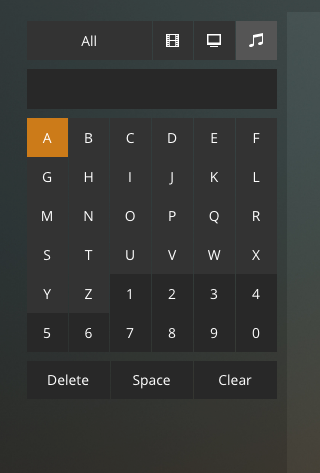
I have a number of recordings that are sorted as YYYY-MM-DD as the album title and now none of these are searchable in the new player because typing - or + controls volume. There is no choice for + or - in the popup keypad either.
This might be surprising but, I know the difference between my desktop and an AppleTV, which I do not own. If you look at my other posts you’ll see I can’t stream anything right now because it’s all Google Cast devices which aren’t working at all.
I am referring to this keyboard, in the MacOS player, which is why I posted about it and included that version number. As you can see no symbols are supported and as described, typing - or + is hijacked by volume controls in the player.
No symbols are supported here if you notice, so sort of two issues at hand. One you can’t type - and + in specifically using a physical keyboard and two, there is no workaround to do it in the UI because apparently nobody thought to even add any symbols as an option.
Yes, this is in the older Plex Media Player, in its ‘TV mode’.
But you have tagged your post not with plex-media-player but with player-mac, which is reserved for the new desktop player https://www.plex.tv/blog/desktop-af/
While the version number you gave looked more like one from the Apple TV.
That’s why I asked which player you are using.
I see you have already filed the bug at GH. Thank you for that!
Ok, that is mildly confusing for all involved it sounds like.
Happy to help with a bug report, didn’t realize there was a git for those until after I went here (submitting support requests to Plex ‘officially’ is a bit confusing too in all honesty)
And custom filters are available. Ok I’ll crawl back under the bridge and wait for Chromecast firmware to be fixed by Google it looks like! Appreciate it.