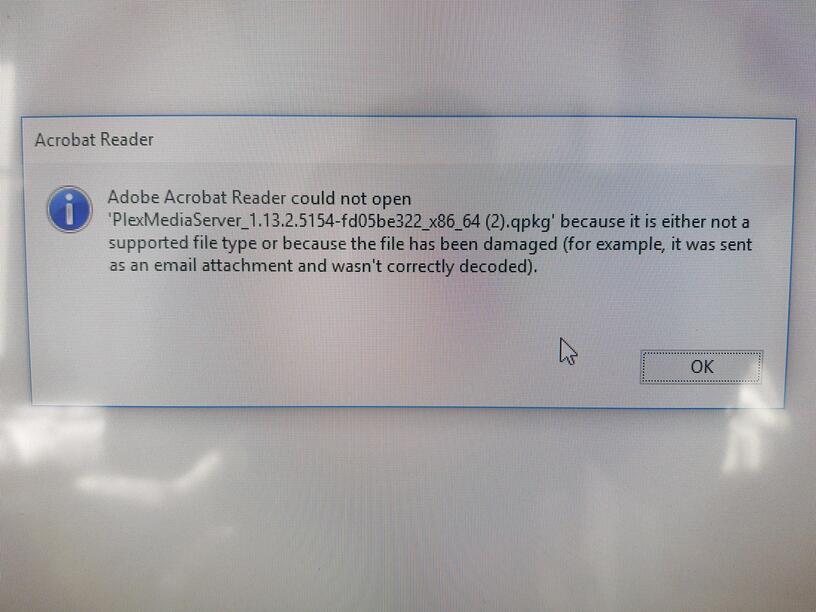
Hello, ive been trying to update plex now for some time but i keep getting an error. It seems to load adobe PDF reader and is trying to open a file.
Reaklly appreciate any comments. thank you
You have downloaded the software for a QNAP NAS device. Not for Windows.
And for some reason the file name extension .qpkg is linked to Acrobat Reader on your Windows box.
QNAP application(*.qpkg).
I know nothing about QNAP but I imagine… nevermind @OttoKerner gots this…
Hi Otto, Thanks for you reply. What im actually doing is clicking on the link in the plex settings to download the latest version and then it takes me to acrobat. Do you think would be better to install a fresh version of plex on the PC, if i do this then will i still have my library etc on the new install? All i want to do is simply update to the latest version.
If you want to update a Plex Server which runs directly on a QNAP NAS, you must first convince your web browser, to not open the link in Acrobat.
The link which previously triggered the start of Acrobat: do a right-click on it. Instead of ‘Open’, choose ‘Save Link as…’
Take a look at this thread for the further steps:
See also this FAQ:
Thank you Otto. I appreciate your help. Ill let you know what happens.
Alexis Aparicio
Please read my response above carefully. You are supposed to do a right-click.
Sorry been away. If I do a right click, what should the file extension be?
For QNAP it is usually .qpkg, I think.
Hi. OK so when i launch Plex on my PC and it says there is an update, am i updating the qnap or am i updating the client on the pc?
Downloading the file with your web browser is not updating anything as such - yet.
It will just give you a file, which you then later use when you go into your NAS’s configuration menu.
How to do that - refer to the manual of your NAS and the above linked QNAP FAQ.

