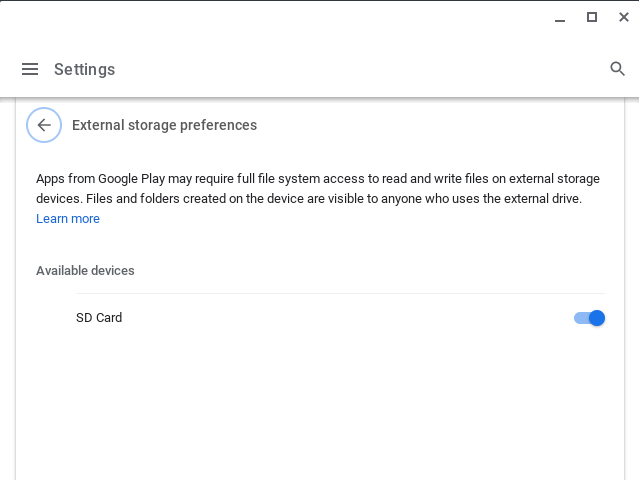
I am trying to get Plex to save content to an SD card on a Chromebook. I have followed the instructions I’ve found online and have enabled full file system access in the system settings (Device, Storage Management, External Storage Preferences), I have also gone into the specific app permissions for Plex and enabled ‘SD Card’.
Within the Plex app when I try and select the External storage location I get the following error:
Location not vaild - The specified location is not writeable and therefore not suitable for Sync
I have tried with both plain Sync, and enabling Downloads.
When browsing the SD card, I can see that the app has been able to create the necessary folder: Android\data\com.plexapp.android so it seems to me that it’s able to write to the drive?
This is working fine for both the Netflix app, and Prime Video.
Just got pointed to this thread. I have not seen that issue. Can you reproduce the error message, wait about 30s to make sure the info gets logged and then grab the android logs and post them here for me to review.
Hi, thank you for your response. Here are some screenshots and requested logs. I have tested this on three different Chromebooks (2 Asus & 1 HP) and all have the exact same behaviour.
Come to think of it, the way Android apps run on a Chromebook, I don’t know if they have access to the SD card.
This must be allowed at the system level. If you look at the screenshots above ‘External Storage Preferences’ if this setting was not enabled when you opened the Plex app it would show 0.0 GB free (the results of the first call).
Attached a screenshot of the contents of the Prime Video directory on the SD card showing a program downloaded to it.
They have the exact same version number as the ones installed on my Pixel so I’m pretty sure they are the Android apps.
It’s strange that the app is making two different calls to the storage and getting different results. You can see that just prior to erroring out, the app is reporting the correct amount of available storage on the SD card.
I can see now that you’ve quoted parts of the log file from back in July when this was posted. However, I was actively troubleshooting at that time and so it’s very likely I was toggling access on and off.
Here is the relevant part of the log-file from when the error was reproduced on Saturday per your request. There is no trace of the 0.0 GB free in the log file.
08-07 15:14:44.353 i: [FileSystemUtil] Found 2 external files dirs:
08-07 15:14:44.354 i: [FileSystemUtil] /storage/emulated/0/Android/data/com.plexapp.android/files
08-07 15:14:44.355 i: [FileSystemUtil] /storage/86C13BC866683768E0CF8DA91D454601F40EF0C4/Android/data/com.plexapp.android/files
08-07 15:14:44.359 i: [FileSystemUtil] Skipping dir (/storage/emulated/0/Android/data/com.plexapp.android/files) as appears to be emulated.
08-07 15:14:44.364 i: [FileSystemUtil] Adding external files dir: /storage/86C13BC866683768E0CF8DA91D454601F40EF0C4/Android/data/com.plexapp.android/files
08-07 15:14:44.397 i: [Sync] Adding external storage path. Description: External storage (496.9 GB free) | Path: /storage/86C13BC866683768E0CF8DA91D454601F40EF0C4/Android/data/com.plexapp.android/files
…
08-07 15:15:00.601 i: [UserAction] Select automatic storage location for sync: /storage/86C13BC866683768E0CF8DA91D454601F40EF0C4/Android/data/com.plexapp.android/files.
08-07 15:15:00.604 w: [Sync] Couldn’t create dirs for new location /storage/86C13BC866683768E0CF8DA91D454601F40EF0C4/Android/data/com.plexapp.android/files.
08-07 15:15:00.606 i: [Sync] Not using new location because it’s not writeable
I have the exact same issue with my Asus Chromebook.
I followed the same steps than karshalpha, and I’m stuck at the same step, where Plex app can see my sd card and the space, but continues telling me that it can’t write on it.
I’ll add that I tried to format my sd card (128 GB) both in FAT32 and exFAT, and I get the same error message.
Thanks for your help, and I hope you’ll find a fix quickly!
Exact same issue here on an Asus 302 Chromebook. My SD card is enabled in Device Settings and Plex has access in the App settings. It reports external storage is available, and the right empty space, but when I select it I get the “not writeable” message.
Getting the same issue this end. This is both with the Plex standard as well as Beta apps available on the chrome store. The storage is recognised, shows up how much free data is available etc. Just doesn’t recognise write permissions even though they are set, as well as storage enabled via the app info screen.
Bump! Same issue ever since Plex switched from “Sync” to Download! It has write permissions, it creates a whole folder set on the SD card (com.plexapp.android) but still gives the error on the app.
Same problem as everyone else here. I gave the SD Card read/write access in Chromebook settings and then enabled the storage permission for Plex and finally rebooted everything. Still get the same error as OP. Using an ASUS C423N with the latest OS and Plex update and new downloads option.
Would be good to get some sort of official update if possible as it looks like no one at Plex’s side has replied to this for 2 months.