Server Version#: 1.19.1.2645
Player Version#: 4.22.3
Starting today. I am unable to play content on my iPhone while at home on the same network. I created a RAM disk yesterday and it’s working great while watching h.265 encoded movies on my Mac. h.264 plays without issue as well. In the past h.264 played well on my iPhone too. Plex server shows my iPhone connected and accessing content. If it’s h.265 encoded the RAM disk fills with transcoded files but nothing makes it to the iPhone. It just spins and spins. These are the errors I am seeing in the log. There are many more of the same as it attempts to transcode and stream. Not sure what is going on. I recently made some changes to my network but the devices are seeing each other. The RAM disk disappeared after restarting today but I named the new RAM disk differently than the last in case it cached the name somewhere. What is odd is that h.264 doesn’t need to be transcoded so it’s not a transcoding issue. 720p does play.
ClientProfileExtra: video transcode target already exists for streaming hls
Network Service: Abandoning browse socket, it was closed.
Network Service: Error in browser handle read: 89 (Operation canceled) socket=-1
Got a request to stop a transcode session without a session GUID (or with an invalid one).
I tested another iOS device, a shared user’s device, and the media plays perfectly. What could be causing the issue with my iOS device? I am the owner of the server and logged in as the owner.
I thought there might be an issue with trusted devices so deleted all of them last night including the server, that hasn’t solved this.
In trusted devices.
Why would I have Safari listed twice with different versions? I have installed the latest version of Plex. Downloaded it directly and it’s showing as 4.22.3. I have no idea where 4.31.2 is coming from.


The first is your web browser accessing your Plex server with the local IP address thus, using the local web client bundled with PMS.
The second is your web browser accessing your Plex server via plex.tv (https://app.plex.tv/desktop), thus using the hosted web client which the latest web client available.
Thanks for that information. Is there something I can do about not being able to view on my iPhone? It makes the initial connection but nothing happens and then an error that the media couldn’t be played. It seems there is a stale settings file somewhere that needs to be removed but I have no clue where.
The issue on my device appears to be a preference related. I can’t turn off “Auto Play” without it being turned back on again. When the video starts playing Plex doesn’t attempt to adjust settings so it can play, or give a warning to adjust playback settings so that it can play. It just says, “Something went wrong playing your media. Please Try again.”
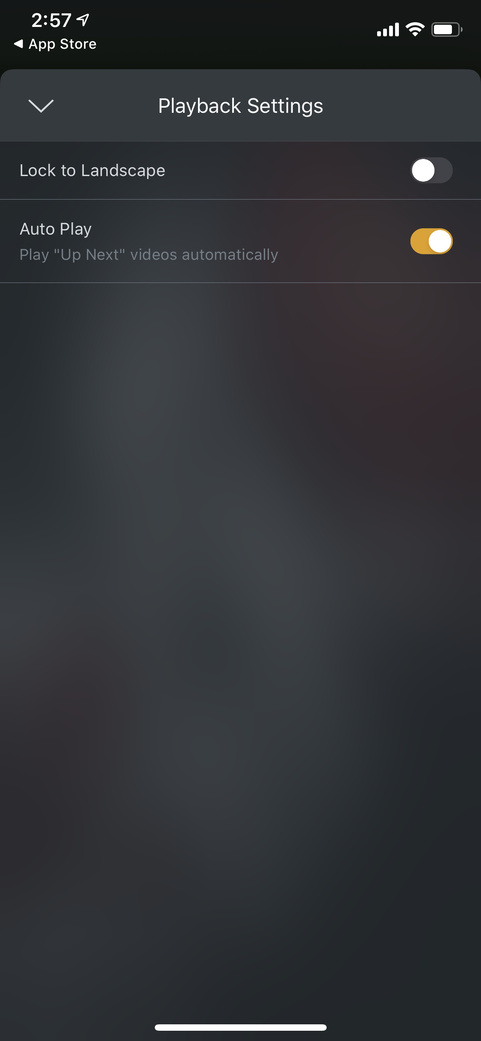
Settings for video playback won’t stay put and sometimes don’t show at all. Consequently, when I try to play a file that needs to be transcoded the transcoding happens on the server, but the file won’t play on the device.
These are standard 1080p files which should play without issue.
If I tried to access the playback settings too early or too late payback options weren’t available…
I only see “Lock to Landscape” and “Auto Play” settings:
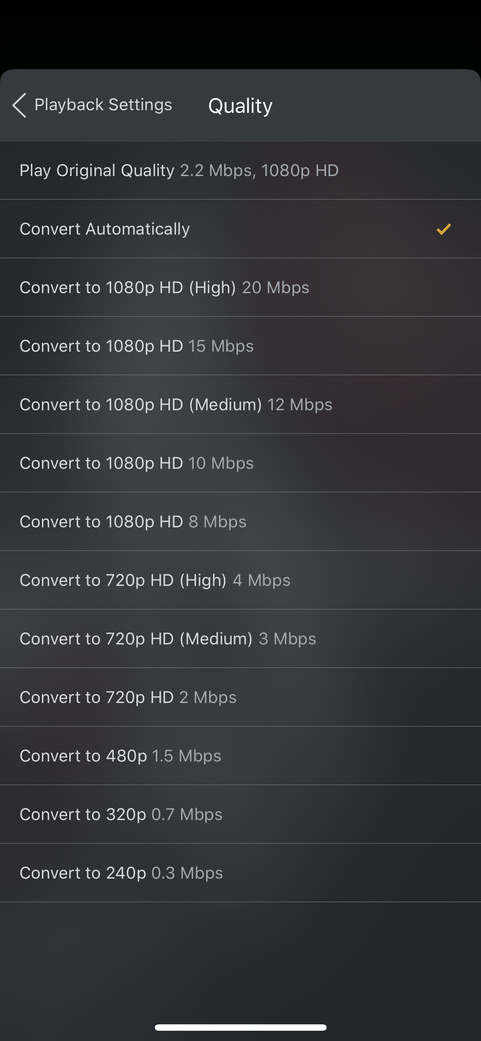
Compared to how it’s supposed to appear:
When I attempt to play a video the progress icon pops up then disappears two or three times before the OnDeck screen is shown where it shows I played the video (which it didn’t). If I try to click on that video I get a playback error. If I am lucky enough to click on “Playback Settings” before the progress icon disappears and the warning is displayed I can make changes in Playback settings so the video will play. (I opened playback settings turned off “auto play” and set the playback to “Convert Automatically” and the video played perfectly.)
Whatever changed between the previous version 6.9/6.10 and 6.10.1 with iOS version checking needs to be looked at. Possibly device and iOS version checking?
iOS 13.4.1
iPhone XS
MT9A2LL/A
Here is a screen recording of the interface issue.
What’s happening in the screen recording is I am trying to use the ellipses to select playback options after the movie fails to play at 00:30. Then again at 00:40 to show it’s not a one time issue. I try to play the video again at 00:46 it fails and shows me the recently played screen at 00:49 I try to refresh and play again and it fails. This time while it’s attempting to play I quickly hit the ellipses to select playback options and finally get the correct screen at 00:59. I select quality, convert automatically and in playback settings it still says “Original (2.2 Mbps, 1080p HD)”. The movie starts playing
Is this a bug? Should I report this somewhere else?
Playback issue on iPhone Xs
Looking at the console with the iPhone connected gives some errors that don’t look good.
PlexMobile (UIKitCore)
Subsystem: com.apple.UIKit Category: LayoutConstraints
Unable to simultaneously satisfy constraints.
	Probably at least one of the constraints in the following list is one you don't want.
	Try this:
		(1) look at each constraint and try to figure out which you don't expect;
		(2) find the code that added the unwanted constraint or constraints and fix it.
(
    "<NSLayoutConstraint:0x2838277f0 UIView:0x10784c160.height == 10   (active)>",
    "<NSLayoutConstraint:0x283825270 V:|-(0)-[UIStackView:0x10784c2d0]   (active, names: '|':PMPlexOverview:0x10784a5e0 )>",
    "<NSLayoutConstraint:0x2838240a0 UIStackView:0x10784c2d0.bottom == PMPlexOverview:0x10784a5e0.bottom   (active)>",
    "<NSLayoutConstraint:0x283b24780 PMPlexOverview:0x10784a5e0.height == 0   (active)>",
    "<NSLayoutConstraint:0x283812da0 'UISV-canvas-connection' UIStackView:0x10784c2d0.top == PMPlexTextView:0x108031200.top   (active)>",
    "<NSLayoutConstraint:0x283812d00 'UISV-canvas-connection' V:[UIView:0x10784c160]-(0)-|   (active, names: '|':UIStackView:0x10784c2d0 )>",
    "<NSLayoutConstraint:0x283811400 'UISV-spacing' V:[PMPlexTextView:0x108031200]-(0)-[UIView:0x10784c160]   (active)>"
)

Will attempt to recover by breaking constraint
<NSLayoutConstraint:0x2838277f0 UIView:0x10784c160.height == 10   (active)>

Make a symbolic breakpoint at UIViewAlertForUnsatisfiableConstraints to catch this in the debugger.
The methods in the UIConstraintBasedLayoutDebugging category on UIView listed in <UIKitCore/UIView.h> may also be helpful.
2020/05/01 13:10:28.199 (108 MB) (4343742) ⚠️ PMKAVVideoPlayer.m:910 | currentOffsetForStreamType: is not implemented in PMKAVVideoPlayer
2020/05/01 13:10:28.288 (110 MB) (4343742) ❌ AVPlayer+PMKAdditions.m:253 | Different number of tracks in player item ((
    "<AVPlayerItemTrack: 0x281a6eff0, assetTrack = <AVAssetTrack: 0x281a3e700, trackID = 1, mediaType = vide>>"
)) and asset ((
))
PlexMobile
2020/05/01 13:10:28.289 (110 MB) (4343742) ❌ PMKAVVideoPlayer.m:211 | Unexpected problem loading tracks in player item <PMKAVPlayerItem: 0x2816a0960, asset = <AVURLAsset: 0x281fcf5a0, URL = https://192-168-1-191.8ff10971feb04eac87d4aa0fa26725d3.plex.direct:32400/video/:/transcode/universal/start.m3u8?audioBoost=100&autoAdjustQuality=1&directPlay=0&directStream=1&directStreamAudio=1&fastSeek=1&includeCodecs=1&location=lan&mediaBufferSize=40000&offset=2912&partIndex=0&path=%2Flibrary%2Fmetadata%2F1005&protocol=hls&session=07AF2E23-5C7D-4165-97F9-53C3042EF0C6&subtitleSize=100&videoQuality=100&videoResolution=3840x2160&X-Plex-Client-Identifier=9E3D3BAF-8145-4CC4-844F-F3242154ABC5&X-Plex-Client-Platform=iOS&X-Plex-Device=iPhone&X-Plex-Device-Screen-Density=3&X-Plex-Device-Screen-Resolution=1125x2436&X-Plex-Device-Vendor=Apple&X-Plex-Drm=fairplay%3Avideo&X-Plex-Http-Pipeline=infinite&X-Plex-Model=11%2C2&X-Plex-Platform=iOS&X-Plex-Platform-Version=13.4.1&X-Plex-Product=Plex%20for%20iOS&X-Plex-Provides=cli<…>