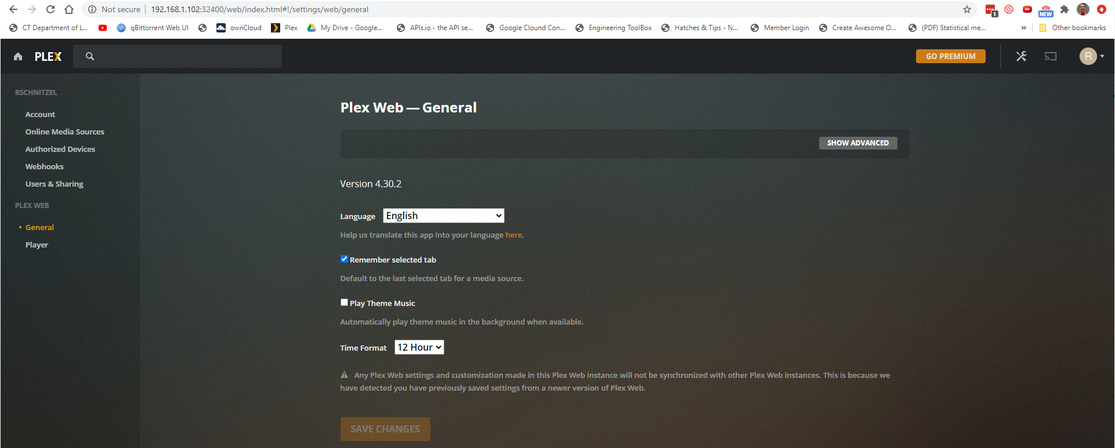
Can't access plex server even on local URL

Server Version#:
Player Version#:

My logs are attached but here is the ufw status for my server:
22/tcp ALLOW IN Anywhere
32400/tcp (plexmediaserver-all) ALLOW IN Anywhere
3005/tcp (plexmediaserver-all) ALLOW IN Anywhere
5353/udp (plexmediaserver-all) ALLOW IN Anywhere
8324/tcp (plexmediaserver-all) ALLOW IN Anywhere
32410:32414/udp (plexmediaserver-all) ALLOW IN Anywhere
1900/udp (plexmediaserver-all) ALLOW IN Anywhere
32469/tcp (plexmediaserver-all) ALLOW IN Anywhere
80,443/tcp (Apache Full) ALLOW IN Anywhere
36660/tcp ALLOW IN Anywhere
4242/tcp (CrashPlan) ALLOW IN Anywhere
8080,35474/tcp (qbittorrent) ALLOW IN Anywhere
22/tcp (v6) ALLOW IN Anywhere (v6)
32400/tcp (plexmediaserver-all (v6)) ALLOW IN Anywhere (v6)
3005/tcp (plexmediaserver-all (v6)) ALLOW IN Anywhere (v6)
5353/udp (plexmediaserver-all (v6)) ALLOW IN Anywhere (v6)
8324/tcp (plexmediaserver-all (v6)) ALLOW IN Anywhere (v6)
32410:32414/udp (plexmediaserver-all (v6)) ALLOW IN Anywhere (v6)
1900/udp (plexmediaserver-all (v6)) ALLOW IN Anywhere (v6)
32469/tcp (plexmediaserver-all (v6)) ALLOW IN Anywhere (v6)
80,443/tcp (Apache Full (v6)) ALLOW IN Anywhere (v6)
36660/tcp (v6) ALLOW IN Anywhere (v6)
4242/tcp (CrashPlan (v6)) ALLOW IN Anywhere (v6)
8080,35474/tcp (qbittorrent (v6)) ALLOW IN Anywhere (v6)

8080/tcp ALLOW OUT Anywhere
8080/tcp (v6) ALLOW OUT Anywhere (v6)

Everything is active and running but I can’t see my server even when using the local connection url.

Please help.

Plex Media Server.log (316.2 KB)

which interface do you have selected as your primary in the server’s network settings.

there seems to be lots of interface change notifications in log.

Jul 27, 2020 22:54:09.239 [0x7fc1786f0100] DEBUG - Detected primary interface: 10.8.1.9
Jul 27, 2020 22:54:09.239 [0x7fc1786f0100] DEBUG - Network interfaces:
Jul 27, 2020 22:54:09.239 [0x7fc1786f0100] DEBUG -  * 1 lo (127.0.0.1) (loopback: 1)
Jul 27, 2020 22:54:09.239 [0x7fc1786f0100] DEBUG -  * 2 enp4s0 (192.168.1.102) (loopback: 0)
Jul 27, 2020 22:54:09.239 [0x7fc1786f0100] DEBUG -  * 1 lo (::1) (loopback: 1)
Jul 27, 2020 22:54:09.239 [0x7fc1786f0100] DEBUG -  * 2 enp4s0 (fe80::7285:c2ff:fe56:cf41%enp4s0) (loopback: 0)```

I’m using /etc/netplan for network settings. Here is the file print out:

network:
ethernets:
enp4s0:
dhcp4: no
addresses: [192.168.1.102/24]
gateway4: 192.168.1.1
nameservers:
addresses: [8.8.8.8,8.8.4.4]
version: 2

I’m running Owncloud and QBittorrent from the server both with remote connection and they have not had any issues.

Sorry I meant what do you have selected here? Try changing it to your 192.168.1.102 if not already.

I can’t see that. My server doesn’t show up at all.

If I may be of some assistance?

  1. Why are you using netplan ?
  2. Why not set the host manually and forget it ? Doing so is a one-time event.
  3. What was changed on the host? (Logs are not VERBOSE by default so it must have worked at some point)

The logs show the network going up and down (like a Yo-Yo). This is bad. PMS won’t work / respond when the network is changing even if nothing changed.

  1. Netplan wasn’t a specific choice. I’m running Ubuntu Server 20.04. It uses netplan by default. I am open to alternatives.
  2. I didn’t think anything had changed on the host. It was working great a week ago and then it disappeared. Before I wiped the install and started fresh I figured I would try and trouble shoot what was going on.

I also have 20.04.1

No “Netplan” specific use. I do use the Gnome NetworkManger. If it’s making the transfer underneath, fine.

[chuck@lizum netplan.513]$ ls
01-network-manager-all.yaml
[chuck@lizum netplan.514]$ cat 01-network-manager-all.yaml 
# Let NetworkManager manage all devices on this system
network:
  version: 2
  renderer: NetworkManager
[chuck@lizum netplan.515]$ 

Setting up the hostname and setting its IP in /etc/hosts will achieve the same thing.

But, before even diving into all that,

What happens if you

  1. Sign out of Plex/web (upper right corner avatar)
  2. Open Plex via the loopback (which is recommended when you are seated at the host - or SSH tunneling into it )

What does systemctl status plexmediaserver show?

Can you obtain the tar.gz of the Logs directory ?

Is this a native package, docker, or snap installation?

  1. Loopback address (127.0.0.1:32400) I get a “This site can’t be reached” message. I tried with my firewall off and on and got the same message
  2. “systemctl status plexmediaserver” result: plexmediaserver.service - Plex Media Server
    Loaded: loaded (/lib/systemd/system/plexmediaserver.service; enabled; vendor preset: enabled)
    Active: active (running) since Mon 2020-07-27 22:54:07 UTC; 1 day 14h ago
    Main PID: 4056 (Plex Media Serv)
    Tasks: 43 (limit: 6940)
    Memory: 361.1M
    CGroup: /system.slice/plexmediaserver.service
    ├─4056 /usr/lib/plexmediaserver/Plex Media Server
    ├─4079 Plex Plug-in [com.plexapp.system] /usr/lib/plexmediaserver/Resources/Plug-ins-69560ce1e/Framework.bundle/Contents/Resources/Versions/2/Python/bootstrap.py --server-version 1.19.4.2902-69560ce1e /usr/lib/plexmediaserv>
    └─4121 /usr/lib/plexmediaserver/Plex Tuner Service /usr/lib/plexmediaserver/Resources/Tuner/Private /usr/lib/plexmediaserver/Resources/Tuner/Shared 1.19.4.2902-69560ce1e 32600 /waitmutex

Jul 27 22:54:07 berkshiremain systemd[1]: Starting Plex Media Server…
Jul 27 22:54:07 berkshiremain systemd[1]: Started Plex Media Server.
3) This is a native package
4) Full plex logs attached. plexLogs.tar.gz (2.1 MB)

  1. Please turn VERBOSE logging off again. It serves no purpose other than make our lives tougher (too much info) except for specific cases. The default “DEBUG” is more than enough. (Verbose generates about 40 lines of output for every mouse click or data packet – complete waste)

  2. Your network, whether a physical cabling or how it’s configured, is an absolute MESS.

Jul 29, 2020 03:21:32.148 [0x7fc16ffff700] DEBUG - Completed: [192.168.1.14:62817] 401 GET / (2 live) GZIP 0ms 435 bytes
Jul 29, 2020 03:21:52.603 [0x7fc152ffd700] DEBUG - NetworkInterface: received Netlink message len=64, type=RTM_NEWLINK, flags=0x0
Jul 29, 2020 03:21:52.603 [0x7fc152ffd700] DEBUG - NetworkInterface: Netlink information message family=0, type=1, index=3, flags=0x1003, change=0x0
Jul 29, 2020 03:21:52.603 [0x7fc152ffd700] DEBUG - Network change.
Jul 29, 2020 03:21:52.603 [0x7fc152ffd700] DEBUG - NetworkInterface: Notified of network changed (force=0)
Jul 29, 2020 03:21:52.603 [0x7fc152ffd700] DEBUG - Network change notification but nothing changed.

1 minute later, it changes again.

Jul 29, 2020 03:22:34.148 [0x7fc16ffff700] DEBUG - Completed: [192.168.1.14:62838] 401 GET / (2 live) GZIP 0ms 435 bytes
Jul 29, 2020 03:22:57.847 [0x7fc152ffd700] DEBUG - NetworkInterface: received Netlink message len=64, type=RTM_NEWLINK, flags=0x0
Jul 29, 2020 03:22:57.847 [0x7fc152ffd700] DEBUG - NetworkInterface: Netlink information message family=0, type=1, index=3, flags=0x1003, change=0x0
Jul 29, 2020 03:22:57.847 [0x7fc152ffd700] DEBUG - Network change.
Jul 29, 2020 03:22:57.847 [0x7fc152ffd700] DEBUG - NetworkInterface: Notified of network changed (force=0)
Jul 29, 2020 03:22:57.848 [0x7fc152ffd700] DEBUG - Network change notification but nothing changed.
Jul 29, 2020 03:23:05.161 [0x7fc16ffff700] DEBUG - Request: [192.168.1.14:62849 (Subnet)] GET /media/providers (3 live) 

And again

Jul 29, 2020 03:25:01.473 [0x7fc152ffd700] DEBUG - NetworkInterface: received Netlink message len=64, type=RTM_NEWLINK, flags=0x0
Jul 29, 2020 03:25:01.473 [0x7fc152ffd700] DEBUG - NetworkInterface: Netlink information message family=0, type=1, index=3, flags=0x1003, change=0x0
Jul 29, 2020 03:25:01.473 [0x7fc152ffd700] DEBUG - Network change.
Jul 29, 2020 03:25:01.473 [0x7fc152ffd700] DEBUG - NetworkInterface: Notified of network changed (force=0)
Jul 29, 2020 03:25:01.474 [0x7fc152ffd700] DEBUG - Network change notification but nothing changed.
Jul 29, 2020 03:25:08.470 [0x7fc14eff5700] DEBUG - HTTP requesting GET https://plex.tv/api/v2/features?X-Plex-Token=xxxxxxxxxxxxxx

Plex cannnot and will not operate this way because , from its perspective, the network adapters are changing. Every time the adapters change, it must

  1. Stop what its doing
  2. Reset / restart all the network sockets (ports to talk to it)
  3. Setup again to listen
  4. Restart internal tasks.

This is a configuration error either

  1. In your Linux itself (( I assert you do not need direct manipulation through netplan – you’re overthinking it ))
  2. You have DHCP and the DHCP server is refreshing the lease every 60 seconds.

This topic was automatically closed 90 days after the last reply. New replies are no longer allowed.