Ubuntu Server 20.04 - Plex bound to loopback, "server" configuration not in settings

Server Version#:1.19.5.3112
Player Version#: 4.34.3 (I guess?)
Logs:
plex-server-log.log (47.7 KB)
plex-web-client.log (82.4 KB)

Hello,

I just installed the Plex Media Server on a fresh Ubuntu Server 20.04 VM (no X11). I attempted to access the server from the local network, however that was not possible since Plex bound to the loopback address and not to 0.0.0.0 which as per this post should be the default. It also didn’t bind to the default port and instead to 32401.

tcp 0 0 127.0.0.1:32401 0.0.0.0:* LISTEN 4093/Plex Media Ser
tcp 0 0 127.0.0.1:32600 0.0.0.0:* LISTEN 4171/Plex Tuner Ser
tcp 0 0 127.0.0.1:40709 0.0.0.0:* LISTEN 4200/Plex Plug-in [
tcp 0 0 127.0.0.1:39373 0.0.0.0:* LISTEN 4126/Plex Plug-in [

I attempted to ssh tunnel port 32401 and managed to connect to the server, but after logging in no server configuration was available in the settings. The installation article states ssh tunneling should allow for server configuration.

Any and all help would be greatly appreciated.

Your logs look pretty normal, for an unclaimed server. The web server thinks it’s listening on both 32400 and 32401, which is normal:

Aug 09, 2020 21:21:36.687 [0x7f756ee79180] DEBUG - HttpServer: Listening on IPv6 as well as IPv4.
Aug 09, 2020 21:21:36.687 [0x7f756ee79180] DEBUG - HttpServer: Listening on port 32400.
Aug 09, 2020 21:21:36.687 [0x7f756ee79180] DEBUG - HttpServer: Listening on port 32401

It also determines that your primary interface should be the “physical” one:

Aug 09, 2020 21:21:39.671 [0x7f756ee79180] DEBUG - Detected primary interface: 10.0.1.2
Aug 09, 2020 21:21:39.671 [0x7f756ee79180] DEBUG - Network interfaces:
Aug 09, 2020 21:21:39.671 [0x7f756ee79180] DEBUG -  * 1 lo (127.0.0.1) (loopback: 1)
Aug 09, 2020 21:21:39.671 [0x7f756ee79180] DEBUG -  * 2 ens160 (10.0.1.2) (loopback: 0)
Aug 09, 2020 21:21:39.671 [0x7f756ee79180] DEBUG -  * 1 lo (::1) (loopback: 1)
Aug 09, 2020 21:21:39.671 [0x7f756ee79180] DEBUG -  * 2 ens160 (fe80::20c:29ff:fe6a:e68%ens160) (loopback: 0)

There is however a problem with it being able to resolve its local *.plex.direct address:

Network: 10-0-1-2.abcdefghijklmnopqrstuvwxyz012345.plex.direct failed to resolve to 10.0.1.2 but instead yielded "84.x.x.x"

This indicates a potential DNS rebinding issue. It likely wouldn’t cause the problem you’re experiencing currently, but could cause problems later with clients attempting to access the server securely. Your router may have an option to disable DNS rebinding protection, or carve out exceptions for known domains; if so, exclude *.plex.direct.

Having said that, can you describe your network topology? Is the server on the same logical network as the system on which you’re running the web client? The server appears to be on a 10.0.1.0 network. If not, the initial configuration needs to be performed via an SSH tunnel proxy. See the “On a Different Network” section of the installation document:

In short, you’d run something like the following on the client system:
ssh ip.address.of.server -L 8888:localhost:32400

And then access http://localhost:8888/web to claim/configure the server. After that, you should be able to access the server by its IP address.

And for what it’s worth, netstat -tupnl | grep -i plex doesn’t show a binding for 0.0.0.0:32400 even on a complete functional system. Here’s the full output of that command on my system:

tcp        0      0 127.0.0.1:37865         0.0.0.0:*               LISTEN      568682/Plex Plug-in 
tcp        0      0 127.0.0.1:32401         0.0.0.0:*               LISTEN      568651/Plex Media S 
tcp        0      0 127.0.0.1:32600         0.0.0.0:*               LISTEN      568733/Plex Tuner S 
tcp        0      0 127.0.0.1:32893         0.0.0.0:*               LISTEN      568758/Plex Plug-in 
tcp6       0      0 :::32400                :::*                    LISTEN      568651/Plex Media S 
udp        0      0 0.0.0.0:32410           0.0.0.0:*                           568651/Plex Media S 
udp        0      0 0.0.0.0:32412           0.0.0.0:*                           568651/Plex Media S 
udp        0      0 0.0.0.0:32413           0.0.0.0:*                           568651/Plex Media S 
udp        0      0 0.0.0.0:32414           0.0.0.0:*                           568651/Plex Media S 
udp        0      0 0.0.0.0:1901            0.0.0.0:*                           568651/Plex Media S 
udp        0      0 127.0.0.1:41051         0.0.0.0:*                           568651/Plex Media S 
udp        0      0 192.168.0.248:39140     0.0.0.0:*                           568651/Plex Media S 
udp        0      0 192.168.0.248:35457     0.0.0.0:*                           568651/Plex Media S 
udp        0      0 192.168.0.248:40125     0.0.0.0:*                           568651/Plex Media S 
udp        0      0 127.0.0.1:36249         0.0.0.0:*                           568651/Plex Media S
1 Like

May I be of help?

May I see a set of DEBUG log files (DEBUG mode on, VERBOSE mode off)
which were collected about 2 minutes after restarting PMS?

If PMS was running, give it 60 seconds to close all network connections after stopping it.

TL; DR - , Stop - wait 60 - Start - wait 2 minutes - Download Logs - Attach ZIP file here.

1 Like

Thank you for this extensive response. The server is assigned a static DHCP mapping of 10.0.1.2/16 GW 10.0.0.1. My PC is on 10.0.3.2/16. As I’ve mentioned in the OP I did attempt to SSH tunnel to no avail (I had to tunnel port 32401, since on 32400 there was just an XML file with directories). The web client loads and I’m able to log in, but there’s no server related configuration there. I’ve turned on debugging and spotted some errors, but couldn’t make sense of them. All post found on this forum related to those errors are after the initial configuration. I attached the Web Client debug logs.

I’ve attached both server and web client logs in the OP, the server service was stopped then started back up and a single connection attempt was made.

@RouNdeL

please:

  1. restart Plex
  2. let it run 2 minutes
  3. Settings - Server - Troubleshooting - Download Logs
  4. Attach the full ZIP please in a fresh post. (do not edit a previous post)

Please do attach the full ZIP logs this time.

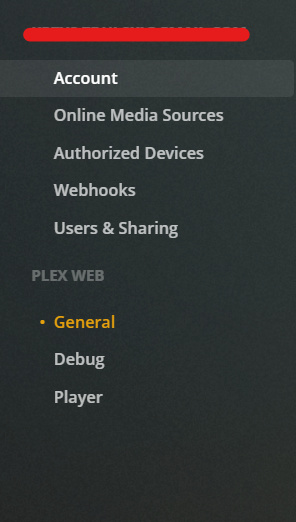
Well, that’s the issue though. The server settings page is missing when I connect to the web client through the SSH Tunnel so I got the logs that I could from the Logs directory and client Debug section.

image

Terminal window →

sudo tar cfz /tmp/PlexLogs.tar.gz   "/var/lib/plexmediaserver/Library/Application Support/Plex Media Server/Logs"

The GZ file will be in /tmp.
Please include it.

fresh Ubuntu Server 20.04 VM

Which Hypervisor is in use?
Is networking configured as NAT, Host/Peer, or other Bridge.

Logs: PlexLogs.tar.gz (72.6 KB)

The Hypervisor is ESXi 6.5. Ubuntu is on a vSwitch with DHCP from pfSense VM, I have connected straight through a physical interface which is set up on the same vSwitch.
Subnet - 10.0.0.0
Subnet Mask - 255.255.0.0
ip a on both machines confirms those settings.

A few things are happening.

  1. The VSwitch configuration is reflecting back the WAN IP instead of the LAN IP
  2. PfSense does not know how to resolve plex.direct and is, correctly, prohibiting the LAN/domain rebinding overlay. You need to grant this exception
  3. What is the default routing table? ( netstat -r ) Is your 10.x.x.x address set as the default route? It doesn’t appear to be.

Thanks for the analysis.
What exactly does 1. mean, do I need to change some settings? I’ve set up the switches as described in the pfSense guide. I’ve added the exception to the DNS Resolver, but it does not seem to have fixed the issue. Here’s the routing table:

Destination     Gateway         Genmask         Flags   MSS Window  irtt Iface
default         10.0.0.1        0.0.0.0         UG        0 0          0 ens160
10.0.0.0        0.0.0.0         255.255.0.0     U         0 0          0 ens160
10.0.0.1        0.0.0.0         255.255.255.255 UH        0 0          0 ens160

Your adapters being found are:

Aug 09, 2020 22:31:20.302 [0x7fcb3f549180] DEBUG - Network interfaces:
Aug 09, 2020 22:31:20.302 [0x7fcb3f549180] DEBUG -  * 1 lo (127.0.0.1) (loopback: 1)
Aug 09, 2020 22:31:20.302 [0x7fcb3f549180] DEBUG -  * 2 ens160 (10.0.1.2) (loopback: 0)
Aug 09, 2020 22:31:20.302 [0x7fcb3f549180] DEBUG -  * 1 lo (::1) (loopback: 1)
Aug 09, 2020 22:31:20.302 [0x7fcb3f549180] DEBUG -  * 2 ens160 (fe80::20c:29ff:fe6a:e68%ens160) (loopback: 0)
Aug 09, 2020 22:31:20.302 [0x7fcb3f549180] DEBUG - Creating NetworkServices singleton.

Do you explicitly need the singleton 0.0.0.0 - UH route? I have no such route.

[chuck@lizum ~.4]$ netstat -rn
Kernel IP routing table
Destination     Gateway         Genmask         Flags   MSS Window  irtt Iface
0.0.0.0         192.168.0.1     0.0.0.0         UG        0 0          0 enp12s0
10.0.3.0        0.0.0.0         255.255.255.0   U         0 0          0 lxcbr0
169.254.0.0     0.0.0.0         255.255.0.0     U         0 0          0 enp12s0
192.168.0.0     0.0.0.0         255.255.255.0   U         0 0          0 enp12s0

After adding the private domain in PfSense, a PMS restart will be needed.

To be honest, I’m not an expert in networking and this network is my attempt to learn it. I’ve not added the 0.0.0.0 -UH route manually, neither have I messed with any of the routing in pfSense. The rules were picked up automatically. I did restart PMS after adding the private-domain option and even rebooted, but that did not help. I confirmed the DNS configuration by attempting to nslookup 10-0-1-2.abcdefghijklmnopqrstuvwxyz012345.plex.direct, which correctly yielded 10.0.1.2. I can now access the server from the local network, but the server settings are still missing both on local and ssh tunel.

Seeing the plex.direct domain resolved now is a step forward.

As for the rest (the VM), I think the host config itself is (forgive me) “botched”.

What is the netmask of the LAN as defined at the pfSense (or ISP modem/router) – whichever is the true edge device?

“Botched” is certainly the right way to put it. The VM network - pfSense LAN interface is static IPv4 10.0.0.1/16 and pfSence WAN is 192.168.1.30/24 which is my LAN with APs etc.

Is it possible for you to stand up another VM, as a true peer on the LAN, free and clear of the Vswitch?

I am suggesting to start simple.
After everything works, integrate it into the vswitch.

Doing to will give you a place to fall back to which is a known stable base.

The VM’s up. DHCP 192.168.1.151/24. Only port 32400 is available from LAN, but returns an XML with MediaContainer root. When tunneling port 32400 the web client loads correctly with server setup. On the original VM when tunneling 32400 the same XML pops up. Tunneling 32401 loads the web client without server setup on both VMs.

You should only ever open IP.addr.of.host:32400/web
It’s also the only port which requires forwarding from the edge device to enable remote access.

The other ports (32401, for example) are internally used ports.

This might be of help.

Understood. I came to a conclusion that it’s actually better for the PMS to be on the edge LAN instead of the VM LAN. Thank you very much for all of your help.

What a silly mistake, the XML was on / and I should’ve browsed to /web on port 32400. Everything works even on the VM LAN now.
