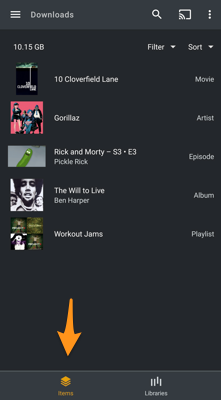
I’ve successfully downloaded movies from my server to my tablet. However, I can’t delete them. This is the same in icon and list view. When I swipe, nothing happens. When I long press I do get options, but they include Play and add to queue. No delete option.
Make sure you’re using theItems tab when accessing you download section. There you can delete those download jobs.
The Library tab of the download section shows individual media items for playback. However those don’t have to be the same as the download jobs (e.g. episodes for playback when you downloaded a season → download item = season; only that can be deleted… hence the Items tab)
Thank you for the response. In my first post, I said I was using the List View. Is that what you mean by “tab”? These are movies, not tv shows. When I follow the above steps on my ipad, no problem, the entire title “slides” when I swipe and I see a delete option. On the Samsung tablet, nothing slides, and the behavior is as described above. No delete option.
No. You should see an Items and Library tab at the bottom of the Download section when opening it from the sidebar.