Server Version#:
Player Version#:
All of a sudden I can’t log into the server on my LG TV. Been using it for months and now it tells me the server is currently unavailable. I can log in on my windows computer so I know it is there, any ideas? I can see the plex free stuff, just not mine.
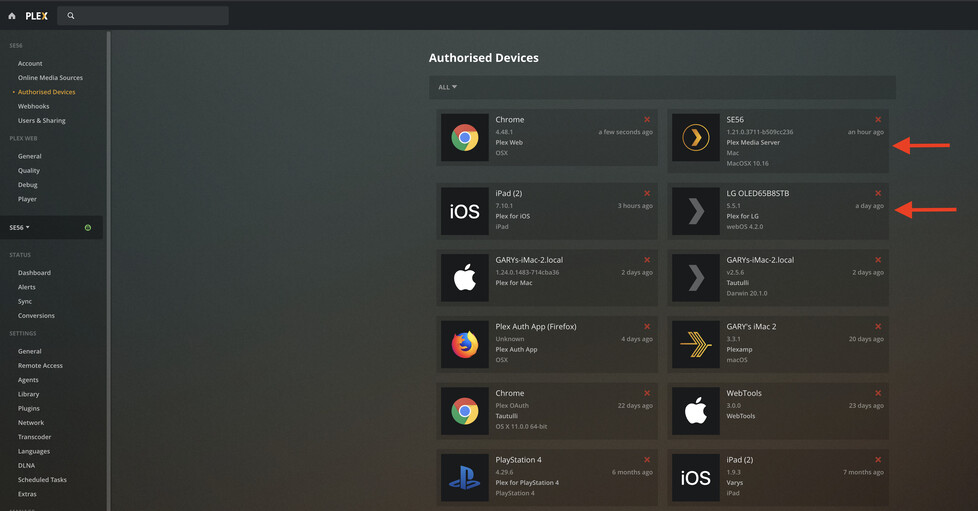
Version 4.48.1
Version 1.21.0.3711
WeOS 05.00.02
Tryed every thing I can think of and no access to the server, just the plex stuff. Strange.
Opened plex on my phone and the same problem, connected to my account but not my server.
Ok, for a start it maybe the case you have LG TV set for no Auto updates. I would suggest doing that first. Then check for updates
Then, as you have said you have WebOS app access, go to settings and add the manual server addresses and port. Now that will be your Windows LAN IP address and port should be 32400.
In advanced settings:
Allow Insecure connections on Local network
Prefer insecure connections on same network
In General settings: enable Auto login
Now in your server/network settings, make sure you have these configured correctly.

With this one add yours

Something really got messed up here. I can’t even open the server to log in, it just hangs on the screen with the plex logo. Even rebooted the system the server runs on and nothing fixed. No idea where to go now.
Have you restarted the server, ok you have. Have you restarted your Router and Tv from the power source
Yes, several times. Deleted and reinstalled plex on the LG couple of times. Signed out and signed by in on my computer and the LG. Everything looks normal except nothing on the server shows up on the LG, just shows the ON PLEX stuff and nothing else. And that shows up whether I’m signed in or not. Some how the server is not connected to my account and that sounds like a problem that cropped up a dozen moths ago. Can’t remember what the fix was then.
Have you signed in and out from Plex Tv web page
Try deleting the server Tile in Authorised devices and sign back in
From a browse use :
app.plex.tv/desktop
Did that and now I don’t have access even on my computer, this is going backwards with everything I try. Guess it time to move on to a different application, this is not the way I want to spend my Sat evenings.
Your last opt ion is to totally uninstall server and start again.
That way you will keep your Pass
I ran the fix server option but have to wait until I can reboot the computer now. Thanks.
Well, rebooted and reclaimed the server and everything is as screwed up as it was before. So I tried plex on my Samsung and my phone again and nothing, no server detection, useless. Something happened overnight last night that screwed things up and there is no obvious fix. How about a notice when you figure this out, would be useful.
Uninstall and start again, so it bad news sorry. Follow the uninstall instructions exactly.
Well, it’s now been about 20 days since this problem first reared it ugly head and it is still a constant problem. Every evening when I go to plex to watch my updated TV shows, the LG TV can not connect to the server. I can see the server on my hosting computer and watch anything I want to on the computer but the LG just keeps trying to connect to the server and reports the exclamation in a triangle indicating it can connect to it. I have tried changing every option in the server that could in any way relate to this problem and the problem continues. Then, after screwing around with the server and restarting the TV a half dozen times and wasting hours of time, all of a sudden it will connect to the server and generally work just find the rest of the evening for no obvious reason, only to encounter the exact same problem the next day. Really get tired of such a repetitive continuing problem with something I paid money for, not sure it is worth the investment any more.
Though I appreciate all the suggested I have received, turns out that this problem, now resolved, was due to the idiot way windows addresses hardware in a computer system. I will post what the problem actually was and the solution just in case this might come up with others, it was the most frustrating problem I have every encountered.
Most computer systems now-a-days come with both a WIFI adapter and a hardwired ethernet adapter installed, and, generally, by default, both are turned on which is were the problem originated. My Dell system had it’s WIFI on running at 433 and it’s ethernet adapter on running at 1000. You would think windows would use the faster connection but, no, it uses the WIFI regardless of what else it sees in the system. Hence the network connection icon in the lower right corner displayed a WIFI symbol and was, in fact, using the WIFI ignoring the faster ethernet connection. Nice. This became apparent when I found two assigned IPs in the router client list for my desktop system with the same device name. This was also the reason why Plex would not find the server, with two connections to the system hosting the Plex server it just ignored both of them. Because it makes a lot more sense to use the faster ethernet adapter I just disabled the WIFI adapter in windows (note the Dell BIOS will not let you disable it there), now the icon on the task bar shows the correct symbol for the ethernet, windows does show the proper symbol there when you figure out what it is actually doing. However, this did not fix the LG finding the server. But it did make it so I could manually put the IP for the Plex server system, only one of which now exists, into Plex on the LG and it immediately pops the server up and has now been working for three days without losing the connection ever. As an aside, I do think there is a problem in Plex with the ANY reference in the network option of Plex server, I have to set that to use ONLY the IP for the ethernet adapter in broadcasting the server, with ANY selected NONE of the TVs in house can find the Plex server, but that situation is above my pay grade. Anyway, problem found and resolved. Thanks to all…
