No worries.
Apparently so, I have DNS Proxy Status as - enabled…
Ouch.
Can you create an exception / rule which allows the plex.direct domain ?
In my pfsense, I define it as a private domain. It overlays my LAN.

This allows glockner-certificate.plex.direct to exist and all the clients to find my server by DNS name.
I have no idea what this means. Can you provide some direction? This is what I see on my router end re DNS

which brand and model please ?
I need to read the documentation when I get home.
Hitron CODA-4680 – thanks I appreciate it!
There is nothing in the modem documentation about rebinding.
The DNS proxy tells the modem server to advertise itself as the DNS server for the LAN. Under normal circumstances, you’ll get the DNS server(s) your ISP provides you.
In your modem, it tells all DHCP clients to send it DNS requests and it will forward (proxy) them.
If this works remotely, when on LTE/etc, but not from the other house on WiFi,
the internet at the other house is the problerm.
You’ll have to track down why it’s not forwarding WiFi traffic OUT to the internet just as normal LTE traffic is.
@ChuckPa – I tried a different router at my remote location and now it works on my TV and phone through the new router, but my laptop still cannot connect. Neither can my ipad. Is there a way for me to determine how this laptop or ipad, even going through the new router, still cannot connect to Plex? Is it possible the app is blocking their signature somehow? Could you check? Or perhaps redo the certificate thing?
Would it be possible to transfer my ‘lifetime’ account to a new account and start anew?
I also tried “DNS rebinding” at my remote router? Didn’t work either…
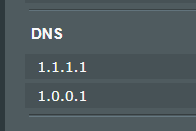
Thanks!
Is your server logged in using a different account?
I look at this email address and there are no servers / user accounts listed at the email address
I thought changing my email would help. It hasn’t. It’s the same email as this profile. The username remains the same (as this forum account).
@ChuckPa – can you delete the non NAS920 server that I accidentally created and then re-do the certification clearing again? I tweaked around my home set up and now my NAS is reconnected to my DECO router. I’m hoping this will fix things.
I see only 1 server, with a Canadian address, on your account “NAS920”,
Certificate cleared. “Generated” certificate ready for you to use.
Please restart the server.
This topic was automatically closed 90 days after the last reply. New replies are no longer allowed.
