Server Version#: 4.66.1
Player Version#: 7.26 (1744)
The server is running on a Windows 10 PC with an Intel i7-4790 CPU @ 3.60 GHz and 16 GB RAM. The server is dedicated to PLEX and sits on two networks (has 2 NICs): 192.168.1.x and 192.168.2.x (the 1.x is my DMZ and the 2.x is my internal network; there is a FW between the internet and the DMZ and a Cisco Security appliance between the DMZ and the internal network).
I have an Apple TV connected to every TV in the house (4 of them). One is connected via ethernet and the remaining three via a Linksys Velop mesh network (TriBand Gigabit). I get 70 Mbps through that network to the Internet - through the Cisco Security Appliance. I am streaming locally and only mention this to suggest the wifi network is robust.
Of these three Apple TV’s on the wifi, one is connected via an ethernet cable directly to a mesh hub (which communicates with the mesh network via wifi), the other two use the Apple TV wifi.
OK, here goes:
The Apple TV connected to the ethernet network directly streams beautifully with PLEX “Home Streaming” set to "Maximum
The Apple TV connected to a wifi mesh hub via ethernet will only stream with PLEX “Home Streaming” set to 8 Mbps (or less)
The two Apple TVs connected via wifi will only stream with PLEX “HomeStreaming” set to 4 Mbps (or less) - so I can’t stream 1080p
This makes no sense to me because all four Apple TVs stream 1080p via other apps (Apple Movies, Netflix, Prime, etc.) from the internet without issues.
Needless to say, I want to stream my 1080p media locally at 1080p. I have experimented with the PLEX server network settings to no avail. I have set the PLEX server “LAN Networks” to “192.168.1.0/255.255.255.0, 192.168.2.0/255.255.255.0” and “List of IP addresses and networks that are allowed without auth” to “192.168.2.0/255.255.255.0, 192.168.1.0/255.255.255.0”.
Thanks! I removed the 1.x entry, actually. I’m not sure what I was thinking, but I have no reason to stream in my DMZ and any outside traffic wouldn’t be local, in any case.
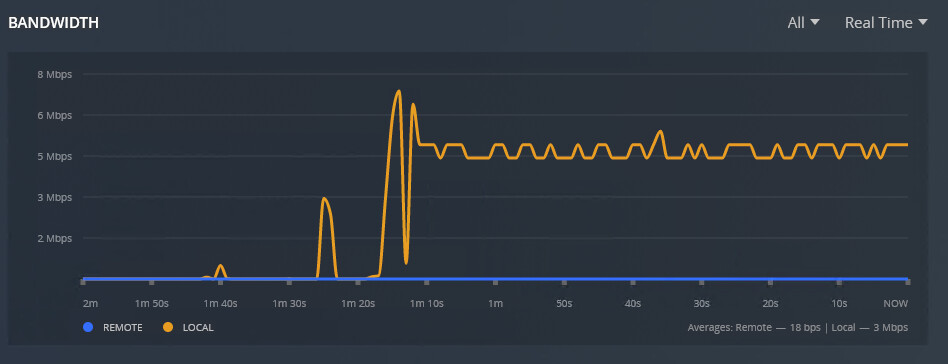
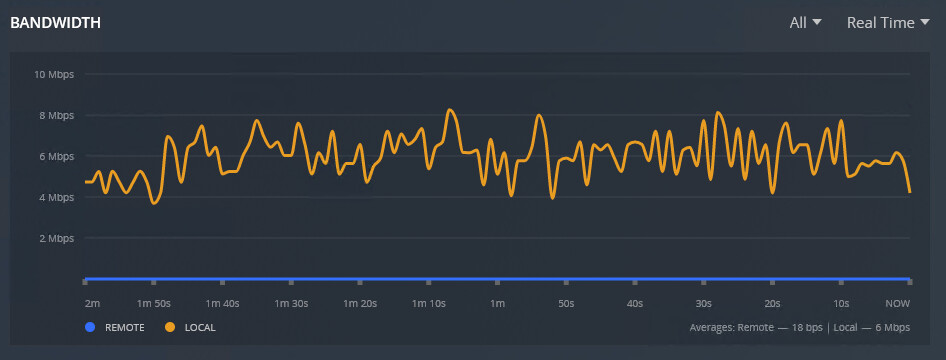
I set the “Home Streaming” value to 20 Mbps. It takes a long time to load (sometimes minutes) and pauses constantly as it plays back - not occasional, but constant and often for long periods - more than a few seconds.
As for the dashboard, the first picture is the bandwidth while the video loads, the second during the “stuttering” playback. The average bandwidth is about 5 Mbps. The CPU and RAM aren’t an issue, as the third picture shows.
I noticed the error “Failed to stream media, client probably disconnected” was repeating over and over again in the logs. I resolved this in the client by setting Settings → Advanced → Use Old Video Player to “on”. This eliminated the log errors and videos started to play almost immediately. There was some occasional stuttering, however.
Again in the client, I set Settings → Advanced → Allow Direct Play to “off”. Now everything streams without stuttering.
My thinking was, setting “Allow Direct Play” to “off” would move the processing to the PLEX server, which has plenty of resources available, but I’m not sure how it works or what this setting is intended to do. If anyone can enlighten me, I would be appreciative.
During playback what does the dashboard “Now Playing” show?
Direct Play means the original file is (potentially) sent to the player as-is. No transcoding or remuxing. The player is responsible for parsing and decoding the file in its entirety.
Direct Stream means the encoded video and necessary audio are extracted from the file, repackaged (remuxed), and sent to the player. There’s no transcoding or quality loss.
Remuxing is very easy and has few downsides. This is useful because it addresses compatibility issues, and many files are poorly muxed in the first place.
The “Old” video player is basically what tvOS provides. It can’t play as many formats and doesn’t have some features the newer Plex player has … but it’s also more compatible with other Apple ecosystem features.