Server Version#: HP Pro desktop 400 G1 sff cpu g3220 3.0ghz
Player Version#: Plex 8.1.2.18135
I can’t stream video on my local network at anything above 4Mbps 720p HD to Plex on my Firestick 4k. Though I can stream the same video file at full resolution to the Firestick using VLC.
So same server, same file, same network and same Firestick all work for VLC but not Plex.
I would prefer to use plex to keep video and photo viewing in one place but at the moment Plex isn’t working well enough.
Can someone assist please.
In the Plex app on the Firestick, check the bandwidth settings. Set them all to Original/Maximum.
Play a video.
During playback, what does it show in the Plex Dashboard?
Is the video & audio direct playing, direct streaming, transcoding?
Does it show if the connection is local, remote, or indirect?
Attach a screenshot if possible.
or “indirect”
I didn’t mention indirect because Plex Relay is limited to 1 Mbps / 2 Mbps, and OP mentioned playing at 4 Mbps.
But yeah, I should have mentioned it. Post amended.
1 Like

Hi Here is a screen grab
Hi the connection is local
The connection is local
Thanks for the update.
What is going wrong?
The movie is playing at 7 Mbps.
It is direct playing both the video and audio, so Plex is not transcoding / modifying either stream, just streaming as-is to the FireStick.
I was hoping someone here would be able to tell me.
The network is more than capable of handling 7Mbps as the fact that I can play the same file on VLC perfectly well.
Help me fill in the blanks.
From the screencap you provided, it appears the movie is streaming at 1080p, 7 Mbps. It is direct playing, so Plex Media Server is not adjusting the resolution or bit rate of the video.
It appears everything is working correctly.
What is not working?
- No video?
- No audio?
- Continuous or occasional buffering?
- Is something modifying the video to 720p/4Mbps?
- Movie does not play at all and TV shows continuous spinning orange circle?
- Something else?
I get you’re frustrated, and I’m trying to help. I’m just having a hard time seeing what is not working.
Pull the Plex XML for the movie and attach it to the thread as a .txt file. If media is incompatible with the FireStick it generally transcodes. However, it never hurts to double check.
A couple of generic things to try:
- In Plex client settings, disable refresh rate switching
- In Plex client settings, disable resolution switching
If that does not help
- In Plex client settings, disable the new player & use the old player. Note this resets to the new player when the client is updated and/or restarted.
The above are workarounds. There were issues with them in earlier versions. They should be fixed in the current release.
FWIW, I have the same FireStick as you. I did not change the above settings, and it is playing 10+ Mbps movies without issue.
1 Like
Do also check if the transcoder is disabled - may be the reason for:
No Audio
No Video
No transcoding of a stream that can’t be hammered into the available bandwidth.
(that may be about 4Mbps - a guess)
The problem is that video will take a very long time to start playing, and when it does it keeps pausing every few seconds.
I will give your suggestions a try and see what happens.
Cheers
Hi, I have tried the settings mentioned but they did not work.
I didn’t mention earlier that I was having the same problem on my phone. I wasn’t so concerned, dropping the quality wasn’t an issue on a small screen. However I found that switching off ‘allow direct play’ fixed the problems on the phone. The only issue now is, I can’t find the same setting on the fire stick app.
There is no setting like that on the FireTV (checked myself recently).
We’re on WiFi - I assume.
Do they still send that little Extension Cable with the Sticks?
If so, hook it up. It might help.
A TV may generate a lot of RF up close - to the back.
Got an HDMI port on the side? Try it.
If trying on 5G - switch to 2.4G. 2.4G will go through things a little better - maybe around something better too. Never know. Worth a shot.
Also check interference - like a neighbor on the same WiFi Channel you are.
WiFi Analyzer is a phone app - free - for just about everything - or it was. That makes it easy to see your WiFi environment.
If you don’t have any neighbors - ur probably ok in that regard.
Troubleshooting may be easier if you make sure your transcoder is enabled, turn on Adjust Automatically - and let Plex alter the stream as much as it has to. The bit rate of that stream will pretty much be your available bandwidth from the router to the stick.
You can then try to improve on that.
Some things to try at least.
1 Like
The video plays fine using VLC so it can’t be interference.
Well…
That explains a lot.

The network speed is 866Mbps
Video will play on my phone app via this AP without pausing only if I switch off ‘allow direct play’ in the app settings or drop the quality down to 10Mbps
The access point shows no interference on the 5G band
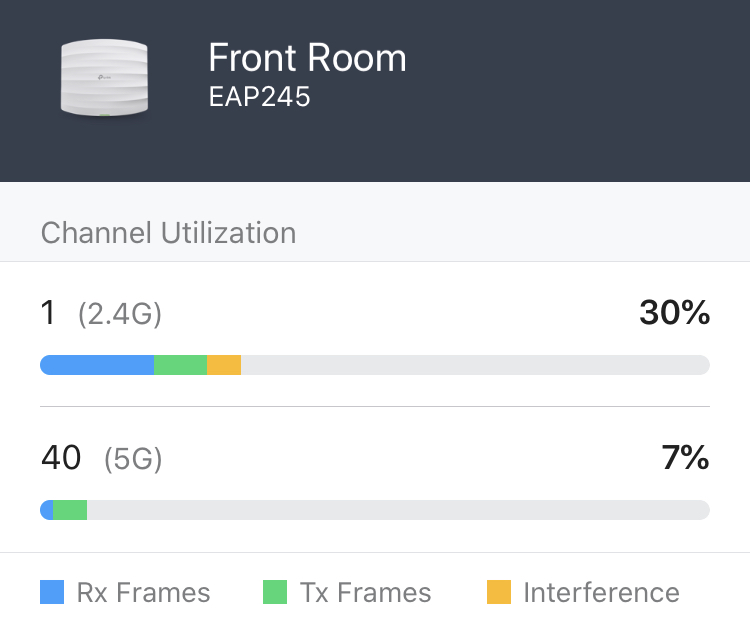
I have tried turning off allow direct play on the server but it has no affect on either the phone or the Firestick. It appears that I have to turn off ‘allow direct play’ on the player app for playback to be full full quality.
Unfortunately the firestick app doesn’t have this option, so I guess I will be using VLC on the firestick.
This topic was automatically closed 90 days after the last reply. New replies are no longer allowed.
