Chrome on Mac does not see Plex server on same subnet

Server Version#:1.24.2.4973-2b1b51db9
Player Version#:
<If providing server logs please do NOT turn on verbose logging, only debug logging should be enabled>

I have a PlexMediaServer running on Ubuntu 22.04. The installation was done by:

sudo apt install plexmediaserver

the serer has been running for months, but I can only see it on one (my Roku) device. I am not trying for the first time in a long time to access it via web on the local subnet. I’ve been ignoring this web problem (and the fact that I cannot see it from iPAD etc.) for months and it’s time to resole all that…

It is not seen by web at http://192.168.1.xxx:32400/web - no server shows there (only Live TV). I see the libraries and so on on the Roku app, also on the same subnet.

The service is running (well, it has to be or Roku wouldn’t see it)… and here is what 'sudo service plexmediaserver status shows:

sudo service plexmediaserver status
● plexmediaserver.service - Plex Media Server
Loaded: loaded (/lib/systemd/system/plexmediaserver.service; enabled; vendor preset: enabled)
Drop-In: /etc/systemd/system/plexmediaserver.service.d
└─override.conf
Active: active (running) since Mon 2023-11-27 11:07:53 EST; 2 days ago
Process: 858 ExecStartPre=/bin/sh -c /usr/bin/test -d “${PLEX_MEDIA_SERVER_APPLICATION_SUPPORT_DIR}” || /bin/mkdir -p “${PLEX_MEDIA_SERVER_APPLICATION_SUPPORT_DIR}” (code=exited, status=0/SUCCESS)
Main PID: 874 (Plex Media Serv)
Tasks: 44 (limit: 28601)
Memory: 267.6M
CGroup: /system.slice/plexmediaserver.service
├─ 874 /usr/lib/plexmediaserver/Plex Media Server
├─1436 Plex Plug-in [com.plexapp.system] /usr/lib/plexmediaserver/Resources/Plug-ins-2b1b51db9/Framework.bundle/Contents/Resources/Versions/2/Python/bootstrap.py --server-version 1.24.2.4973-2b1b51db9 /usr/lib/plexmediaserver/Resources/Plug-ins-2b1b51db9/Sy>
└─3147 /usr/lib/plexmediaserver/Plex Tuner Service /usr/lib/plexmediaserver/Resources/Tuner/Private /usr/lib/plexmediaserver/Resources/Tuner/Shared 1.24.2.4973-2b1b51db9 32600

Nov 27 11:07:53 r2d2 systemd[1]: Starting Plex Media Server…
Nov 27 11:07:53 r2d2 systemd[1]: Started Plex Media Server.
Nov 29 23:31:14 r2d2 systemd[1]: /etc/systemd/system/plexmediaserver.service.d/override.conf:1: Assignment outside of section. Ignoring.
Nov 29 23:31:23 r2d2 systemd[1]: /etc/systemd/system/plexmediaserver.service.d/override.conf:1: Assignment outside of section. Ignoring.

PIDs 874, 1436 and 3147 are listed above. Those look like this:

ps -fp 874,1436,3147
UID PID PPID C STIME TTY TIME CMD
plex 874 1 0 Nov27 ? 00:14:59 /usr/lib/plexmediaserver/Plex Media Server
plex 1436 874 0 Nov27 ? 00:01:00 Plex Plug-in [com.plexapp.system] /usr/lib/plexmediaserver/Resources/Plug-ins-2b1b51db9/Framework.bundle/Contents/Resources/Versions/2/Python/bootstrap.py --server-version 1.24.2.4973-2b1b51db9 /usr/lib/plexmediaserver/
plex 3147 874 0 Nov27 ? 00:02:44 /usr/lib/plexmediaserver/Plex Tuner Service /usr/lib/plexmediaserver/Resources/Tuner/Private /usr/lib/plexmediaserver/Resources/Tuner/Shared 1.24.2.4973-2b1b51db9 32600

I have reviewed dozens of articls about similar issues, mostly they lead me down a primrose path.

The above is what I see at the top right of the browser when I navigate to that :32400 site. I am logged in to my account, the serice is running, I’m on the same subnet, I have literally hundreds of processes that access and share data between and among all my network servers… where can I find a map that will help me understand what might be causing this?

This might be a silly question… are you signed into Plex Web using the same Plex account you’re using with your Plex Media Server?
Your last screenshot shows that PMS is actually running… you’re getting to see the web interface Amat least — if it doesn’t show you any of your content this might be due to accessing it while being signed in ad a different Plex account which doesn’t have access to that server’s libraries.

Follow-up questions:

  • do you experience the same when using a different browser?
  • do you experience the same if you’re accessing Plex using https://app.plex.tv/desktop?

Not a silly question. Thanks so much for your attention and thought.

I have only one Plex account.

I have the same experience with Safari. Chrome and Safari are the only browsers at my disposal currently.

That link you sent (https://app.plex.tv/desktop) provides a slightly richer experience, but again none of my server libraries appear. Both those interfaces have a “+ Your media” link at the top left navigation, and each of those offers to download PMS for Mac (presumably since the browser is running on Mac).

I have the same experience on browser (Chrome, Safari) on my iPhone and both of my iPads (all still on the local subnet). But I’ve found that the iOS/iPadOS apps offer a MORE button. When I press that, I see two servers. The one on top (plex0-nas1) is no longer viable, hasn’t been for years. The second one shown is R2D2 Media Server, the one I’m trying to access. But still no libraries. Well, here’s a shor of the screen.

Do you see the libraries if you click on R2D2 Media Server in the More section? If so, you should be able to pin the libraries for them to show up in the sidebar / main navigation.

No. When I touch/press/click on “More,” (I cringe when other people say this) nothing happens. It looks like it could be an active link, but it’s apparently just text.

Maybe I could start by eliminating that old plex0-nas1 server - wherever that configuration is, it’s no longer valid. How would I do that? Maybe I’ll find something there?

Why using old version? (I suppose that is just what you originally installed months ago) Though it may not fix issue it might be worth updating

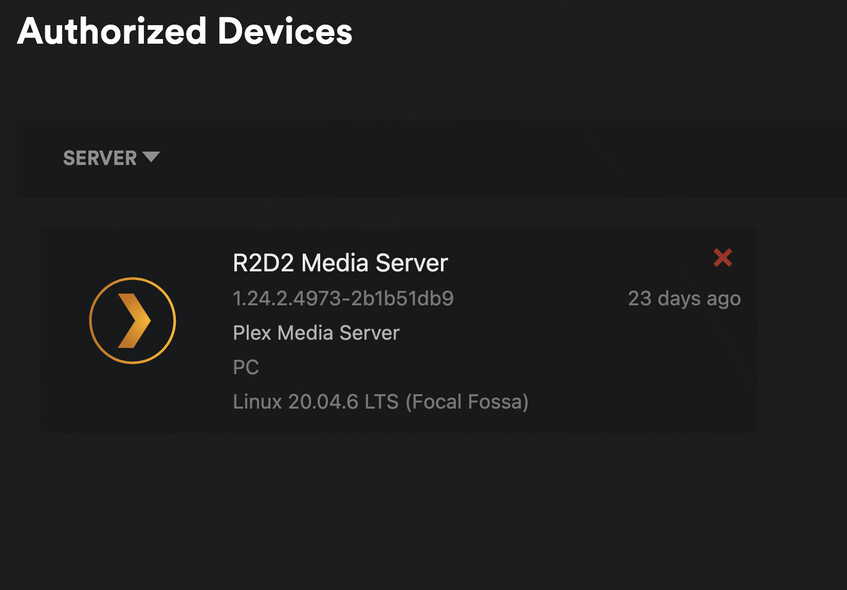
In authorized devices https://app.plex.tv/desktop/#!/settings/devices/pms but that will not disply libraries

1 Like

I’m not offered a newer version.

sudo apt install plexmediaserver
[sudo] password for dennis:
Reading package lists… Done
Building dependency tree
Reading state information… Done
plexmediaserver is already the newest version (1.24.2.4973-2b1b51db9).
0 upgraded, 0 newly installed, 0 to remove and 60 not upgraded.

That nas1 server is not listed in my authorized devices. Checked that yesterday.

Sorry, I said this server is Ubuntu 22.04 It’s actually 20.04. I was confused with another server, c3po

23 days ago

seems like something is preventing it from communicating with Plex.tv do you see any network errors in server logs?

Wow, now that I look: Tons. Logs are huge! (200K+ within a few seconds after service restart.)

I put logDebug=“0” into the /etc/systemd/system/plexmediaserver.service.d/override.conf

Then did: sudo systemctl daemon-reload && sudo service plexmediaserver restart

But still I see a LOT of DEBUG lines in those logs. How to I stop that?

Anyway, this is what you want to see, without those 1,683 DEBUG lines

Nov 30, 2023 16:39:17.822 [0x7f722fc08b38] INFO - Plex Media Server v1.24.2.4973-2b1b51db9 - Ubuntu PC x86_64 - build: linux-x86_64 debian - GMT -05:00
Nov 30, 2023 16:39:17.822 [0x7f722fc08b38] INFO - Linux version: 20.04.6 LTS (Focal Fossa), language: en-US
Nov 30, 2023 16:39:17.822 [0x7f722fc08b38] INFO - Processor Intel(R) Core™ i5-3570K CPU @ 3.40GHz
Nov 30, 2023 16:39:17.822 [0x7f722fc08b38] INFO - Compiler is - Clang 11.0.1 (https://plex.tv e0c29d5827bc4eaaa2ceb882cbeed224b0960173)
Nov 30, 2023 16:39:17.822 [0x7f722fc08b38] INFO - /usr/lib/plexmediaserver/Plex Media Server
Nov 30, 2023 16:39:17.914 [0x7f722e109b38] WARN - Couldn’t determine bundle identifier for plug-in at: “/usr/lib/plexmediaserver/Resources/Plug-ins-2b1b51db9/WebClient.bundle”
Nov 30, 2023 16:39:18.157 [0x7f722e236b38] WARN - [MediaProviderManager] Unrecognized MediaProvider feature: markers
Nov 30, 2023 16:39:19.404 [0x7f722e109b38] INFO - Refreshing paths watched by LibraryUpdateManager
Nov 30, 2023 16:39:28.015 [0x7f722e203b38] ERROR - Error issuing curl_easy_perform(handle): 7
Nov 30, 2023 16:39:28.015 [0x7f722e203b38] WARN - HTTP error requesting POST http://127.0.0.1:32600/devices/discover (7, Couldn’t connect to server) (Failed to connect to 127.0.0.1 port 32600: Connection refused)
Nov 30, 2023 16:39:33.691 [0x7f722e4b9b38] WARN - NAT: PMP, got an error: Not Supported by gateway.
Nov 30, 2023 16:39:34.679 [0x7f722e236b38] WARN - NAT: PMP, got an error: Not Supported by gateway.
Nov 30, 2023 16:39:34.683 [0x7f722e236b38] ERROR - Error issuing curl_easy_perform(handle): 3
Nov 30, 2023 16:39:34.683 [0x7f722e236b38] WARN - HTTP error requesting GET http://104.191.112.90:0/identity (3, URL using bad/illegal format or missing URL) ()
~
filteredlg.log (1.7 KB)

I found the solution, finally. For whatever reason, the server had appently lost its validation with plex.tv. I found an article here that solved that for me.
https://www.reddit.com/r/PleX/comments/wwje5x/i_cant_claim_server_after_password_update/

Thanks so much for your attention; I’m good to go now.

1 Like

This topic was automatically closed 90 days after the last reply. New replies are no longer allowed.
