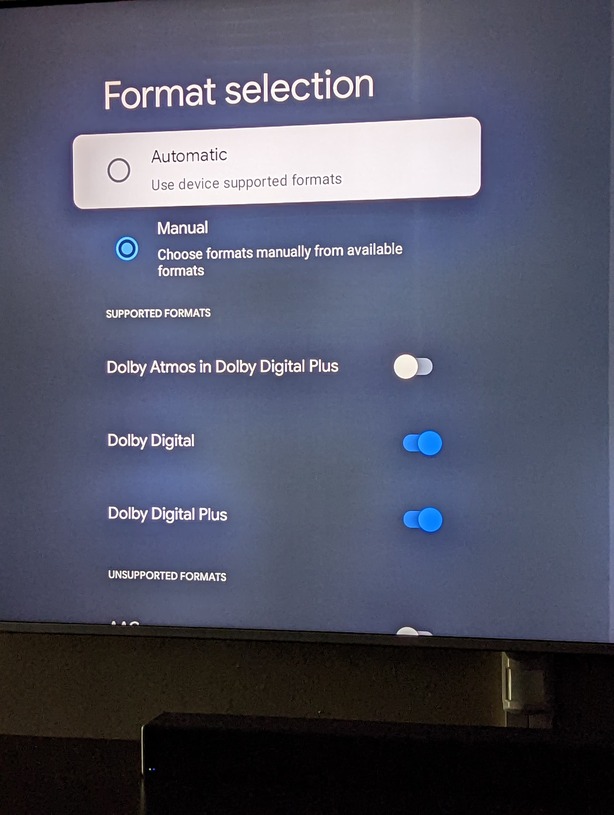
Server Version#: 1.28.2.6151
Player Version#: 9.7.0.34811
In the settings of the Chromecast I have Dolby Atmos turned off. This is because my tv supports Atmos but my soundbar does not. So if I don’t tell Chromecast to disable Atmos I get no sound.
But since I have Atmos turned off when I try to play a movie I ripped that has DTS-HD (Atmos) I get an error “An error occurred while attempting to play this video. Please check your connection and try again.” But if I turn on Atmos in the Chromecast settings it will play but with no sound because that is what happens with my soundbar.
The really annoying part is the Plex app on Roku is smart enough to play the videos with DTS-HD even if Atmos isn’t available. And I guess Roku must just be converting the Atmos signal to standard DD+.
Dolby and DTS are competing surround sound technologies. So turning off DD+ w/ Atmos shouldn’t have an effect on it playing DTS of any type.
Now the Roku does not support DTS-HD as I recall so your Plex is probably transcoding it. But the CCwGTV will pass it through. Is it possible that your TV does not support DTS-HD and that is where the error comes in.
If you can, I would plug the CCwGTV directly into your sound bar instead of the TV. That way the CCwGTV can detect what audio formats it actually supports.
The error shows up when I have my Chromecast set to have Atmos turned off. If I set my audio settings on Chromecast to automatic the video will play on Plex but with no sound, this is expected because even if I play Netflix Atmos content with my Chromecast audio set to automatic I get no sound. Which is why I have my Chromecast set to have Atmos turned off.
The video plays without error if I set the Chromecast audio settings to automatic. Or if I enable Atmos when I have the audio settings set to manual as shown in the screenshot on the OP
with Google TV, I added a screenshot of the setting. If I have that set to Manual with Atmos off I get the error on Plex. If I have the setting set to automatic for the audio Plex plays the video fine. But I can’t have my Google TV set to automatic since my soundbar doesn’t support Atmos.
If you can plug it directly into the sound bar. Your TV probably cannot process DTS-HD either and is causing your error. Otherwise, turn off HDMI Passthrough and you will have to settle for transcoded 5.1. That’s assuming that your TV can pass that through. Plex may just decide to Transcode into Stereo.