If you get one that doesn’t work… if it’s now working ok – we’ll happily take that 
And the problem rose again. sharing the logs. Ugghhh whyyy. Plex Media Server Logs_2021-08-21_13-48-59.zip (4.9 MB)
This shouldn’t be too complicated. Items (ie, movies) and collections should compute a binary value to either show or hide them in the Library view. For movies in a single collection, this is easy:
| Collection Setting | Collection Visibility | Item Visibility |
|---|---|---|
| Disabled / Hide Collection | hide |
show |
| Hide items in collections | show |
hide |
| Show collection and items | show |
show |
The question is: what should Plex do if settings between two collections contradict?
Obviously, collection visibility is easy – they can’t contradict each other, since they are exclusive of each other.
But Plex needs to make a choice when a movie is in multiple collections, with some saying hide and others saying show.
The most straightforward solution here (and the one that is implied by having a default and an override) is to just allow any collection to override the default collection setting. That is, if the default is hide and ANY collection overrides that to say show, then the movie gets a show, and vice versa. (If a movie is in 2 collections, neither of which is set to library default, then it should still take the value of the one that contradicts the library default.)
The Proposed Result column in the following table illustrates that logic for a movie in two collections:
| Collection 1 (Default or Matches Default) | Collection 2 | Current Result | Proposed Result |
|---|---|---|---|
hide |
hide |
hide |
hide |
hide |
show |
show |
show |
show |
hide |
show |
hide |
show |
show |
show |
show |
Note the Current Result column. In the current implementation, Plex seems to prioritize show, regardless of where that value comes from (ie, it does an OR on all collections that contain the movie, with show = true and hide = false), so even if a movie is not in a collection that applies the library default, it will still take the show value if ANY collection assigns it. From this thread (and my own experience), this is probably the worst possible choice aside from random sampling. Even just flipping it to prioritize hide would have been better.
Now, a lot of people here are asking how to always collapse “franchises” (eg, LOTR 1, 2, and 3 into “LOTR Collection”), but show individual items from “sets” that are not part of franchises (eg, show Parasite but not Return of the King when both are part of “Oscar Winners”, since Return of the King should be collapsed into “LOTR Collection”.)
With the current implementation (and without using smart collections), the only way to do this is to set the default to hide, and then create another collection that contains all the movies that are not part of a “franchise” collection, and set that collection to show. Not impossible, but definitely not easy or intuitive (made harder by the inability to filter to movies not in a collection), and you end up with this weird collection that isn’t actually a movie collection you would care about outside of hacking your Library visibility settings.
In contrast, to accomplish this with the proposed logic, you would have to set the library default to show collection items. Then, for all “franchise” collections, set the override to hide items. With that, all movies in “set” collections would show by default, and that setting would be overridden to hide if the movie is part of a “franchise” collection. Simple, makes sense, and your collections actually mean something.
(Note that for this to actually be usable, we would also need some new UI in the Collections view to mass edit collection visibility, which doesn’t currently exist.)
Voted.
I see no reason whatsoever to have a collection and also have everything in that collection be viewable separately in the same library.
I have a few reasons to either not show the collection or to show both the items and collection.
In movies: I have both the theatrical and special versions of the Alien films, I don’t want two collections, and I don’t want to show one collection and then four more films that seem like they should be in the collection, so I just show all the films individually.
Also findability within the library (without the search bar). With the Universal/Hammer monster movies, I show both the films and the collections. If you want to watch Frankenstein, just go to Frankenstein in the F’s; if you just want to watch a monster movie, go to one of the collections. (They don’t need to be shown in the library, I just like them)
Generally I only make collections for franchises, and only if they’re 4-5 movies plus (or spread out by name, like the Godzilla/Kong movies), otherwise I don’t bother. I’m fine having a duology or trilogy of movies showing together in my library.
In TV: I have a number of collections for different franchises and connected series (and a couple just to connect one series to the corresponding movie collection), but the only collection I show in the library is Marvel–just because there are so many series. Star Wars is probably next, it’s getting up there.
I was talking about have a collection of movies in the same universe, like “Star Wars”. All Star Wars movies would be in it so why have all the movies listed separately as well? It’s a waste of pixels.
But if you have a “Favorite Sci-Fi & Fantasy” collection, you should be able to list any movie and not affect any other collection or listing.
Just curious, but why would you want a collection that is not shown?
“I have a few reasons to either not show the collection…”
I watch things through Plex almost exclusively on my TV. I don’t ever want to have to use the search bar to get to something, so findability in the library is key. I have the DC Animated Universe collection in TV (BTAS, Static Shock, Justice League, etc.), and if I want to watch Static Shock, I don’t want to have to remember it’s under ‘D’ in the library, so the collection stays in the Collections tab and the individual series stay in the Library tab. Same with the BBC Earth/David Attenborough collection.
But with every rule there’s an exception. Like I said before, I have a Monarch Monsterverse collection in movies showing in the library specifically to group the Kong and Godzilla movies, which moves all of them into the ‘M’ section. Oh well.
Another aspect is how important the “whole” of the collection is to any one item in it. For the DCAU and BBC Earth stuff, not really except for the Batman series which will all be next to each other anyway. But for something like Star Wars, each movie has a (more or less) important role in the collection as a whole. That’s something else to consider in lumping things together, “Do you need to know it’s part of a collection to find it and enjoy it?”

Just voted for this. I was wondering if this could be solved by taking the library default into account - give priority to hiding if the library default is to hide items in a collection, but to give priority to showing items (as currently) if that is the library default.
That would give us control over what the priority should be.
Voted, but I had one other option that may be too obtuse but seems that it would work (may have already been suggested) : Separate on/off display toggle for items and collection. Borrowing some of the previous examples:
Iron Man Collection: Items [hide] Collection [show]
Marvel Collection: Items [show] Collection [show]
Oscar Winners: Items [show] Collection [hide]
If a movie is in any collection that has “Items [hide]” selected it is not displayed in the Library tab. Same for collections (although obviously a much simpler check.) This also opens up the fourth option that is not currently available: hiding both items and collections from the Library tab such that the items are hidden and the collection is only shown in the Collections tab. Not sure if it is something that is needed, but surely someone somewhere would think of some reason to use it.
4+ years and still nothing. Glad my Plex Pass is being used well. This visibility issue makes creating some collections absolutely pointless.
Want a Thor collection? Better not include them in your overall MCU collection.
Want a Halloween franchise collection? Better not put it in a Halloween Season collection.
+1
My OCD needs this. I think I may entertain the idea of the ‘singles/show’ folder while I’m holding my breath!
I’d also like to have an option to hide the collections and the items in it, because there are many items that exist in multiple collections, the small collections make the collections we want to show, the large collections we don’t want to show, but hiding the large collections causes the items in the small collections to be split out and shown separately, which we don’t need, we need an option to hide the collections and hide the items in them. Because these collections we only want to show them on the collection page, not in the library.
There’s a different feature suggestion for that
Collections have been a disappointment due to the basic logic as coded.
SHOW COLLECTION INLINE, SHOW ITS ITEMS
HIDE COLLECTION INLINE, SHOW ITS ITEMS
Are coded as FORCIBLY SHOW ITS INLINE ITEMS, NO MATTER WHAT
While
SHOW COLLECTION INLINE AND HIDE ITS ITEMS
Are coded as
HIDE ITS ITEMS ONLY IF IT IS NOT IN ANOTHER COLLECTION THAT FORCIBLY SHOWS ITEMS.
This logic is backward. ALL ITEMS ARE SHOWN… it is the “DEFAULT BEHAVIOR” from before collections existed. The feature was supposed to offer inline collapse. FORCING DEFAULT behavior (as in not using Collections at all) to override the behavior of a new feature, negates the feature.
If any Collection says HIDE, it should HIDE. Collections that say SHOW should be coded as “don’t modify the behavior of the items” since the default behavior was ALWAYS to SHOW.
There are two reasons I want collections:
1) to collapse many films into one inline. I have 42 Abbott & Costello films. No point in everyone scrolling past 42 films every time. Most of them have title starting with “Abbot and Costello…” The few people who want to watch them will open a collection. MOST will ignore their existence. The best use is when HIDE collapses many movies alphabetically into one. All NINE STAR WARS: blah blah. films become one STAR WARS poster. This improves usability, reduces graphic/bandwidth load, speeds browsing. GREAT!
2) group like films together because they share a trait, subject matter, aka tag. Now one example would be CHRISTMAS MOVIES. I might want to hide all of them most of the year in a collection. Come November I could even flip the collection behavior to STOP HIDING. But let’s look at something more common since it is not uncommon for films to be capable of belonging to multiple collections. Lets look at three tags
MARVEL COMICS
MARVEL CINEMATIC UNIVERSE
THE AVENGERS
There are more than a half dozen films of Marvel’s Avengers. The 4 MCU films you just thought of, Avengers Confidential (animation), Next Avengers (animated), Ultimate Avengers, etc. All of them would be tagged for “THE AVENGERS”, 4 tagged “MARVEL CINEMATIC UNIVERSE”, and all tagged “MARVEL COMICS”.
MARVEL COMICS would NOT HIDE ITEMS. This should not mean they are FORCED to display.
This is a collection of all marvel’s creative property films over the last 80 years (1944 CAPTAIN AMERICA). This might point out older movies or less known properties to a marvel comics fan, like “Werewolf By Night”. If this were TV Shows, people might not have heard of “Legion”. Hiding these is kinda detrimental, especially to little known ones. Because no one will see them UNLESS they are looking for marvel stuff. And there are many sub-collection that, alphabetically, would be better placed.
MARVEL CINEMATIC UNIVERSE. I don’t want to hide these either. These movies can actually be watched IN ORDER… there is a logical order to them and they cross properties(aka collections). This is meant to gather but NOT HIDE them specifically.
THE AVENGERS. Like Abbott & Costello, here is an opportunity to collapse and reduce clutter on the library when browsing. THESE I’m willing to HIDE. It puts all Avengers properties under “AVENGERS” alphabetically. I might even want an ULTIMATE AVENGERS (HIDE) tag so those movies show as a collection alphabetically at “Ultimate…” as well.
So, If I want to hide…
NOPE!!! CAN’T!
I already said to “forcibly show” them in the two previous collections. This feature is now broken and non-functioning.
To me, this is THE use case of multiple collections that should have defined the coding. Most are groupings to make it easier to find related movies. Like 007–the titles are alphabetically all over the map. But debateable if I would want them to HIDE Harry Potter and the.'. HIDE/COLLAPSE. Fantastic Beasts films HIDE/COLLAPSE, J.K.Rowlings DON’T HIDE. J.R.R.Tolkien DON’T HIDE. The Hobbit HIDE/COLLAPSE. Lord of the Rings HIDE/COLLAPSE. To me HIDE/COLLAPSE is about the alphabetical position of the COLLECTION vs. the movies inside.
Now people also want nesting, which I get but I would be more than content if the basic logic wasn’t busted.
Harry Potter Universe/J.K.Rowling. (DON"T HIDE)
Harry Potter and…(HIDE)
Fantastic Beasts (HIDE)
20th Anniversary (single item, only in Universe collection)
I would be happy if Plex corrected the bad logic of SHOW ITEMS. All the films in the sub-collection would be tagged in the larger. I prefer this!! Because it means there is a collection alphabetically at “Fantastic Beasts…” Users don’t have to go to “Harry Potter Universe” to find a film that starts with “Fantastic” It also means things like the 20th Anniversary show would be in plain sight, not buried. If someone hadn’t heard about it , they would see it when browsing.
This was how I assumed this would work, and I don’t see why it was implemented with the inverse logic as it breaks the HIDE/COLLAPSE feature.
Voting as well. This has become a pain point for me, specifically with my Foreign Films Library. Within this library, I have organized the films into collections based on originating country, like so:
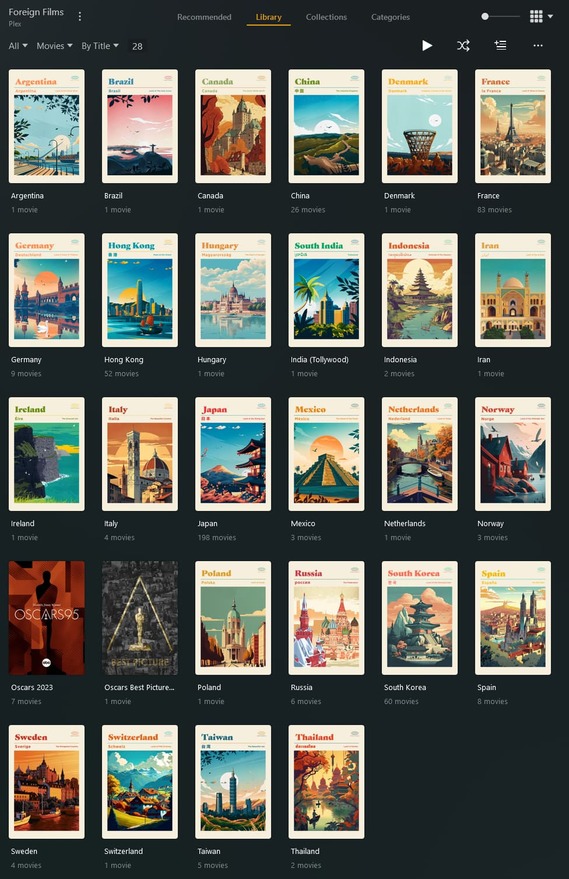
You’ll notice in the above screenshot, I also have two Collections based on the Academy Awards: Oscars 2023 (all nominated films from 2023) and Best Picture Winners. I would prefer to have the two Academy Award-related collections hidden from the Library view. The typical option for this would be “Hide this collection but show its items”. However, when set to this mode, the collection itself is hidden, but it forces the library items within the collection back into the library view amongst the country collections, like so:
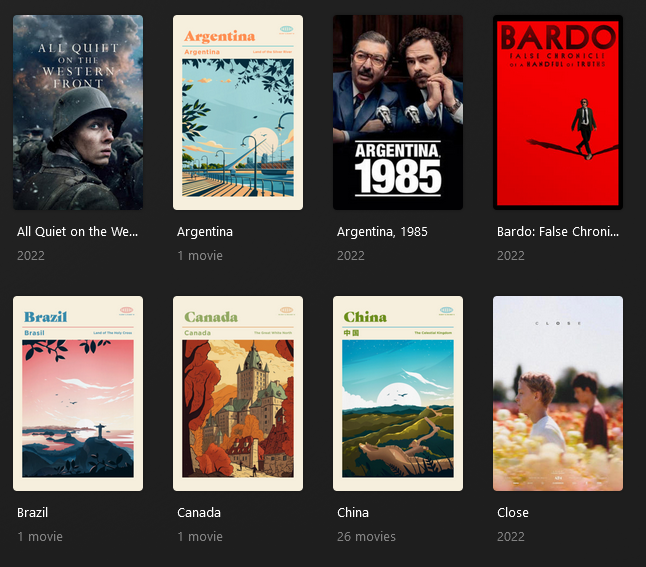
Obviously, this is not ideal. Amongst the available collection modes (Hide items in collection, show collection + items, and hide collection but show items), nothing will allow me to hide the Oscars collections while keeping the library items hidden within their respective country collections.
Giving priority to the hide mode over the show mode is the easiest fix for this, probably. Though, I think the most elegant solution is to simply have two mode options. like @cjohnk suggested.
- The Collection modes would be
showandhide. - The Item modes would also be
showandhide. And if it was an issue to give priority to one or the other, there could be anignoreoption so the Collection doesn’t affect the library items within.
I suggest that Plex should support nested collections, which could effectively resolve this issue. For instance, I have a collection for Iron Man and another one for Marvel. I would like to hide individual items within the Iron Man collection while displaying individual movies in the Marvel collection. Series within the Marvel collection should appear as a collection, ensuring that items within the series are consistently hidden, while individual items remain visible. This way, they won’t impact each other.
Plex staff don’t use their own app enough to recognize pretty glaring issues with features that they heavily promoted at launch. Small libraries, casual use, very little tinkering. It’s very obvious.
5 years.
If you need a workaround use “smart” collections for broad collections based on theme, cast/crew, etc. and only use “normal” collections for franchise collections. It can help clean up your library but there will be situations it still won’t fix. A proper fix would be to give individual library items a show/hide toggle.
I’d like to choose which of show or hide items in conflicting collections have priority.
For example, I have the movies Cars 1, 2 and 3 in two collections, “Cars” and “Pixar”. If I set the collection mode for “Cars” to hide movies and “Pixar” to show, then “Pixar” wins and the Cars movies are shown in the main movies list, right beside the “Cars” collection.
I’d like to switch that priority so “Cars” wins and its contents would be hidden, but the likes of Brave or WALL-E would be visible from the “Pixar” collection. Maybe another collection mode could be added to read “Show items not in other collections”.
I just realised that option won’t work. It should be “Show items not hidden in other collections”.
