Are you on the new movie agent? I’m using the legacy agent and my writer fields are all over the place. Still hesitant to move my library over to the new agent because there are still issues the new agent have the legacy one doesn’t.
Yes, using the new agents for for both TV and Film
Oh, and just know -
For any shared user, TV Smart Collections are broken
They can see that the collection is there, but the collection shows empty for any shared user
Thanks good to know on both accounts. Really hope the new agents gets to feature parity soon, so I can fix the wonky fields I have now. I haven’t even started tackling collections for TV and I guess now I’ll wait a bit longer :). My movie library has been a disaster ever since collections started rolling out because I went Collection Insane hoping they’d fix this much earlier than they have.
What’s the issue you’re seeing ?
Whatever source the legacy agent gets the writer data from isn’t consistent with having the author of source-material (ie. novelists) listed as a writer. My 4K library is using the new agent and from what I’ve seen it is much more consistent displaying source authors. As an example 6 of the Bond films in my library don’t have Flemming listed as a writer and no Agatha Christie movies list her as a writer.
I can fix those manually, but more consistent source data would make it easier to maintain.
Oh I see - I thought you were saying there were issues with the new agent
Syncing labels to make smart collections is coming soon to Plex Meta Manager. I hope to have the update out this weekend.
that’s pretty cool news!
As a test I created a Smart Collection for me and the hiding\visibility works as I would like and relates to this feature suggestion.
I created a Smart Collection which is just recently released movies that are unplayed.
I set the collection to show the collection and the items in my library (library default is to hide items in collections).
I have movies in the smart collection with show items set that are also in standard collections set to hide items from library. John Wick 3 is in the smart collection as recently released and unplayed and in a standard “John Wick” collection is still hidden in the library as desired while other titles in the Smart Collection, which are not in standard collections, are visible in the Library.
That works exactly as I like for two different collection visibility settings and wasn’t possible with two standard collections.
I haven’t tested two smart collections set for conflicting hide\visible settings but at the very least this provides an option that does work for creating dynamic collections that don’t impact standard collections.
Good work!
Something people should be aware of if you’re using Smart Collections to get around the show/hide conflict.
Plex has seemingly confirmed machete order will only be coming to standard collections and not smart collections: Custom Collection Sorting - Machete Order - #75 by BigWheel
Doesn’t seem like Plex has a complete plan for collections yet, makes me wonder if this issue ever gets fixed.
My smart collections are not showing up on home anymore. I tried even creating a new smart collection, I reset the manage recommendations even. Nothing works.
It’s such a huge bummer
Working great for me… so you might want to elaborate.
Did you re-add the collection to the home screen after you reset the recommendations?
I did, but it just refuses to.
Even when I start a new smart collection it just refuses to show up on home.
However, normal collections/non-smart collections do show up on the home when I make it visible.
It’s really frustrating as I use the smart collection for movies with subtitles in a specific language.
Which exact version of Plex Web and PMS are you using?
Version 1.33.0.2444-a220eae4 & Version 1.24.1.4931
The latest. I have tried everything I can think of, I honestly dont get it. It was working great for a while and it just stopped. Idk why it stopped working, it’s been a few small updates now since it stopped working, I just figured it would work again with one of these updates but nothing so far
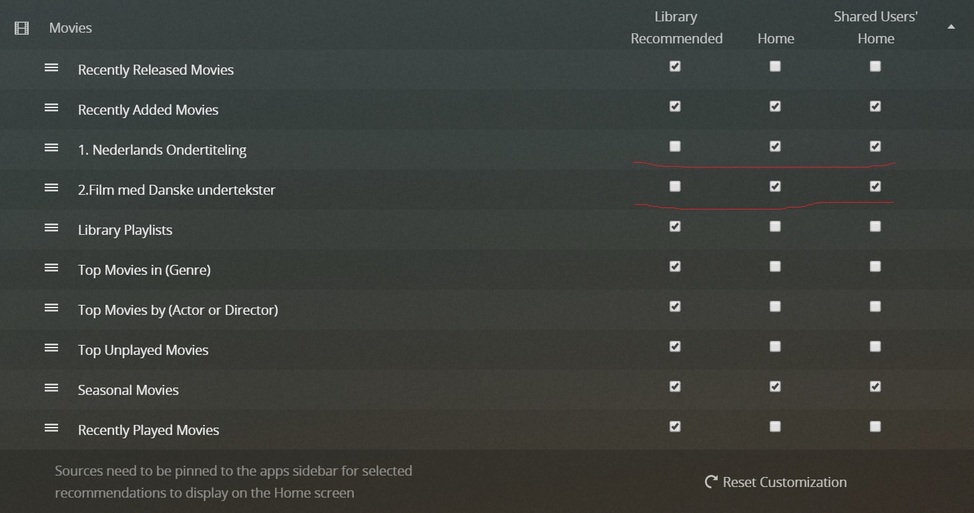
Even when all 3 are selected (library recommended too) nothing changes.
This won’t be much consolation to you… but even in Plex (for Mac) this is working fine for me (same as on Plex Web – hosted and bundled versions). Also tested this with various smart collections to rule out it might be somehow linked to certain filter criteria – still cannot reproduce this behavior.
Does this behavior remain the same after a full stop / reboot of your server?
Is this the same for you using the desktop app or Plex Web?
When I restart the server nothing changes.
There are times that one of the two pops up, but honestly I don’t know why.
I just the Windows app.
It stays the same on the web app, the windows app, for others it’s also not visible like TV and android. It’s super weird
As I just wrote this, all of a sudden both just popped up on home, showing as they should. I didn’t restart the server or touch anything. I will monitor for if it stays like this. It seems to have no rhyme or reason
Can you add a smart collection to your home screen, wait a minute and then collect your server logs to share them here?
I made a new smart collection but now all of a sudden it works as if nothing was ever wrong. Should I still share the logs or will it be not be usefull now that it seems to work ?
