ok thanks, here is a screen shot, i was able to grab it today (there where 5x of them when i got to the PC as it had done 5x recordings, so far, today).
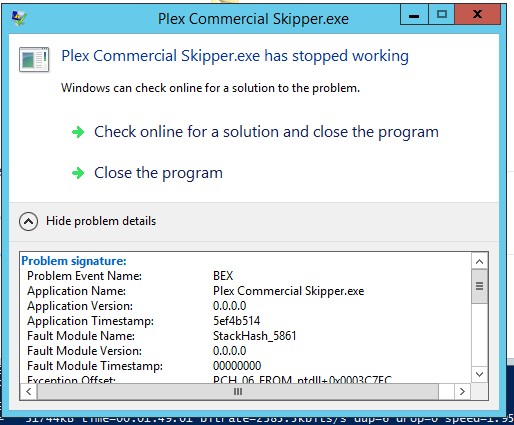
ok thanks, here is a screen shot, i was able to grab it today (there where 5x of them when i got to the PC as it had done 5x recordings, so far, today).
On my Windows 2012 server, I had to do the following:
There’s also a registry switch for this.
Please check google for how to do this on your OS.
Then, Plex will no longer show the recordings as still recording.
The error had not gone away though - you are just not bothered any longer to click it away.
Development team found the problem. The program is corrupting the command line arguments when the command line is too long
Command line with very short paths / parameters does not crash
Next step is working on a fix
Thank you for the update, sir!
That’s great news. Looking forward to the fix.
Great news, thanks…
So what made ‘us’ unique? It seems this issue was only affecting a minority of users.
It could be a longer file path than normal? I store my files on a NAS, and recordings go several folders deep. Just a guess based on commentary.
\SERVERNAME\Video\RecordedTV\SHOWNAME\SEASON\ …
The command line for initiating Plex Commercial Skipper.exe got too long for a buffer size used internally by the program - the command line includes paths to the ini file, to the media directory and to the file.
Good news is that a fix has been tested and it no longer crashes. I am expecting this to get released in Plex Media Server version 1.20.2 - I do not believe it will be possible to get it into 1.20.1
Thank you, sa2000 and the whole team!
and more good news - we are trying to bring the fix earlier in the next beta of 1.20.1
Hi all,
I got asked to try an experimental build by the plex team - it fixes the issue. Hopefully it will make it into the next release.
Thanks! Will.
Same. Working again for me in the test build.
I wish they’d ask me too test the new build. I already beta test their tvOS app.
Beta 1.20.1 which will have the fix will be out very soon - I expect it to be this week
Plex Media Server 1.20.1.3213 has now been released as beta
See release notice Plex Media Server
So, I’m rolling with the test build Version 1.20.2.3200. It is not yet calling for an automatic update. Should I be seeing that yet, or do I have to go manual?
I manually downloaded and installed PMS version 1.20.1.3213. I am very happy to report that in my initial testing, it fixed the crash problem and successfully removed commercials from my test recordings. Thank you to @sa2000 and the Plex development staff for resolving this.
On windows to go to the official beta would be a downgrade from 1.20.2 to 1.20.1 so please shut down Plex Media Server and uninstall the special development build through ‘Add and Remove Programs’ and then manually download and install the official beta
Ok… Now that this function is (possibly) restored, does anyone have a quick and dirty method to reprocess about 6 months of recordings.
Could there possibly be something as simple as a command line that could be issued for a particular file (filename.ts), or even dropping a copy in the .grab folder?
