After installing PMS 1.19.3.2843, did you toggle the option for commercial skipping (off then back on)? That seems to fix the issue for some Linux systems, but my PMS is running on Windows and up to this point the toggle did not help.
Windows as well. I’ve tried that in the past, but will try again for poops and giggles.
While turning it off and back on again is the oldest trick in the tech book, it didn’t work for me either (Windows).
No luck here either. Nearly 4 months since the issue manifested itself. Very frustrating. Too bad this feature isn’t more mainstream so as to gain more attention.
Please! This has gone on too long.
2 Likes
Newest update did the trick for me. I have the QNAP version installed on my QNAP NAS though. I have had this issue for at least 5 months if I remember it right. Hope this information helps somebody. Now off to start recording more shows 
Version 1.19.3.2852 notes mentioned a fix, but it didnt fix anything for my Windows PMS. Are there things I should be checking? I tried the Disables/Detect and Delete toggle dance.
Newest update worked for me, too–Synology NAS.
I first tried the DVR a couple of weeks ago, but was dismayed to discover the commercial skip–flawed implementation though it may be–didn’t even try to work, and in fact had been broken for 4-5 months. I gave up, went and tried Emby, wasn’t happy there, went and tried Channels, found it a bit lacking, then suddenly this update came out. I just uninstalled and cancelled Channels.
It’s still broken - commercials aren’t being cut from the recordings 
The XML file with cuts is being created, it’s just not being acted upon.
1 Like
Still no worky in Windows with Version 1.19.4.2865.
1 Like
Commercial skipper doesn’t work and still crashes On 1.19.4.2865. Windows Server 2019. Same with the intro skipper.
1 Like
I’m just seeing .log files and segment-list.txt in the target directory from DVR recordings all of a sudden - since upgrade to Version 1.19.4.2865 (Windows 7 install)
it’s always been flakey - usually doing nothing, but now I’m getting these two files every job?
What would really help here is if Plex had in the setup page for this feature so we can see/set the presets and maybe just understand WTF is going on with it?
This appears to be a defect. The thread for the extra files is here.
1 Like
Thanks, not sure how I missed that one.
This is now addressed in the latest release
see release note for 1.19.4.2902
- (DVR) Commercial skip log file was still sometimes improperly copied into user library directories
Can confirm the commercial skip issue is still NOT fixed in Windows version: 1.19.4.2902
1 Like
I can also confirm that 1.19.4.2902 did not fix my windows 10 version. I just tried “Use DVR Settings” and “Detect and Deletes Commercials” (I never know which is correct to choose) and neither worked. I’ll try togging the Remove Commercials over at Live TV and DVR.
What else can I try ? Are there some logs I can send you? This has been broken for months. Let me know how I might help.
Toggling Disabled and Detect and Delete didn’t help either, standing by to help you guys help us.
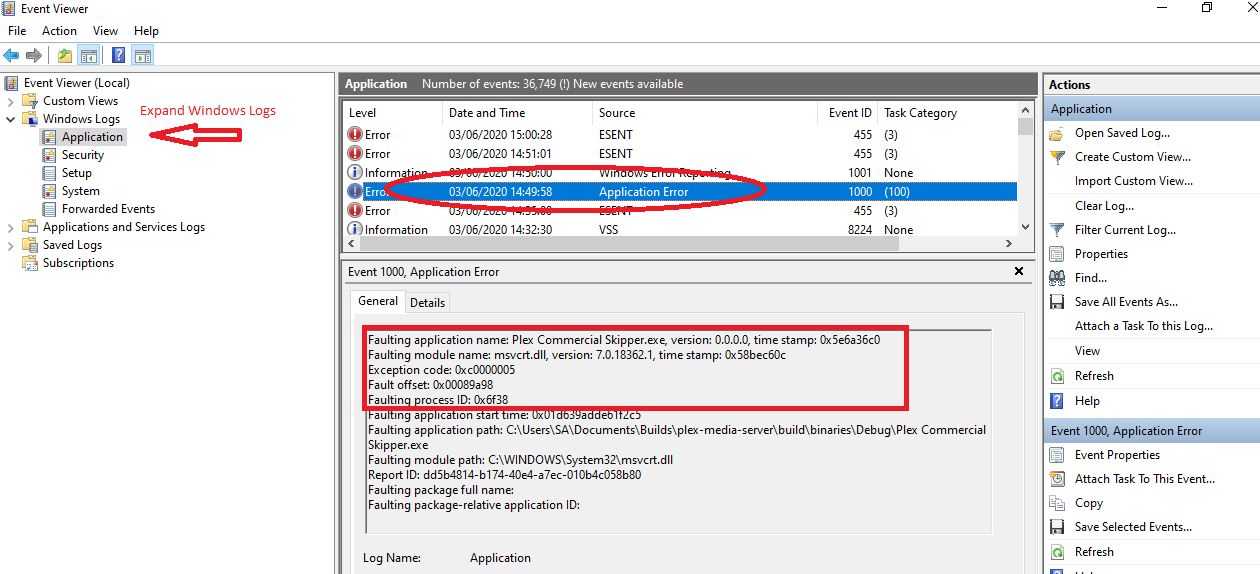
I managed to reproduce a crash of the Plex Commercial Skipper.exe on windows which I am following up. There would be events in the windows application event log - like this
Faulting application name: Plex Commercial Skipper.exe, version: 0.0.0.0, time stamp: 0x5e6a36c0
Faulting module name: msvcrt.dll, version: 7.0.18362.1, time stamp: 0x58bec60c
Exception code: 0xc0000005
You can open Event Viewer and check the Application event log to see if this is happening at the time
1 Like
I have an Applications and Services log in the Event Views, and I saved the log, but I’m sorry I can’t figure out how to view the data in the .evtx file.