It may be the trace level that is making it unusable - although the logs you gave me did not have any additional logging. May be you have now. You can try switching to TranscoderLogLevel to verbose
Best to restart the server before any tests to get new logs set created
Transcoder jobs also get killed and new ones started if you do any seeking
I did a few restarts, so that shouldnt be an issue and i dont do any seeking, still the transcoder keeps crashing. Furthermore i can see the transcoder processes only beeing killed and re opened when its lagging. As long as the playback is smooth, there are no killed transcoder processes.
As soon as i changed the TranscoderLogLevel to verbose, i was able to play movies again and i can now also transcode again. With the lags/crashing included though.
There are tools that are available to split An mkv file and break it up - so you should be able to create an mkv file that has the first 20 minutes of the movie file
I’ll check it out and cut it into length. Unfortunately it seems to be a general issue, since it happens with many movies. Didn’t test if it happens with all of them though.
I ran a few memory tests - so far no errors found.
What’s the explanation for my transcoder process continuously using up more ram even over the 2gb limit? I guess it shouldn’t be that way, correct?
I just realized that all of those canceled transcoder processes took up slightly over 2gb ram. Maybe that’s the reason they are, constantly being killed.
I am waiting for a file that we can try and replicate the suspected memory leak with
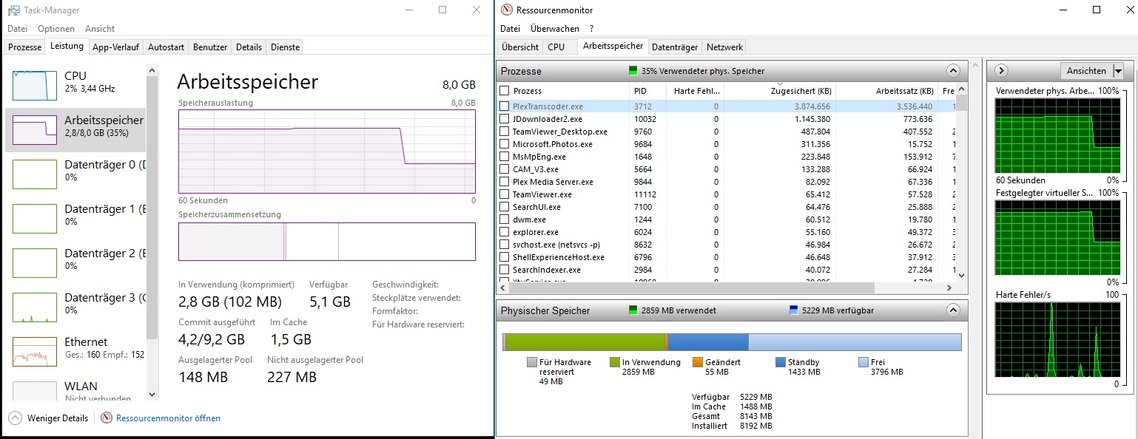
Please get me logs of the failure with this clip with the test carried out with transcoder logging of verbose and server logging of verbose with these settings in place before a restart of the server and running the test that gives the failure. Also a screenshot of the transcoder process in resource monitor showing memory private data, committed etc and please do only one test after the restart of the server so there would be only one transcoder process showing
Would like to refer it to the development team with a sample to recreate the issue
I have noticed that the transcoder was trying to buffer 2000 seconds - could you also get me an export of all the server settings - you can send me by Private Message a Regedit export to text file of HKEY_CURRENT_USER\Software\Plex, Inc.\Plex Media Server
Ive been on a trip outside the country for a while. Will try to get everything done as quickly as possible - short clip, logs and settings export.
Regarding the buffer time, if been playing with that setting in the beginning because i thought maybe that might have been the reason for the stuttering.
No, hevc wasnt the issue. As far as i can tell any movie causes the transcoder to crash.
Im currently collecting all the data.
The movie im testing with always crashes in minute ~11 (+/- 30seconds) when ram usage of plextranscoder reaches ~ 3874.000KB with total system usuage of about 6 of 8GB when transcoding down to 1080p@20MBPS.
I repeated it several times with the same results:
3 of the screenhots show 3 crashes (a few seconds after the crashes) of the same 4k files beeing transcoded down to 1080p@20mbps.
I started all of them at the beginning and switched manually to transcoded quality as soon as possible, that might be the reason for the slight time and ram usuage differences.
The 4th screenshot is made shortly before a crash @ ~3840.000KB.
I hope ive done everything correctly. Ive sent you the regedit plex settings via private message.
The 20min test clip, the server logs and several screenshots of the process and the crashes are uploaded in the dropbox.
I just realised, that the crash always happens when all free adressable ram is used up. Ive added a “shortly before crash” screenshot, where only 1MB available ram is free.
Thank you very much. I will have a look when I finish what I working on now.
And thanks for sending the registry export
I would like you to reset the Transcoder Settings to default and see if that makes a difference.
Settings / Server / Transcoder / Show Advanced
Change Transcoder Quality from Make my CPU hurt to the default of Automatic
Change Transcoder Default Throttle Buffer from 2000 to the default of 60
Change Background transcoding x264 Preset from ultrafast to the default of veryfast
Some of these may now be hidden - in which case registry edit would need to be done
I reset those settings and this time it took 24 minutes before it crashed. Usually it took just 11minutes @ 20mbps.
As usual it crashed when the transcoder process took about 3880MB.
upgraded the servers ram from 8gb to 16gb - still crashes at around 3800mb of transcoder ram usuage even though there is enough free ram left now. Since the reset settings last time, it now crashes at min 24 though.
Is there a way of how to reset the whole plex server with settings ? I tried reinstalling, but the settings are being kept. Its getting anoying to not being able to use my media with any other device, especially since im leaving for a lonely woods cabin for two weeks at the 15th.
I deleted those 2 things and uninstalled it in the regular way. But the issue is still there… More Ram didnt help either, always crashing at around 3880MB
I did not expect the setup of a new Plex Media Server would overcome the issue.
What is the scale of the problem ? What proportion of your videos does the transcoder run out of memory? It is not a common problem - so could be specific to your media.
You mentioned it is not just HEVC files. Could you let me have similar diagnostics a short test clip that results in the problem and is not HEVC?
The issue is now with the development team and the additional information and diagnostics for failures for other than HEVC files and steps to reproduce the problem would help
By chance were the files that created the crash using TrueHD audio? There are several other threads which describe the consistent transcoder failure when TrueHD audio is present. The only solution that works for me is to rerip the original content without TrueHD audio. Transcoding will then function normally.
I have not come across any other failures that are due to running out of memory. If you are aware of forum threads with same issue, please let me know and i will include them in the issue I referred to the development team