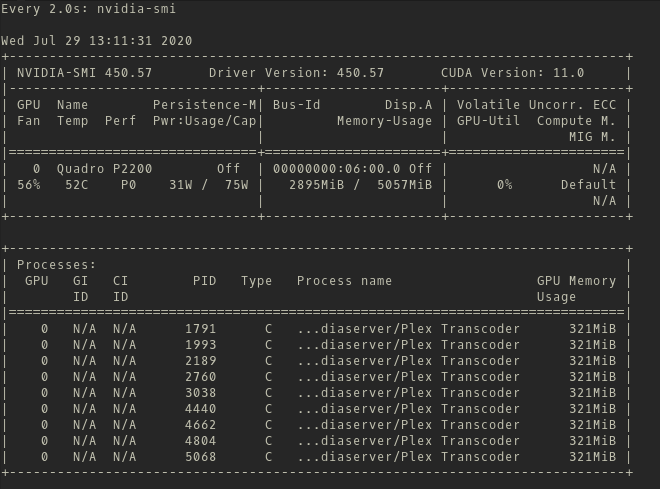
Thank you for taking the time to do that. I know the logs are very lengthy.
Generally the subtitles are not being burned in. When they are (SyncLounge Player) I will start to see very high CPU load across the system’s 24 threads. I’m not testing media with subtitles to burn currently as I know that presents its own issues. The full length Sintel movie does not force subtitles.
I was just inspired to try something else. I am able to use optimized versions to test the GPU conversion as well. It works flawlessly.
On software, I only get <5.x speed with very high load on the system
Wouldn’t this indicate some problem with the Media Decision Engine?
I tried the fixes / startup parameters people claim worked for them
kernel 5.7.8 (current kernel)
kernel 5.8
kernel 5.4
kernel 4.4
nvidia-440
nvidia-450.51
nvidia-450.57 (current driver)
I haven’t tried nvidia-335.21 yet, but since this seems to be specifically related to Plex Web, I’m not sure where to go here.
I wrote a Python shim that intercepts Plex Transcoder just so I could render out the transcoder flags to a shell script and call the Transcoder as a child process - it works, but it is not very enlightening.
Here is the 2 minute clip you asked for. Clipped with ffmpeg -ss 60 -i $FILENAME.mkv -c copy -t 120 $OUTFILE.mkv. It should be identical container/stream format due to -c flag.
Sorry the domain name looks sketchy, it’s an open source file host with a command line API. My computers are currently boxed up as I am moving.
I don’t have a quicksync (vaapi) Intel to test, only have the P2200 Quadro. My Xeon x5650s are too old for vaapi to work.
Plex Server in my configuration will attempt to open vaapi, fails, tries nvdec/nvenc, succeeds, repeats trying vaapi again, and then Plex Server kills the transcoder with a -9 signal. Finally, plex web will sit there polling for a transcoder route and get a 404.
I have done everything to ensure there is no Intel graphical device on my server including disabling the onboard graphics in the bios. Plex will still attempt vaapi.
Just chiming in to say I also have this issue with Plex Web. Running Proxmox with plex in an LXC, the 1650 Super is able to transcode on Android and roku TV just fine, transcode quality can be adjusted on a whim. In web, if you start playback in original and then lower to force a transcode the transcoder runner fails. However, starting the stream in a lower quality does work and is hw transcoded. Switching quality from there sometimes works, other times it fails. I can get more info and logs tomorrow, but this is on the latest nvidia driver and ubuntu 20.04.
I have seen a couple other threads here and there about this issue:
This guy says his was fixed, but no luck for me. I’ve attached some debug logs from mine, at 15:42:11 I chose a lower quality from a file playing in original quality and it just froze with a black screen.
Proxmox 6.2-15 (kernel 5.4.65-1-pve)
Plex inside an unprivileged Ubuntu 20.04.1 LXC, 1650 Super passed through with Proxmox’s nvidia hook
Plex server 1.20.4.3517
nvidia driver 455.38
That would be an interesting “gotcha”, but I really doubt that a PCI x4 port would cause hardware transcoding to fail. The link speed should not interfere with hardware transcoding as you’d have to saturate many gigabytes per second over the port – and unless you’re live transcoding lossless 8k 60fps HDR video, nobody should be running into it.
In any case this is definitely not my problem as evidenced by my motherboard manual and verified with lspci
Yeah I didn’t mean to link that exact post lol, but he said his was fixed with the 450 driver a bit later. Mine is actually connected via PCIE 3.0 x1 because I can’t fit a 1650 Super into my 2U chassis lol, but even that should be fine at around 1GB/sec.