Converting to a lower quality fails with Hardware-Accelerated Streaming in Plex Web

We’re all good.

I’m sorry i’ve been slow to respond. With the holiday and my personal work load, it’s been a bit :crazy_face:

I do need to figure out why this is happening.

The valid is corrupt.

Mar 30, 2021 01:51:41.013 [0x7fce27ff7700] DEBUG - [Now] Adding 1 sessions.
Mar 30, 2021 01:51:41.014 [0x7fceba155700] DEBUG - Completed: [10.10.10.75:57353] 200 GET /status/sessions (7 live) TLS GZIP 1ms 2509 bytes (pipelined: 46)
Mar 30, 2021 01:51:41.042 [0x7fce220fa700] DEBUG - [Transcode] Scaled up video bitrate to 14602Kbps based on 1.500000x fudge factor.
Mar 30, 2021 01:51:41.043 [0x7fce220fa700] DEBUG - [Transcode] Streaming Resource: Reducing playback quality for 19047kbps stream bitrate: video resolution to 1920x1080, audio channels to 2, quality to 85, disable video DS as 2147483647kbps is > the 18683kbps available
Mar 30, 2021 01:51:41.043 [0x7fce220fa700] DEBUG - [Transcode] Codecs: testing h264_nvenc (encoder)
Mar 30, 2021 01:51:41.043 [0x7fce220fa700] DEBUG - [Transcode] Codecs: hardware transcoding: testing API nvenc
Mar 30, 2021 01:51:41.043 [0x7fce220fa700] DEBUG - [Transcode] [FFMPEG] - Loaded lib: libcuda.so.1

Would you consider clicking “Analyze” for that file and trying it again using entirely default playback (let it do everything itself)

No worries! Just wanted to make sure this didn’t slip through the cracks while I have the VM available for testing.

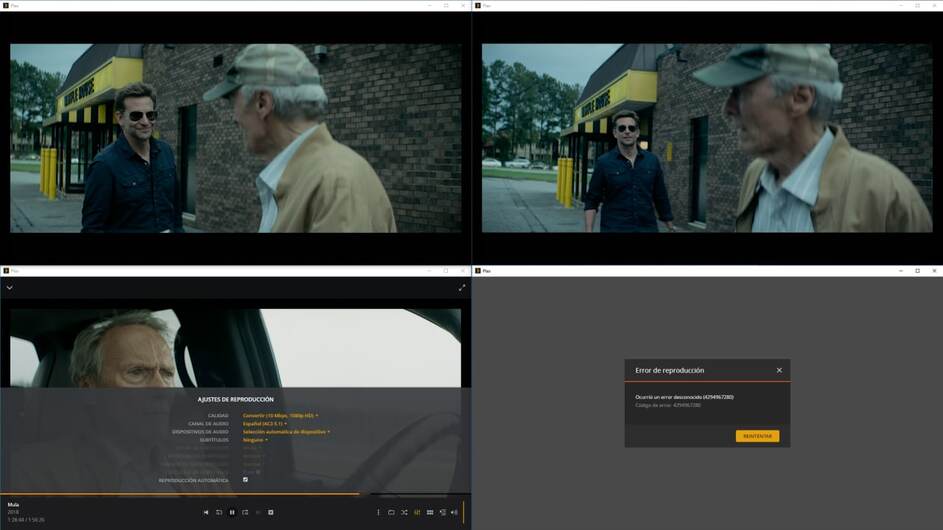
I clicked analyze on the file in Plex web player in Brave browser, it loaded a circular graphic in the middle of the file for about a second and a half, then repeated my playback process - same behavior. It plays normally when no settings are changed during playback (direct play). If I manually adjust the quality to 480p while it’s playing, the web player shows no playback progression in elapsed time, the dashboard shows an increasing counter that does not change quality or show hardware transcoding. When I pause on the web player, the counter on dashboard goes back to the time at which I changed the quality.

Plex app for windows works fine converting to 480p. It pauses for a few seconds (presuming to buffer) then delivers the lower quality video. I did not do analyze in Plex app for Windows before playing back, let me know if that needs to be done as well. Logs attached.Plex Media Server Logs_2021-04-07_12-12-01.zip (2.8 MB) Plex Media Server Logs_2021-04-07_12-15-45.zip (2.8 MB)

You do realize, HW-anything , in a VM, is always a risky proposition ?

I don’t doubt there’s something not right but I am not equipped to recreate it.
I don’t have proxmox on anything nor am I familiar enough with it to have confidence in what I do. (I’m only now getting ESXi up and running on a dedicated Hades Canyon)

Understood, but I’m not convinced this is a purely HW transcoding issue, since it seems to work 100% fine in Plex App for Windows, or Plex App on Android - it seems more a Plex Web player issue in the browser, maybe with how Plex Web is calling transcoding/HW transcoding specifically.

And, as mentioned, if you want to use my environment, I’m perfectly fine being smart hands for troubleshooting over a screen sharing session.

@ChuckPa,

I still reproduce this problem on 100% bare metal.

  • Android app can request transcodes fine
  • Roku transcodes fine
  • SyncLounge (html / web based) transcodes fine
  • Plex Web consistently does not transcode

Here is my /dev/dri

ls -al /dev/dri/
total 0
drwxr-xr-x  3 root root       100 Apr 26 16:57 .
drwxr-xr-x 22 root root      4320 Apr 27 16:02 ..
drwxr-xr-x  2 root root        80 Apr 26 16:57 by-path
crw-rw----  1 root video 226,   0 Apr 27 15:48 card0

Here is my install log for the latest version:

Unpacking plexmediaserver (1.22.2.4282-a97b03fad) over (1.22.2.4264-b275c4330) ...
Setting up plexmediaserver (1.22.2.4282-a97b03fad) ...
PlexMediaServer install: PlexMediaServer-1.22.2.4282-a97b03fad - Installation starting.
PlexMediaServer install:
PlexMediaServer install: Now installing based on:
PlexMediaServer install:   Installation Type:   Update
PlexMediaServer install:   Process Control:     systemd
PlexMediaServer install:   Plex User:           plex
PlexMediaServer install:   Plex Group:          plex
PlexMediaServer install:   Video Group:         video
PlexMediaServer install:   Metadata Dir:        /var/lib/plexmediaserver/Library/Application Support
PlexMediaServer install:   Temp Directory:      /dev/shm  (set in Preferences.xml)
PlexMediaServer install:   Lang Encoding:       en_US.UTF-8
PlexMediaServer install:   Intel QSV Hardware:  Not found
PlexMediaServer install:   Nvidia GPU card:     Found
PlexMediaServer install:
PlexMediaServer install:   OpenCL library:      Installed
PlexMediaServer install:   Beignet package:     Installed
PlexMediaServer install:
PlexMediaServer install: Completing final configuration.
PlexMediaServer install: Starting Plex Media Server.
PlexMediaServer install: PlexMediaServer-1.22.2.4282-a97b03fad - Installation successful.  Errors: 0, Warnings: 0
Processing triggers for libc-bin (2.31-0ubuntu9.2) ...
Processing triggers for mime-support (3.64ubuntu1) ...

Latest ubuntu:

grep DISTRIB_DESCRIPTION /etc/*release
/etc/lsb-release:DISTRIB_DESCRIPTION="Ubuntu 20.04.2 LTS" 

Latest supported kernel:
Linux nas 5.8.0-50-generic #56~20.04.1-Ubuntu SMP Mon Apr 12 21:46:35 UTC 2021 x86_64 x86_64 x86_64 GNU/Linux

Latest Nvidia Production Branch Release

cat /proc/driver/nvidia/version
NVRM version: NVIDIA UNIX x86_64 Kernel Module  460.73.01  Thu Apr  1 21:40:36 UTC 2021
GCC version:  gcc version 9.3.0 (Ubuntu 9.3.0-17ubuntu1~20.04)

Log snippet, derived with the following steps

  1. cleared with truncate -s 0 *.log
  2. click play at original quality
  3. switch to 480p

Results

  1. plex web plays original quality
  2. once switched, log full of ffmpeg flags with transcoder capabilities
  3. plex kills transcoder 3-5 times
    • nvidia-smi show gpu process for a moment, then it dies, repeat for each kill
  4. transcoded video never (or very rarely) plays

I can reproduce this problem on any media in my library, but I specifically test on Blender Foundation’s Sintel as it is creative commons and can be redistributed anywhere.

logs.zip (16.6 KB)

mcapplbee, thanks for confirming this is an issue on bare metal as well!

I also forgot to mention in my very last response, but did earlier, that it works with Ubuntu 18.04 in the exact same proxmox/vm config, so it didn’t seem like a straight virtualization issue - good that we have full confirmation that it’s not related to virtualization at all.

Been struggling with this issue myself. As reported by everyone else, transcoding on clients other than plex web is fine. But plex web in chrome/firefox has issues. It does however seem to function fine within Microsoft Edge however!

I had started my own thread before finding this, but bumping this one up aas clearly it’s a long standing issue within plex web.

Weirdly enough I had no issues for a while after installing a GPU and it performed fine within plex web, it only happened after I attempted to load as many transcodes as I could.

Its fine if I just allow plex to decode with gpu hw, but enabling encoding with gpu hw breaks within plex web on ff/chrome.

Ubuntu 18.04, Nvidia 1650 Super with 460.73.01 driver. Server: 1.23.0.4497. Plex web 4.55.1. Bare metal.

I have had HW transcoding off for a while now, but at the time, I too started 2 topics (1,2). Exact same issue, cannot start the transcode in the web client but I could do it on my phone and my TV’s.

I keep checking back on this. Every time I do a kernel upgrade, nvidia driver update or plex update I can reproduce the problem consistently. My system is simply Ubuntu 20.04.2 LTS on bare metal with a P2200 GPU.

We have a lot of users with this problem still @ChuckPa
Do you need more information from us?

I’m fairly technical when it comes to Linux and development (it’s my career).
At this desperate point, I’m adding gdb break points to see if I can isolate what exactly causes Plex to pass kill -9 to the transcoder process when viewing media through Plex Web.

PMS sends sigkill (not sigterm which is more graceful but not guaranteed) when the STOP message from Plex/Web arrives.

I wish I had an Nvidia GPU-capable machine here so I could be hands-on with this.

What I have found is there’s a version of the Nvidia drivers which does cause problems

The minimum version required now is 418.30 due to the API version.

I have seen folks use version 430 with success.

IIRC, there were issues with version 455.

Looking at the Nvidia page tells me they just built (but don’t think QA completed) 460.

What level of success is achieved when not using a bleeding-edge driver?

I rebuilt my VM and took some snapshots and started testing this morning.
The driver versions available via repository are 390, 418, 450, 460, and 465.
I didn’t test with 390 since you said API version requires 418.30 min.
Installed 418 from repo, which installed 418.197.02 per nvidia-smi.
Plex web attempting to play lower quality video continues to play 1080p. While this is playing, nvidia-smi shows plex PID using some GPU resources, which is interesting, as the web monitor does not show HW transcoding.

Plex app for Windows, trying to play 240p, throws this error:
An unknown error occurred (4294967283)
Error code: 4294967283
After this, Plex is using 300% CPU (3 cores on this system), though nothing is playing.

Downloading logs, will attach here and revert to snapshot pre-NVIDIA driver install, and try with 450.
Plex Media Server Logs_nvidia 418_2021-06-24_14-49-12.zip (407.1 KB)

Getting the same unknown error occurred with driver version 450, but no CPU complete utilization. Maybe because it’s a newer version of PMS since the last time I tested this?

Will try with 460 and 460 server now.

edit2: 460 hw transcoding works with plex app, does not work with plex web, same as observed before, it says it’s playing when it’s not. I couldn’t even get 418 or 450 drivers to work with plex app using latest PMS from plex repo, though i did reboot with 460 after configuring hw transcoding and i did not with the other versions (not sure if this would make a difference, if so just let me know and i can revert snapshot and test).

As mentioned previously, if you’d like to do a screenshare at some point to use my lab to troubleshoot, I’m willing to host.

I can no longer reproduce the problem.

I have since rebuilt my NAS with brand new hardware and OS (arch).
It’s now on an X399 motherboard with a 2nd gen threadripper. It still has the p2200 and plex web can transcode fine.

My original NAS is not in working order and would not be easy to swap parts in and out to see what is different.

Guessing this is because of the OS change, since Ubuntu 18.04 works just fine with hw transcording to lower quality, but 20.04 does not. What version of arch did you move to?

Not shure if this relates but i just had to reinstall Plex after an poweroutage and the SD-card problems vmware having with ESXi 7.0u2…

Anyhow, I have a Nvidia M2000 with 4GB passthrough:d to my ubuntu VM, it installs fine and drivers is the latest 460.73.1 Quadro M2000 and Quadro M2000 Soundcard is passthrough:d

Starting a movie in 1080p and issuing the command nvidia-smi results in a process Plex Trancoder etc. BUT, I cant get it to use more than 29MiB of the GPU memory?

If I start a movie in 4k no process at all is started when running nvidia-smi?? And the movie stutters.

Running Ubuntu 20.04 and there was no issues before.

Just wondering when reading through the thread, could my problem be related to the problems you are talking about?

Hello all,

I think I am 1 more affected by this issue. I have been reading all the post, and I am facing similar problems. I opened this other post 4 days ago:

But found now this one. I currently have a P2000 running under ubuntu 20.04 and driver 470.02.01. With this I am not able to transcode on web browsers, neither on PMP. The rest of the players are pretty much stable and smooth.

I see some of you are reporting to have this working on Ubuntu 18.04. Any specific driver, to make this work? or PMS version?
I was hoping some quick action was gonna be taken from Plex team on my post, but now I see that this issue is having more than 1 year.

I will need to see if it is worth it selling my P2000 and adquiring a low consumer one. Or just maybe deciding moving far away from plex… I hate doing so, but I see very little help in here, and no planned date on when this is going to be taken into account and solved :frowning:

Hello all,

So yesterday I was able to make it work under Ubuntu 18.04, however, even after making it work, it seems playing 4 transcodes under PMP or browsers, is not working. Plex directly kicks the playback, or shows an error, even if the GPU is capable of working with that number of transcodes:

I have also tested on M2000, and it seems to be having the same sort of issue.

Just want to know if finally someone from plex team is going to look into solving this @ChuckPa or @chrisallen as he was reporting to have a P2000 but never came back

I have moved over to our official Docker container + Nvidia P2000 passthrough on Unraid. I am able to successfully transcode 1080p source down to 1.5mbps 480p

image

I guess your docker container might be using linux kernel 4.X, under 5.X it is currently not working on ubuntu 20.04.
Either way on low kernel 4.X like ubuntu 18.04 multiple transcodes on PMP are not working and pretty unstable as showing above. Can you please try opening like 4-5 PMP transcodes, as the P2000 is very much capable of doing so…

What I pretty much saw interesting is that, I am able to run 7 4k transcodes with the P2000 with the new VRAM fix that you implemented on last versions. However to achieve this 7 transcodes, I need to be selecting different files on different devices. Even myself having dedicated 64GB of RAMDISK for plex, it won’t allow me 4 transcodes in PMP without crashing and giving me errors

BTW, just to clarify, when I was refering to PMP, I was currently meaning Plex for windows. It was myself confusing with the name, but I can pretty much assure that bugs are ongoing in Plex for windows

Hello all,

So after many troubleshooting, trying different OS, and different configs, I was able to identify that one of the main causes of this was because of running the system under legacy config in BIOS, and not EUFI. Once I changed to UEFI, I was able to “solve” the problem.

When I started to run in UEFI, I was able to achieve 8 4k transcodes in Plex for windows, without any issues, by using Debian 10 under proxmox. However, the same proxmox config, I was only able to get 4 4k transcodes on debian 20, the bug seems to still be happening on here.

Also I tried running debian and ubuntu under UNRAID, and the same problem for both, 4 4k transcodes on ubuntu, and 5 4k transcodes under debian.

About web browsers, whether I use debian/ubuntu, on UNRAID or Proxmox, the same issue still goes on. It seems like plex is hitting some sort of timeout or whatever, and killing the Nvidia process before it actually starts. At least now I am able to run all GPU power under debian 10 without issues.

With all this information, knowing that this is happening under this OS, can someone from plex team start taking this serious and help all the affected people that are under this situation?
@chrisallen @ChuckPa

Kind regards
