I have been having the same issue off and on. “could not move recorded media to destination”. The recordings always end up in the .grab folder in my recycle bin. I am running the plex media server on a synology DS218+ and saving the recordings to a folder on the NAS. I’m running version 1.18.7.2457. It usually happens when it is recording two shows at once but today it happened with just a single recording. I have “remove commercials” enabled. The recording was from 2-3pm EST. I’ve attempted to attach my logs and a screen shot.
Plex Media Server Logs_2020-02-28_15-30-19.zip (5.7 MB)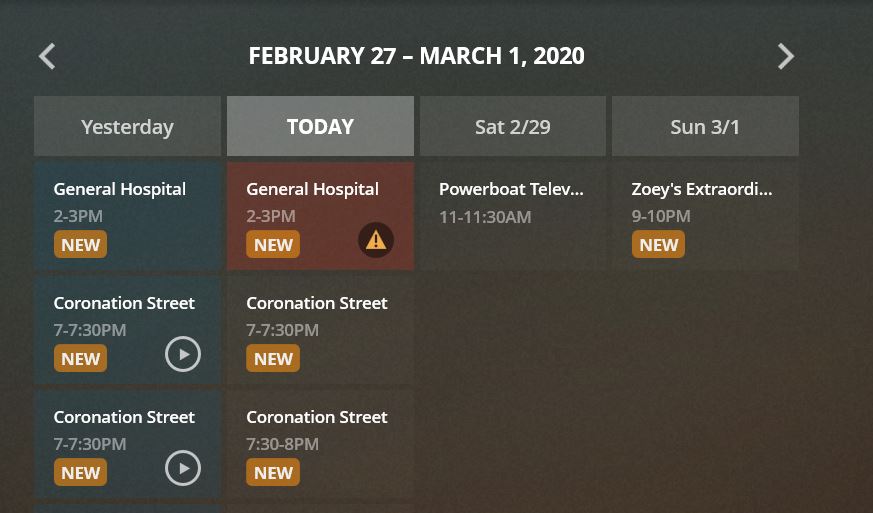
I have been running PlexMediaServer-1.18.8.2468 about 8 days now. It seems to have fixed both my issues on my Synology Diskstation DS1819+:
1 - Could not move recorded media to destination
2 - Shows grabbing more than one tuner (e.g. it is recording 7 shows but it looks like 12 tuners are in use).
I stopped restarting the service 3 or 4 days ago and all looks good.
1 Like
Very strange. I can see no purging of the .grab directory on this server but at the end of the recording, the directory or .ts file was not there.
I see you only have one server. Was this the case on the 28 Feb when this arose?
Do you have any scripts that may tidy up .grab directories?
I can only suggest we look for more examples of this and may need to add some extra logging. Could you switch to the latest beta release and see if there is any difference
Thank you for taking a look at it for me. I was having this problem reoccur many times for about two months. Yes I only had the one server running on the NAS and don’t have any unusual scripts. The problem seems to have resolved (fingers crossed) but I’m not entirely sure what fixed it. I did the clean bundles, optimize database and I changed the folder where my recordings were kept. I moved the recordings folder inside the Plex folder which was automatically created on the NAS when the server was first installed. I’m glad its working again, I was getting tired of having to manually move shows out of the recycling box. Plex is now working out to be a nice replacement for my old windows media centre setup. Thank you again for taking the time to help out.
1 Like
What was the setup before ? a mounted network share ? Recently I came across some access issues with a CIFS setup. When that was changed - problems went away…
There were many similar actions that were ok -only one failed. May be there was system issue and lost access to the path
Logs extract shows all ok apart from attempting to access the path at 15:02:02 failing
Feb 26, 2020 21:00:01.096 [0x7fe8f39af700] DEBUG - Grabber: Saving recording to "/volume1/TV Recordings/.grab/26ae95d7674d9ddf982e02779d564bb71807984b-26e560fba7c8949e2ddadae768ef1c4bad1d938e"
Feb 26, 2020 21:01:00.879 [0x7fe8f6e6b700] DEBUG - Grabber: Saving recording to "/volume1/TV Recordings/.grab/c56d08975aeffdfc6406838b0d740e8c6cd309ee-26e560fba7c8949e2ddadae768ef1c4bad1d938e"
Feb 26, 2020 21:13:42.167 [0x7fe8f4b43700] DEBUG - Grabber: Moving "/volume1/TV Recordings/.grab/758ad030d4c1592e1e2eac5ac36e955ab3d34d58-26e560fba7c8949e2ddadae768ef1c4bad1d938e/Chicago Med (2015) - S05E15 - I Will Do No Harm.ts" to "/volume1/TV Recordings/Chicago Med (2015)/Season 05/Chicago Med (2015) - S05E15 - I Will Do No Harm.ts"
Feb 26, 2020 22:15:09.197 [0x7fe919fc5700] DEBUG - Grabber: Moving "/volume1/TV Recordings/.grab/c56d08975aeffdfc6406838b0d740e8c6cd309ee-26e560fba7c8949e2ddadae768ef1c4bad1d938e/Transplant (2020) - S01E01 - Pilot.ts" to "/volume1/TV Recordings/Transplant (2020)/Season 01/Transplant (2020) - S01E01 - Pilot.ts"
Feb 26, 2020 22:21:07.931 [0x7fe9367f0700] DEBUG - Grabber: Moving "/volume1/TV Recordings/.grab/26ae95d7674d9ddf982e02779d564bb71807984b-26e560fba7c8949e2ddadae768ef1c4bad1d938e/Chicago Fire (2012) - S08E15 - Off the Grid.ts" to "/volume1/TV Recordings/Chicago Fire (2012)/Season 08/Chicago Fire (2012) - S08E15 - Off the Grid.ts"

Feb 27, 2020 00:00:00.418 [0x7fe9367f0700] DEBUG - Grabber: Saving recording to "/volume1/TV Recordings/.grab/bb5bc07c65e98da1a26e22ee5a5c1a60cac358fd-26e560fba7c8949e2ddadae768ef1c4bad1d938e"
Feb 27, 2020 00:35:35.249 [0x7fe91ae6b700] DEBUG - Grabber: Moving "/volume1/TV Recordings/.grab/bb5bc07c65e98da1a26e22ee5a5c1a60cac358fd-26e560fba7c8949e2ddadae768ef1c4bad1d938e/Coronation Street (1960) - 2020-02-26 07 00 00 - Coronation Street.ts" to "/volume1/TV Recordings/Coronation Street (1960)/Season 2020/Coronation Street (1960) - 2020-02-26 07 00 00 - Coronation Street.ts"

Feb 27, 2020 13:59:00.909 [0x7fe8f7159700] DEBUG - Grabber: Saving recording to "/volume1/TV Recordings/.grab/b1818656d297fc77e68ba36f4a32c7b5f886ebad-26e560fba7c8949e2ddadae768ef1c4bad1d938e"
Feb 27, 2020 15:15:20.608 [0x7fe8f7447700] DEBUG - Grabber: Moving "/volume1/TV Recordings/.grab/b1818656d297fc77e68ba36f4a32c7b5f886ebad-26e560fba7c8949e2ddadae768ef1c4bad1d938e/General Hospital (1963) - S57E222 - 02-27-2020.ts" to "/volume1/TV Recordings/General Hospital (1963)/Season 57/General Hospital (1963) - S57E222 - 02-27-2020.ts"

Feb 27, 2020 19:00:00.444 [0x7fe934d43700] DEBUG - Grabber: Saving recording to "/volume1/TV Recordings/.grab/53f7a759d4e5d8a9e738098ee46494e4909c72d8-26e560fba7c8949e2ddadae768ef1c4bad1d938e"
Feb 27, 2020 19:35:50.114 [0x7fe91a88f700] DEBUG - Grabber: Moving "/volume1/TV Recordings/.grab/53f7a759d4e5d8a9e738098ee46494e4909c72d8-26e560fba7c8949e2ddadae768ef1c4bad1d938e/Coronation Street (1960) - 2020-02-27 07 00 00 - Coronation Street.ts" to "/volume1/TV Recordings/Coronation Street (1960)/Season 2020/Coronation Street (1960) - 2020-02-27 07 00 00 - Coronation Street.ts"

Feb 27, 2020 20:00:00.928 [0x7fe8f5fc5700] DEBUG - Grabber: Saving recording to "/volume1/TV Recordings/.grab/7e91d0a63588c2b6053c45566d207236a43c07ae-26e560fba7c8949e2ddadae768ef1c4bad1d938e"
Feb 27, 2020 20:00:00.929 [0x7fe8f4e31700] DEBUG - Grabber: Saving recording to "/volume1/TV Recordings/.grab/8cdac0ed55ed2c961a9d377c5b7da94e8fc1d81d-26e560fba7c8949e2ddadae768ef1c4bad1d938e"
Feb 27, 2020 21:00:00.435 [0x7fe935c38700] DEBUG - Grabber: Saving recording to "/volume1/TV Recordings/.grab/17ff625a4be8e08f33c2a8a17d15ec5f01603509-26e560fba7c8949e2ddadae768ef1c4bad1d938e"
Feb 27, 2020 21:13:10.045 [0x7fe8f7d11700] DEBUG - Grabber: Moving "/volume1/TV Recordings/.grab/8cdac0ed55ed2c961a9d377c5b7da94e8fc1d81d-26e560fba7c8949e2ddadae768ef1c4bad1d938e/Katy Keene (2020) - S01E04 - Chapter Four Here Comes the Sun.ts" to "/volume1/TV Recordings/Katy Keene (2020)/Season 01/Katy Keene (2020) - S01E04 - Chapter Four Here Comes the Sun.ts"
Feb 27, 2020 21:13:20.505 [0x7fe91ae6b700] DEBUG - Grabber: Saving recording to "/volume1/TV Recordings/.grab/17ff625a4be8e08f33c2a8a17d15ec5f01603509-26e560fba7c8949e2ddadae768ef1c4bad1d938e"
Feb 27, 2020 21:20:36.148 [0x7fe91b159700] DEBUG - Grabber: Moving "/volume1/TV Recordings/.grab/7e91d0a63588c2b6053c45566d207236a43c07ae-26e560fba7c8949e2ddadae768ef1c4bad1d938e/Station 19 (1993) - S03E06 - Ice Ice Baby.ts" to "/volume1/TV Recordings/Station 19 (1993)/Season 03/Station 19 (1993) - S03E06 - Ice Ice Baby.ts"
Feb 27, 2020 22:09:30.784 [0x7fe91a88f700] DEBUG - Grabber: Moving "/volume1/TV Recordings/.grab/17ff625a4be8e08f33c2a8a17d15ec5f01603509-26e560fba7c8949e2ddadae768ef1c4bad1d938e/Grey's Anatomy (2005) - S16E15 - Snowblind.ts" to "/volume1/TV Recordings/Grey's Anatomy (2005)/Season 16/Grey's Anatomy (2005) - S16E15 - Snowblind.ts"

Feb 28, 2020 00:00:00.931 [0x7fe91ae6b700] DEBUG - Grabber: Saving recording to "/volume1/TV Recordings/.grab/dfabc2e2b9b2543aee92272af8fe42eb52237959-26e560fba7c8949e2ddadae768ef1c4bad1d938e"
Feb 28, 2020 00:35:34.724 [0x7fe9367f0700] DEBUG - Grabber: Moving "/volume1/TV Recordings/.grab/dfabc2e2b9b2543aee92272af8fe42eb52237959-26e560fba7c8949e2ddadae768ef1c4bad1d938e/Coronation Street (1960) - 2020-02-27 07 00 00 - Coronation Street.ts" to "/volume1/TV Recordings/Coronation Street (1960)/Season 2020/Coronation Street (1960) - 2020-02-27 07 00 00 - Coronation Street (copy 1).ts"

Feb 28, 2020 13:59:00.708 [0x7fe934d43700] DEBUG - Grabber: Saving recording to "/volume1/TV Recordings/.grab/9f5de1f4209550429baf0a3562f1a5c8121537b1-26e560fba7c8949e2ddadae768ef1c4bad1d938e"
Feb 28, 2020 15:02:02.388 [0x7fe8f7447700] ERROR - Grabber: Failed to inspect file: Could not parse /volume1/TV Recordings/.grab/9f5de1f4209550429baf0a3562f1a5c8121537b1-26e560fba7c8949e2ddadae768ef1c4bad1d938e/General Hospital (1963) - S57E223 - 02-28-2020.ts (error=-2): No such file or directory
Feb 28, 2020 15:02:02.392 [0x7fe8f7447700] ERROR - Grabber: Error processing files: boost::filesystem::directory_iterator::construct: No such file or directory: "/volume1/TV Recordings/.grab/9f5de1f4209550429baf0a3562f1a5c8121537b1-26e560fba7c8949e2ddadae768ef1c4bad1d938e"
Just a regular shared folder on the NAS. It shouldn’t be a permissions issue since other recordings were all going to that same folder. Who knows but I am happy its working now 
@sa2000 My apologies for not responding sooner. I kind of gave up for a while. I do have two Plex servers running, sharing the same directories, Synology and Mac OS X. I’m downloading the current versions and will let you know if recordings start working properly.
1 Like
4 posts were split to a new topic: Errors moving / creating / accessing files and directories - permissions denied
Wow, Thanks for the quick reply. I am fair with Linux - I know how to change Permissions and will give it a try. Some of this was my effort to move and recreate the Directories to fix my problem Looks like I did more damage. I think I have fixed the “.grab” missing and Permissions. Which file was this in? I will dig through and try to find. I have more Recording about to start so I will see and hope all goes well. Thanks for the help.
@sa2000 Great news to report - recordings are working reliably again! Thank you!
I started seeing this issue when I added a second hdhomerun (1 quatro and 1 dual) to my system. I am seeing some shows are appearing in the activity list as two separate recordings taking place at the same time (both tuners are recording the same program) when the program ends, only one recording “wins” and the other throws an error. It seems totally random. Some programs do this all the time, where others do not. It seems that changing the recording rule from “Keep All” to some other setting (i.e. Episodes add in the last 7 days) keeps the system from doubling up recordings, but I have not extensively tested this.
Running plex server within Terra Master NAS and the latest plex and NAS OS. Having the same problem but with only one show. That show was recording daily 4 times per day until about a week ago. My NAS started showing an error of one of the drives was missing.I eventually ended up resetting and erasing the entire NAS and reinstalled all the media from a backup every since then that one show gives me the same error daily. I’ve recorded others shows from the same and other networks and even at the same time. The all work except this one show after reinstalling.
I just ran into this issue tonight for the first time. Makes no sense as it just recorded four shows perfectly fine before it happened… I have logs I can PM if needed.

ok please disregard my request - see Could Not move recorded media to destination
DISREGARD FOLLOWING:same error here, recording intermittently fails with this error about 2-3% of total scheduled items. I have a homebuilt NAS and Plex runs on it with Ryzen 2600, 2TB left in btrfs storage pool. 98% of shows record fine, “Modern Family” is the only one that fails with this error about 10% of the time. Pretty odd
Version 1.19.2.2737
Here’s a grep of the Modern Family Episode title “Yes-Woman”:
Plex Media Scanner.log:May 15, 2020 09:26:12.388 [0x7f2c3be0b2c0] DEBUG - Destroying metadata item 16517 (Yes-Woman)
Plex Media Server.4.log:May 15, 2020 04:00:58.493 [0x7ff9a3fff700] DEBUG - Destroying metadata item 1902 (Yes-Woman)
Plex Media Server.5.log:May 15, 2020 02:05:07.693 [0x7ffa38ff9700] DEBUG - Butler: Scheduling deep analysis for: Yes-Woman
Plex Media Server.5.log:May 15, 2020 02:26:44.964 [0x7ff9c17fa700] DEBUG - Grabber: Recording for 'Modern Family - E19 - Yes-Woman' on channel 54.1 stopped with status complete.
Plex Media Server.5.log:May 15, 2020 02:26:44.964 [0x7ff9c17fa700] DEBUG - [MI] Opening input file: "/pool-erm/Plex-ERM-TV-DVR/.grab/920db5d1d408afe282c2c163c0c1a6e9c9150c1b-83d86fc375c8924d3fd1b26e1a806cfe00b18537/Modern Family (2009) - S10E19 - Yes-Woman.ts"
Plex Media Server.5.log:May 15, 2020 02:26:44.965 [0x7ff9c17fa700] DEBUG - [FFMPEG] - Opening '/pool-erm/Plex-ERM-TV-DVR/.grab/920db5d1d408afe282c2c163c0c1a6e9c9150c1b-83d86fc375c8924d3fd1b26e1a806cfe00b18537/Modern Family (2009) - S10E19 - Yes-Woman.ts' for reading
Plex Media Server.5.log:May 15, 2020 02:26:44.970 [0x7ff9c17fa700] ERROR - Grabber: Failed to inspect file: Could not parse /pool-erm/Plex-ERM-TV-DVR/.grab/920db5d1d408afe282c2c163c0c1a6e9c9150c1b-83d86fc375c8924d3fd1b26e1a806cfe00b18537/Modern Family (2009) - S10E19 - Yes-Woman.ts (error=-2): No such file or directory
Plex Media Server.5.log:May 15, 2020 02:26:44.970 [0x7ff9c17fa700] DEBUG - Grabber: Scheduling 'Modern Family - E19 - Yes-Woman' for assimilation.
Plex Media Server.5.log:May 15, 2020 02:26:44.974 [0x7ff9c17fa700] DEBUG - Assimilator: Postprocessing, we're going to put `Modern Family - E19 - Yes-Woman` in `/pool-erm/Plex-ERM-TV-DVR/Modern Family (2009)/Season 10/Modern Family (2009) - S10E19 - Yes-Woman.ts`
Plex Media Server.5.log:May 15, 2020 02:26:44.974 [0x7ff9c17fa700] DEBUG - Grabber: Operation for 'Modern Family - E19 - Yes-Woman' on channel 54.1 completed with status error (Could not move recorded media to destination)
grep: PMS Plugin Logs: Is a directory
I notice an interesting preceding error “ERROR - Grabber: Failed to inspect file: Could not parse…” as if the file was trashed before that, yet the file was recorded successfully. I do not find this recording in my trash folder.

I can upload logs if it helps, 6MB [Plex Media Server Logs_2020-05-15_17-45-05.zip]
can’t start an investigation without the logs. I have seen this type of error recently on cancelled or aborted recordings.
ok please disregard my request - see Could Not move recorded media to destination
DISREGARD FOLLOWING: ok I attached the actual log.zip to Could Not move recorded media to destination
Since my last post, 2 out of 3 Modern Family recent recordings, failed with the same error last night. Just now I restored from trash, an old directory tree recorded by Plex DVR from several days ago, for Modern Family (2009)/Season 10, to the Plex recording location on its local storage. I am assuming it has the correct permissions since Plex created this old directory. The new recordings of other TV series are still recording normally today and previously.
here’s a screenshot of permissions for Modern Family and .grab, the subdirectories have the same, and other shows are still recording ok:

ok I think this issue can be put on HOLD in my case, it has something to do with permissions, bad owner or group. I started recording a new test-show-schedule and reproduced the error., then changed the recording location and rebooted, and then the same test-show-schedule started working for my test. I see some differences in owner+group in the test-location and the changed-location, so I’ve probably messed up the default recording directory owner+group somehow.
Thanks, please disregard my request.
I too am having this issue. It’s really driving me nuts!
I also have been getting the same issue. What baffles me is that there is sporadic successful recordings interspersed before and after :

1 Like
Hi,
Same issue here.
Since a while, I did not record anything.
I tried to record a show 2 days ago -> same error !
PMS version 1.19.5.3112 on synology NAS
Nevertheless, it is well recorded under .grab, but deleted after a while.
