Seemingly random failed recordings with error: Could not move recorded media to destination

I am seeing shows seemingly randomly fail to record all have the message:

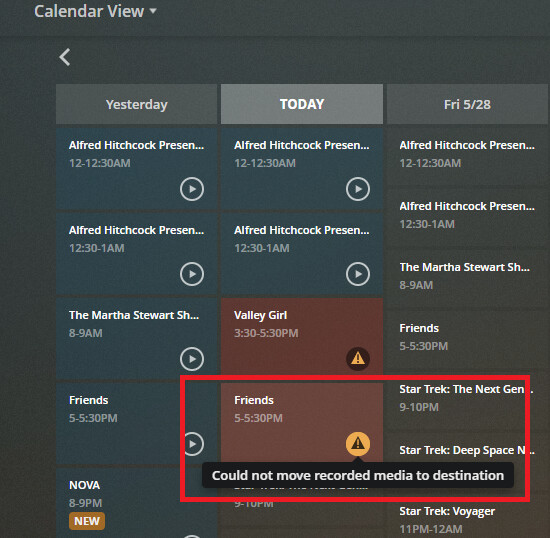
“Could not move recorded media to destination”

See screenshot below where the same show records successfully and also fails at other airings

There is another thread where at least 2 others are experiencing the problem with no resolution to the issue and the thread closed automatically after 90 days:

For me it seemed to start happening after doing the following:

I deleted my two HD Homerun Tuners one an Extend and the other an HD Homerun Connect. I re added the Connect and no longer used my Extend and instead added an old Dual I had lying around that I was previously using with Windows Media Center.

(on a sidenote Plex server was not discovering the HDHomeRun Dual on the network. I had to turn off the Firewall in Ubuntu for the Plex server to discover it. Others have reported similar issues on the forum with the Dual.)

Other issues that started happening at around the same time:

After adding the Extend and the Dual all the scheduled DVR recordings came back.

Some recordings were recording twice after this change (simultaneously.)

Another show still recorded even after deleting it from the DVR schedule.

I tried deleting and re adding many of the shows that exhibit the random fail to move issue but this did not help.

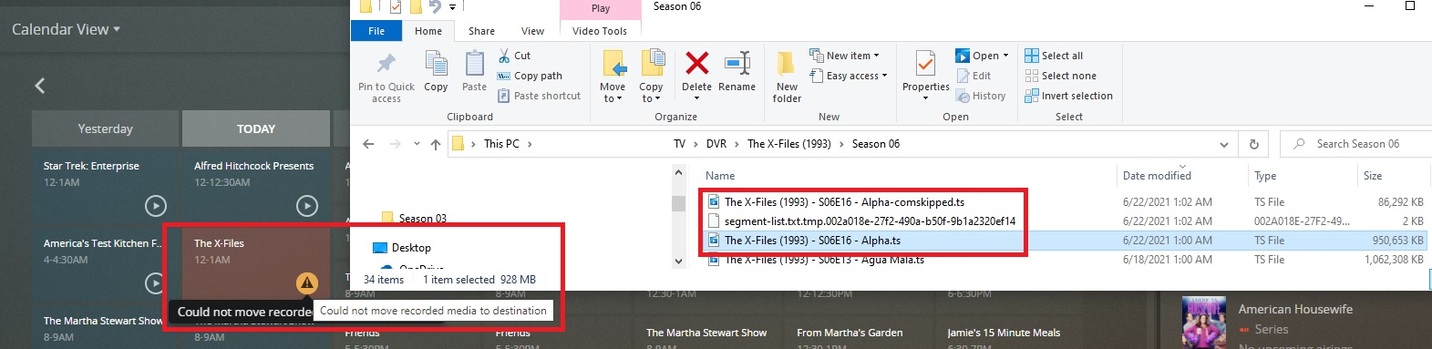
The recorded file does actually get moved into the correct folder. When this error occurs however the following files are also left behind in the same target folder corresponding to the failed recording:

segment-list.txt.tmp.3dbbc464-7cfb-4f18-81bb-c6322c3d1b19

Show - SxxExx - Episode-comskipped.ts

Show - SxxExx - Episode.log

Info about my setup

Plex Media Server Version 1.22.3.4392

Running on

Ubuntu Linux version: 18.04.3 LTS (Bionic Beaver) running on Intel NUC hardware

Storage is an UnRAID NAS
Would you be able to share debug level Plex Media Server logs for a time period where there was a failed recording? Hopefully it will provide a more detailed message regarding the error. Perhaps something is locking the file(s), preventing it from removing them? Do all of your recordings go to the same library?

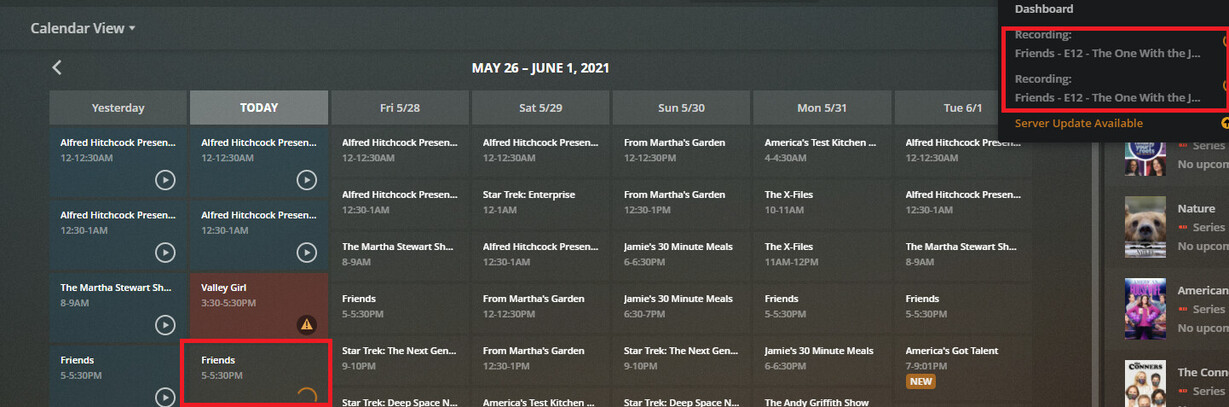
I will. It just happened again and I did not have debug level turned on if that is an option. I will grab the logs as they are right now. I noticed that this particular situation had the double recording issue and then the result was “could not move recorded media to destination.” see screenshots. Ignore the recording before it “Valley Girl.” That was a first time recording of a movie using Live TV/DVR. I set it to record a movie to a share that the user has only read access too. I need to setup read write permissions for recording movies.

Would you be able to post the logs you have? Debug level logging might be turned on as a default, and even if it is not they are worth reviewing.

FYI, you can check the log levels that are set in Plex Web by going to Settings → General (the “General” under “Settings” on the left, not “General” under the “Plex Web” heading!) Then click the “Show Advanced” button. Verify that “Enable Plex Media Server Debug Logging” is checked, but don’t enable “Verbose” logging. Click the “Save Changes” button. Verbose is too much information and typically the logs roll off after a couple minutes. When you have a chance that it isn’t being used restart your Plex Server instance.

Thanks for the reply hokierulz. I did already have debug logging enabled as it turns out. I have also rebooted the Plex server multiple times while this issue has been occurring.

The logs I captured are polluted with another misconfiguration issue that is completely unrelated as well as a media scan I kicked off around the same time so I don’t want to proved those.

It happened again last night but I did not bother to gather the logs however I glanced at the tuners and the lights indicated that a tuner was being used for each duplicate recording (2 tuners were in use on the HD Homerun.) And the final result when the duplicate recordings finished recording the episode was “Could not move recorded media to destination.”

The unwanted double recording seems to be the root cause of the “Could not move recorded media to the destination” error in my case. When it happens again I will capture the logs and upload them.

The duplicate recording issue is described exactly in two other posts. One even mentions the HDHomerun Dual as an additional tuner possibly causing the issue which is also what I added to my configuration before this all started. I may try removing it and see how that goes:

1 Like

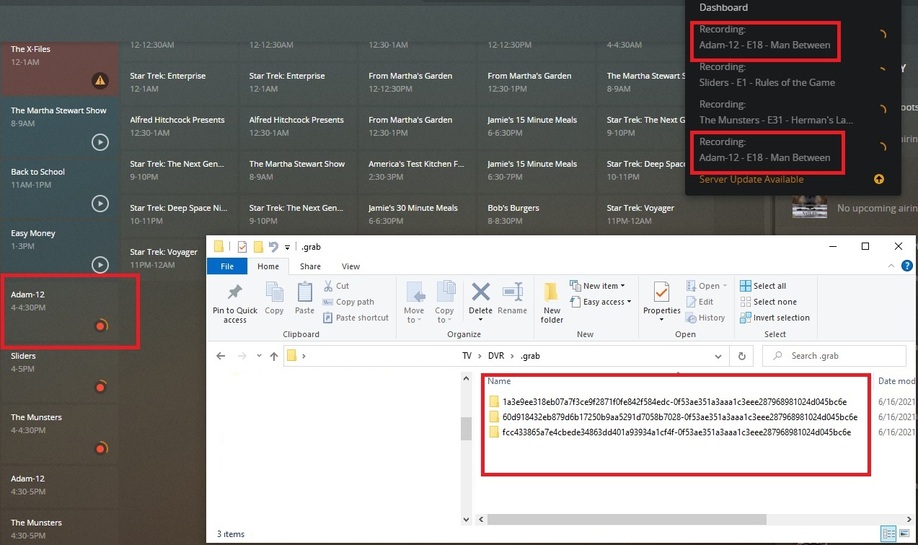
I was able to recreate the issue in the middle of the day when it was more convenient to download the logs immediately after the problem occurred. Please see attached log files. The recording that generated the error in this case was Between 2021-06-16 16:00:00 and 2021-06-16 16:30:00 on channel 7.2: ‘Adam-12 - E18 - Man Between’

Plex Media Server Logs_2021-06-16_16-47-17.zip (5.2 MB)

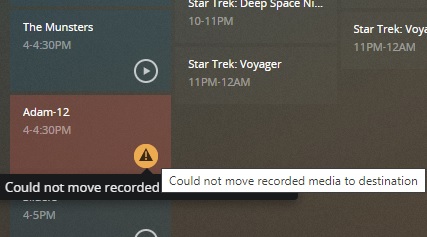
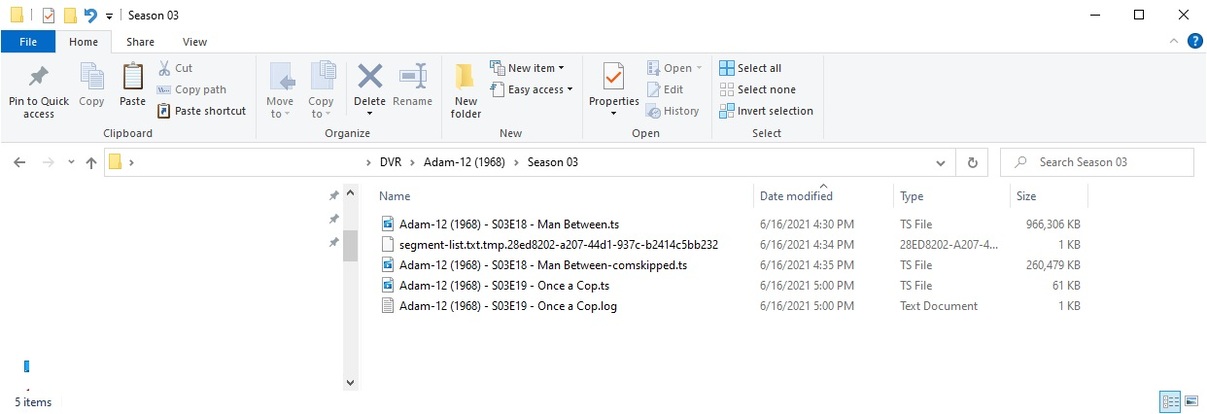
As you can see in the screenshot below it listed it as being recorded twice while the recording was in progress. The second screenshot shows the “Could not move recorded media to destination” error. The third screenshot shows the destination folder contents. The file for the failed recording “Adam-12 (1968) - S03E18 - Man Between.ts” is in the destination directory along with two other files that were left behind:

segment-list.txt.tmp.28ed8202-a207-44d1-937c-b2414c5bb232
Adam-12 (1968) - S03E18 - Man Between-comskipped.ts

There were two other successful recordings happening for two other shows during this time frame.

Thanks for looking at this. I also found three additional posts with a similar issue

It happened again at 1:00 AM this morning when recording The X-Files (1993) - S06E16 - Alpha

Error: “Could not move recorded media to destination”
“The X-Files (1993) - S06E16 - Alpha.ts” file actually does get moved to destination folder
segment-list.txt.tmp.002a018e-27f2-490a-b50f-9b1a2320ef14 file left behind in destination folder
“The X-Files (1993) - S06E16 - Alpha-comskipped.ts” file left behind in destination folder

Last night at 11 pm “The X-Files (1993) - S07E02 - The Sixth Extinction II Amor Fati” recorded successfully. A second recording immediately following for “The X-Files (1993) - S07E03 - Hungry” failed. See screenshot.

I gave up on getting anyone to take my issue seriously and just retired my Dual and haven’t had any issues since.

So a bit new with plex internal structure, if it says could not move recorded media to destination the actual file must be there somewhere right? i just cannot find it, is it possible to get it to move now that i have resolved my issue (just simple permissions that were wrong), any help would be much appricated.

In my case it is a different issue (still happening.) The files are actually moved to the target directory successfully. However during post processing something goes wrong and this error displays.

If they are not being copied to the target directory because of permissions problems perhaps they are still in the .grab folder in the path your configured the DVR to save files to ?

If it is there it will be in the .grab folder underneath your TV Library location. I don’t hold much hope because it usually cleans up after the recording.

Thanks although it only had half a recording from almost a year ago. it makes sense as the permissions were wrong (i had hoped it recorded to a different folder)

This topic was automatically closed 90 days after the last reply. New replies are no longer allowed.