Credits detection doesn't clean after itself in /tmp

Like this report from 2023, Plex Media Server is filling up my /tmp folder (tmpfs) to the point it stops streaming sometimes because it fails to create the folder necessary to transcode audio. I didn’t want to setup a cronjob to clear /tmp or automatically reboot my computer every day.

Feb 14, 2025 15:27:22.555 [140170659257144] INFO - [Req#14af/Transcode] CodecManager: starting EAE at "/tmp/pms-f0f8cff4-eeea-4f68-8e52-97b77e5665d3/EasyAudioEncoder"
Feb 14, 2025 15:27:22.555 [140170659257144] ERROR - [Req#14af/Transcode] Error creating directory "/tmp/pms-f0f8cff4-eeea-4f68-8e52-97b77e5665d3/EasyAudioEncoder/Convert to Dolby Digital Plus (Max Quality - 1024 kbps)": No space left on device
Feb 14, 2025 15:27:22.555 [140170659257144] ERROR - [Req#14af/Transcode] CodecManager: could not create EAE watch folder
Feb 14, 2025 15:27:22.555 [140170659257144] ERROR - [Req#14af/Transcode] Error configuring transcoder: Decoder install failed: eac3_eae
Feb 14, 2025 15:27:23.767 [140170541316920] WARN - [Req#14b3/Transcode] Denying access to transcode of key /library/metadata/7465 due to terminated session

Using SSH, I also cannot create any files or folders in /tmp:

root@rafael-pc /tmp# mkdir test
mkdir: cannot create directory "test": No space left on device

The largest folder in /tmp was about 4.2GB in size and is the same folder it appears on the Feb, 13’s Credits log: PlexCreditsDetection-fa4703a6-8f9c-403b-bdc4-75091017e83a

Feb 13, 2025 04:08:09.543 [140398481636096] INFO - Plex Media Scanner v1.41.4.9421-0ce20c470 - Fedora Linux Gigabyte Technology Co., Ltd. B650M GAMING WIFI x86_64 - build: linux-x86_64 - GMT -03:00
Feb 13, 2025 04:08:09.544 [140398481636096] INFO - Linux version: 41 (Server Edition), language: en-US
Feb 13, 2025 04:08:09.544 [140398481636096] INFO - Processor: 12-core AMD Ryzen 5 7600 6-Core Processor
Feb 13, 2025 04:08:09.544 [140398481636096] INFO - /usr/lib/plexmediaserver/Plex Media Scanner -C -f /(the same full mkv path) --log-file-suffix  Credits --creditsTempDataPath /tmp/PlexCreditsDetection-fa4703a6-8f9c-403b-bdc4-75091017e83a
-- other file because of the date, no log content was removed besides the file name
Feb 14, 2025 04:47:13.613 [140416027306752] INFO - Plex Media Scanner v1.41.4.9421-0ce20c470 - Fedora Linux Gigabyte Technology Co., Ltd. B650M GAMING WIFI x86_64 - build: linux-x86_64 - GMT -03:00
Feb 14, 2025 04:47:13.613 [140416027306752] INFO - Linux version: 41 (Server Edition), language: en-US
Feb 14, 2025 04:47:13.613 [140416027306752] INFO - Processor: 12-core AMD Ryzen 5 7600 6-Core Processor
Feb 14, 2025 04:47:13.613 [140416027306752] INFO - /usr/lib/plexmediaserver/Plex Media Scanner -C -f /(the same full mkv path) --log-file-suffix  Credits
Feb 14, 2025 04:47:13.664 [140416034197248] WARN - Failed to create temp dir "/tmp/PlexCreditsDetection-0f384c59-3b15-4c6c-ae23-6e3e5059c1ca": 28, No space left on device
Feb 14, 2025 04:47:13.724 [140416034197248] ERROR - Error creating directory "": Invalid argument

I don’t know if the process ended abruptly in Feb, 13, as my scheduled tasks ends at 5 am, but there are ways to clean the folder even if the process were to be killed anyway.

Server Version#: 1.41.4.9421
Player Version#: 4.143.0

I have now updated to 1.41.4.9463-630c9f557 and enabled debug logs. I will try to report soon as it happens again.

How large is your temp dir?

31 GiB is the hard limit in my current setup, but not all is always useable (tmpfs has some weird behavior from what I’ve read investigating this issue)

The problem with my /tmp was inode exhaustion. It happened today and I was able to investigate further.

root@rafael-pc ~# df -h /tmp
Sist. Arq.      Tam. Usado Disp. Uso% Montado em
tmpfs            31G  3,7G   28G  12% /tmp
root@rafael-pc ~# df -i /tmp
Sist. Arq.        Inós  IUsado ILivre IUso% Montado em
tmpfs          1048576 1048576      0  100% /tmp
root@rafael-pc ~# df  /tmp
Sist. Arq.     Blocos de 1K   Usado Disponível Uso% Montado em
tmpfs              32458752 3854932   28603820  12% /tmp
root@rafael-pc ~# free -vht
               total        used        free      shared  buff/cache   available
Mem:            61Gi        59Gi       2,1Gi       376Ki       1,2Gi       2,2Gi
Swap:          8,0Gi       4,7Gi       3,3Gi
Total:          69Gi        64Gi       5,4Gi
Comm:           38Gi        11Gi        26Gi
root@rafael-pc ~# ls -l /tmp
total 0
drwxr-xr-x. 2 plex plex      260 fev 15 04:28 PlexCreditsDetection-6a9816e0-d149-47b5-875e-c23aacb28d62/
drwxr-xr-x. 2 plex plex 19274460 fev 15 02:50 PlexCreditsDetection-d8bdf134-8ff2-4319-81a8-bba70a341217/
drwxr-xr-x. 2 plex plex       40 fev 15 04:31 pms-8816f6e6-ef62-473f-93eb-aa101933cb5f/
drwx------. 2 root root       60 fev 14 22:08 ssh-XXXXXXHSTE8b/
root@rafael-pc ~# du -sh /tmp/*/
44K	/tmp/PlexCreditsDetection-6a9816e0-d149-47b5-875e-c23aacb28d62/
3,7G	/tmp/PlexCreditsDetection-d8bdf134-8ff2-4319-81a8-bba70a341217/
0	/tmp/pms-8816f6e6-ef62-473f-93eb-aa101933cb5f/
0	/tmp/ssh-XXXXXXHSTE8b/
root@rafael-pc ~# find /tmp -type f | wc
 963734  963734 77962326
root@rafael-pc ~# ls -la /tmp/PlexCreditsDetection-d8bdf134-8ff2-4319-81a8-bba70a341217/ | tail -n 8
-rw-r--r--. 1 plex plex     1300 fev 15 02:40 thumb-99992.jpeg
-rw-r--r--. 1 plex plex     1300 fev 15 02:40 thumb-99993.jpeg
-rw-r--r--. 1 plex plex     1300 fev 15 02:40 thumb-99994.jpeg
-rw-r--r--. 1 plex plex     1300 fev 15 02:40 thumb-99995.jpeg
-rw-r--r--. 1 plex plex     1300 fev 15 02:40 thumb-99996.jpeg
-rw-r--r--. 1 plex plex     1300 fev 15 02:40 thumb-99997.jpeg
-rw-r--r--. 1 plex plex     1300 fev 15 02:40 thumb-99998.jpeg
-rw-r--r--. 1 plex plex     1300 fev 15 02:40 thumb-99999.jpeg

I’ll look into increasing the limit of inodes in /tmp’s tmpfs for Fedora anyway.

Edit: Using systemctl edit tmp.mount, I removed the hard limit of “1m” inodes on /tmp, leaving to the default value (described here at nr_inodes) and now I have “8m” as a limit. I will report tomorrow how Plex uses it. I’ve also increased Fedora’s zram size and added a swap on disk to be safe for this test in case Plex exports more millions of files with the increased limit :sweat_smile:.

If someone from Plex wants the log file to investigate why sometimes the Credits folder aren’t getting deleted, I have saved it and can send by private message or something else, I don’t feel like attaching it here publicly.

My sister told me transcoding stopped again. With the increased limits, Plex just used up more space for Credits Detection :sweat_smile:. All 8 million inodes used up and 29 GB of RAM through tmpfs.

root@rafael-pc ~# df -hi /tmp
Sist. Arq.      Inós IUsado ILivre IUso% Montado em
tmpfs           7,8M   7,8M      0  100% /tmp
root@rafael-pc ~# df -h /tmp
Sist. Arq.      Tam. Usado Disp. Uso% Montado em
tmpfs            31G   29G  2,6G  92% /tmp
root@rafael-pc ~# du -sh /tmp/*/
29G	/tmp/PlexCreditsDetection-ee05a44a-4a3b-4e05-b7f8-df40b0fd086c/
(...)
root@rafael-pc ~# ls -l /tmp/PlexCreditsDetection-ee05a44a-4a3b-4e05-b7f8-df40b0fd086c/
(...)
-rw-r--r--. 1 plex plex 1300 fev 16 06:46 thumb-9958312.jpeg
-rw-r--r--. 1 plex plex 1300 fev 16 06:46 thumb-9958313.jpeg
-rw-r--r--. 1 plex plex 1300 fev 16 06:46 thumb-9958314.jpeg

I saved the logs again, in case any Plex employee needs for investigating the issue (no one asked for it yet).
Since this is just wasting RAM, I will decrease the /tmp’s tmpfs limits to the original values, disable “Generate credits video markers” in Plex Media Server and hope someone fixes this issue in the future.
I will try to keep this thread alive for the coming months since this report was locked and the issue still exists.

I am the author of the original 2013 post. I cannot reproduce this with latest Plex Media Server 1.41.4.9463

root@plex:~# du -sh /tmp/
7.2M	/tmp/

root@plex:~# ls /tmp/ | grep PlexCreditsDetection

Note that in my setup, /tmp is not tmpfs mounted, only /transcode, like this --mount type=tmpfs,dst=/transcode,tmpfs-size=32G,tmpfs-mode=1777

Did you try mounting /tmp without tmpfs and see if anything changes? Incorrect permissions come to mind for your /tmp mount.

@ChuckPa any chance you can look at these logs?

I am using Fedora’s setup for /tmp on tmpfs and using Plex’s RPM package for Fedora, so permissions shouldn’t be an issue. Plex doesn’t have issues creating/deleting other files and folders there too.

I can test creating a file-backed filesystem and mounting to /tmp to avoid running out of root space. I can’t give much more space than that or a real partition because I don’t have any extra drives with free space (my filesystem doesn’t support shrinking).

I looked into the history on this.

There was tentative work done but never made part of PMS because the user(s) involved stopped responding.

Since I’m likely to be doing a fresh start on this issue, even though I’ve seen it before, I would like to ask system questions:

  1. Is the host HDD or SSD based ?
  2. PMS is running native on the host ?
  3. How are the host’s partitions formatted ? (ext4, xfs, something else?)
  4. What are the capacities involved for the partitions ?
  5. How much host memory ?

Thank you and @dbirch for the support! I appreciate it!

  • Is the host HDD or SSD based ?
    • Boots from SSD, media on HDD (/pool/data/)
  • PMS is running native on the host ?
    • Native on Fedora 41 (plexmediaserver-1.41.4.9463-630c9f557.x86_64.rpm)
  • How are the host’s partitions formatted ? (ext4, xfs, something else?)
    • Root on xfs, media on zfs
  • What are the capacities involved for the partitions ?
    • Root has 1TB, 60% used (400GB free)
    • Media has 29TB, 77% used (6,7TB free)
    • Here’s df excluding docker overlays (I don’t run plex on docker)
      Sist. Arq.              Tipo     Blocos de 1K       Usado Disponível Uso% Montado em
      /dev/mapper/fedora-root xfs         975016812   557018860  417997952  58% /
      devtmpfs                devtmpfs         4096           0       4096   0% /dev
      tmpfs                   tmpfs        32458748           4   32458744   1% /dev/shm
      efivarfs                efivarfs          128          38         86  31% /sys/firmware/efi/efivars
      tmpfs                   tmpfs        12983500        2836   12980664   1% /run
      tmpfs                   tmpfs            1024           0       1024   0% /run/credentials/systemd-journald.service
      tmpfs                   tmpfs            1024           0       1024   0% /run/credentials/systemd-network-generator.service
      tmpfs                   tmpfs            1024           0       1024   0% /run/credentials/systemd-udev-load-credentials.service
      tmpfs                   tmpfs            1024           0       1024   0% /run/credentials/systemd-sysctl.service
      tmpfs                   tmpfs            1024           0       1024   0% /run/credentials/systemd-tmpfiles-setup-dev-early.service
      tmpfs                   tmpfs            1024           0       1024   0% /run/credentials/systemd-tmpfiles-setup-dev.service
      tmpfs                   tmpfs            1024           0       1024   0% /run/credentials/systemd-vconsole-setup.service
      tmpfs                   tmpfs        32458752           4   32458748   1% /tmp
      /dev/nvme0n1p2          xfs            981132      483056     498076  50% /boot
      /dev/nvme0n1p1          vfat           613184        7700     605484   2% /boot/efi
      pool                    zfs        7176014080         256 7176013824   1% /pool
      pool/data               zfs       31074308096 23898294272 7176013824  77% /pool/data
      tmpfs                   tmpfs            1024           0       1024   0% /run/credentials/systemd-tmpfiles-setup.service
      tmpfs                   tmpfs            1024           0       1024   0% /run/credentials/systemd-resolved.service
      tmpfs                   tmpfs         6491748          24    6491724   1% /run/user/0
      tmpfs                   tmpfs            1024           0       1024   0% /run/credentials/getty@tty1.service
      
    • The mounting options for /tmp’s tmpfs from tmp.mount (systemd) are: Options=mode=1777,strictatime,nosuid,nodev,size=50%%,nr_inodes=1m
  • How much host memory ?
    • 64GB

2c., you can try using a bind mount for /tmp, like this:

# mkdir <somewhere>
# chmod 1777 <somwhere>
# mount -o bind <somewhere> /tmp

This might disrupt programs currently accessing the old /tmp; you can unmount once done testing:

# umount /tmp
# rm -r <somewhere>

To aid with focusing in on this,

Would you both consider making an override.conf for plexmediaserver.service in /etc/systemd/system/plexmediaserver.d/override.conf ?

Specifically, I would like to confirm whether PMS is:

  1. Failing to cleanup after success
    -or-
  2. Failing to cleanup after error(s) or being interrupted

Looking back, I wonder if the previously incomplete credit detections left behind temp files which are now contributing to a cascade failure for anything attempting to use $TMPDIR

To test this, I request:

  1. Create a temporary directory for PMS to use on the HDDs
  2. Create the service override.conf as follows:
[Service]
Environment="PLEX_MEDIA_SERVER_TMPDIR=/path/to/temp/dir"
Environment="TMPDIR=/path/to/temp/dir"
  1. Make certain this directory is fully RW by the plex runtime user (plex:plex by default)

  2. Restart PMS

@pdan

The above will not impact any other running processes / files open on /tmp.
Less invasive this way.

I have re-enabled the credits detection, overridden plexmediaserver.service and shifted Scheduled Tasks so I could get back to you sooner.

I have found the issue. Its not Plex’s fault except for the lack of safeguards and a corner case fault tolerance, which is totally understandable, but can be improved to not happen again.

TL;DR: 2 files have broken timestamps, I didn’t check prior to now, Plex doesn’t check for it before transcoding for Credits Detection and ffmpeg tries to extract an absurd amount of frames (way more than the amount available in the media).

Investigation: The Scheduled Tasks was supposed to end at 3pm. At 6pm, htop still showed 2 Plex processes transcoding with low resolution, related to Credits according to the logs. I investigated the files mentioned in the command line and they have broken timestamps. The 2 files shown in the processes have a duration of >10 years on ffprobe and MediaInfo:

# mediainfo
(...)
File size                                : 2.88 GiB
Duration                                 : 89678 h
Overall bit rate                         : 77 b/s
Frame rate                               : 0.000 FPS
(...)

# ffprobe:
(...)
Stream #0:0: Video: h264 (High), yuv420p(tv, bt709, progressive), 1920x1080 [SAR 1:1 DAR 16:9], 24 fps, 24 tbr, 1k tbn (default)
      Metadata:
        BPS             : 71
        DURATION        : 89678:38:15.485000000
        NUMBER_OF_FRAMES: 60936
        NUMBER_OF_BYTES : 2886353893
(...)

I don’t know why ffmpeg is extracting literally millions of frames instead of all the ~60 thousand available in the media.

# Plex's transcoding commandline
FFMPEG_EXTERNAL_LIBS='/var/lib/plexmediaserver/Library/Application\ Support/Plex\ Media\ Server/Codecs/e613bce-97f23d579c1001d8e9cc0d2e-linux-x86_64/' "/usr/lib/plexmediaserver/Plex Transcoder" -codec:v h264 -y -threads 6 -skip_frame noref -ss 648481 -i /pool/data/(media file path).mkv -vf "[in]fps=0.5,scale=w=320:h=320:force_original_aspect_ratio=increase,showinfo[out]" -vsync passthrough -f image2 "thumb-%05d.jpeg"

Anyway, after setting Plex’s tmp folder to my HDD and eventually killing the Plex transcoding process, the du command was taking so long, I gave up checking its size. The last time I saw, it was ~160GB and that was a couple of hours before killing the process. Now I have deleted the folder and will get the disk usage by comparing zfs list -p instead (for reference, 24889790158816 bytes used before removing the folder). Removal is still ongoing, so I will report approximate folder size later. I will remove those files from the Plex library and revert the changes to plexmediaserver.service.

The limited tmpfs space was crashing the transcoding processes before I could look into them and the two different files in the recent logs having the same issue made me believe it was a solely Plex problem instead of the files themselves.

Anyway, even though Plex isn’t cleaning after itself, it is clear that nobody would add a 10 year video to the library. So if adding safeguards for these situations or changing the handling of these kinds of files is of interest for the Plex Media Server, I can try to help further investigations or test solutions. If it isn’t, I can close this issue.

@rafaels

Plex should cleanup after itself and, further, not create a file for each frame of video. It should also recover gracefully from failures.

Engineering has a task to do just that – Use the FFMPEG libraries directly and read from the file for credit detection. This results in everything being done in RAM just like streaming the file to itself so it can look for the credits.

Thanks, that’s good to know! I don’t know why it started transcoding into jpegs in the TEMPDIR then. I’ll leave this open then and wait for further instructions :saluting_face:

Just to complete yesterday’s statement, that folder ended up being ~380GB up to the point I killed the Plex process about 3 hours after the end of Scheduled Tasks’ window. Killing the process this way didn’t delete the folder. After removing those 2 broken files from the library and reverting the systemd service to use system’s /tmp (on tmpfs), I had no issue and no files remained in /tmp.

I do have stored the two files that were causing issue and Plex’s logs, so I am able to test solutions or investigate further (or even send them to you if needed).

Hi, @ChuckPa. I wanted to add on to this thread as I am experiencing similar behavior. However, in my case, I do not appear to be generating any such error logs despite monitoring the logs actively through the console, and reference logs present in /var/lib/plexmediaserver/Library/Application Support/Plex Media Server/Logs

At this time, similar to rafaels and pdan, I also have orphaned paths in /tmp that were left there. However, they presently contain no data.

$ du -sh /tmp/pms-*
0       /tmp/pms-5b8164f8-f744-405f-a3ae-30ee4ee3d4bf
0       /tmp/pms-6569a578-7b7d-46b7-81bd-93261307fc72
0       /tmp/pms-ce162763-f6a6-4b47-b388-72d029ed9c81
0       /tmp/pms-ec8035c0-0bef-4f4c-96c4-414bd64ace56

Similar to their situation, in my case, Plex is failing to successfully write anything under those directories because Plex has already consumed the entirety of available storage in /tmp (presently 9.7GB) - to the point that it is actively holding 12GB of 16-20GB (balloon device) of available vRAM, and consuming the entirety of available swap - which is not ideal for an SSD.

Plex continuously floods /tmp with tens of thousands of files in the format as follows:

$ ll /tmp                                                                                                                                                                    06:27:59 [11388/11388]
total 10111948
-rw-r--r--. 1 plex     plex       768150 Feb 19 07:04 0001b6af6c48a23010bff950e2977507.jpg
-rw-r--r--. 1 plex     plex        76424 Feb 19 06:31 000f0a4103c73355aaf85d1acd1bf8f3.jpg
-rw-r--r--. 1 plex     plex            0 Feb 13 07:41 001147f5-2009-48c9-a673-003ee8f3d632
-rw-r--r--. 1 plex     plex      1294124 Feb 20 03:51 0012238ef5f991d59f3c8c4696871d46.jpg
-rw-r--r--. 1 plex     plex            0 Feb 13 07:46 001b4a58-f154-49a6-b5d9-7fbcefbb2501
-rw-r--r--. 1 plex     plex       907741 Feb 16 07:43 001c70d3c0e25a87542dd024c8780e12.jpg
-rw-r--r--. 1 plex     plex       255700 Feb 16 07:59 001d9581592f96e17a45cd58e0f51ddd.jpg
-rw-r--r--. 1 plex     plex            0 Feb 13 07:41 0027d1c3-b461-4813-b0e3-e65f793a589e
-rw-r--r--. 1 plex     plex      1897463 Feb 16 07:37 0028d8e10924eeeea3333035ff7d7030.jpg
-rw-r--r--. 1 plex     plex        20831 Feb 19 07:04 0028e3aa81eb28baddcb3abc07d867fd.jpg
-rw-r--r--. 1 plex     plex       173548 Feb 23 03:55 00338447254d6919613d2b70e2120d29.jpg
-rw-r--r--. 1 plex     plex            0 Feb 13 07:52 004d28c3-7368-41ca-9513-551b319cf93d
-rw-r--r--. 1 plex     plex       169913 Feb 19 07:22 005936897927e09683af8b994bb8ab68.jpg
-rw-r--r--. 1 plex     plex      1115372 Feb 19 07:00 005f901c4c23f8146ceeb6003c4f27fb.jpg
-rw-r--r--. 1 plex     plex            0 Feb 13 07:53 006b55f3-1873-492b-8ab7-ef7a4b4241f6
-rw-r--r--. 1 plex     plex      2307811 Feb 19 06:44 007120ea75df28077a10f7207246254b.jpg
-rw-r--r--. 1 plex     plex            0 Feb 13 07:39 007de141-d963-4193-ab85-7e59e4c23348
-rw-r--r--. 1 plex     plex            0 Feb 23 04:06 007ff2c7-e15d-4e16-b491-3ee95d4714d0
-rw-r--r--. 1 plex     plex      1122732 Feb 19 06:56 00854f20a1fd666023b0a4ff71e66f37.jpg
-rw-r--r--. 1 plex     plex        90292 Feb 20 04:12 0087911150aedb51b8345412c8f31660.jpg
-rw-r--r--. 1 plex     plex      3028578 Feb 20 04:17 009a8853503fe175e9a902f772a5174e.jpg
-rw-r--r--. 1 plex     plex      2467653 Feb 20 04:01 009d9626209ed20f0dca16875b792077.jpg
[...]

Some of these paths have persisted since I last rebooted the server, and thousands of files have existed for the last 10 days:

$ uptime; ls -ltrh /tmp | grep plex
 06:44:35 up 20 days,  8:53,  5 users,  load average: 1.94, 1.55, 1.42
drwxr-xr-x. 3 plex     plex        60 Feb  3 15:32 pms-ce162763-f6a6-4b47-b388-72d029ed9c81
drwxr-xr-x. 3 plex     plex        60 Feb  5 04:58 pms-ec8035c0-0bef-4f4c-96c4-414bd64ace56
drwxr-xr-x. 3 plex     plex        60 Feb  7 03:07 pms-6569a578-7b7d-46b7-81bd-93261307fc72
-rw-r--r--. 1 plex     plex      180K Feb 13 07:31 a85f1fc8-1cde-4e68-9a4e-09d1ec5be704
-rw-r--r--. 1 plex     plex         0 Feb 13 07:31 c0c42d3b-9b83-49bd-b7e5-a3f9df310548
-rw-r--r--. 1 plex     plex         0 Feb 13 07:31 cc78157f-b727-4d26-aeef-c1eb45adb6bd
-rw-r--r--. 1 plex     plex         0 Feb 13 07:31 26495dcb-910f-42d3-a040-49c58d00c34e
-rw-r--r--. 1 plex     plex         0 Feb 13 07:31 6f1828e4-eeaf-463b-a70d-27717f8fa47c

…with others larger than 0 bytes having persisted for the last 9 days:

drwxr-xr-x. 3 plex     plex        60 Feb 13 15:14 pms-5b8164f8-f744-405f-a3ae-30ee4ee3d4bf
-rw-r--r--. 1 plex     plex      1.1M Feb 14 03:06 717afa5bf072e42d4d5e60f90726f5e4.jpg
-rw-r--r--. 1 plex     plex       94K Feb 14 05:24 aaf3e4332b28730a704be7fe5653b465.jpg
-rw-r--r--. 1 plex     plex      239K Feb 14 05:33 88790939c0765d028e9116821f95104c.jpg
-rw-r--r--. 1 plex     plex      194K Feb 14 05:33 c867ce6afedaea88f4a1a93eb1150c78.jpg
-rw-r--r--. 1 plex     plex      183K Feb 14 05:33 19599071f81c22c4eb520bdfe265bebb.jpg
-rw-r--r--. 1 plex     plex      1.2M Feb 14 05:33 c5a5ce63287092251b08668486204054.jpg
-rw-r--r--. 1 plex     plex      579K Feb 14 05:33 0434e810457e79452f6171a0c601d5fa.jpg
-rw-r--r--. 1 plex     plex      1.1M Feb 14 05:33 15308d526eb2e137a498df208aed3d4f.jpg
-rw-r--r--. 1 plex     plex      509K Feb 14 05:33 0af8e44eb848f94d041637a6e87beea5.jpg
-rw-r--r--. 1 plex     plex      2.3M Feb 14 05:33 8ad2f54b5ef5dbdd0cbef76e4fffb8df.jpg

It is possible that this may have an increased scope as well. For example, album artwork scanning for music libraries appears to either fail as a result of consuming available storage, and subsequently not clearing files, or albums will inexplicably lose artwork en masse across the entire library.


Plex Version: Version 1.41.4.9463 (consistent problem across multiple releases)
OS Release: Fedora Server 41
Install method: dnf

~$ ls -l
-rw-r--r--. 1 midnight midnight 105599340 Feb 10 10:44 plexmediaserver-1.41.4.9463-630c9f557.x86_64.rpm

~$ dnf info plexmediaserver
Updating and loading repositories:
Repositories loaded.
Installed packages
Name            : plexmediaserver
Epoch           : 0
Version         : 1.41.4.9463
Release         : 630c9f557
Architecture    : x86_64
Installed size  : 205.4 MiB
Source          : plexmediaserver-1.41.4.9463-630c9f557.src.rpm
From repository : @commandline
Summary         : Plex organizes all of your personal media so you can easily access and enjoy it.
URL             :
License         : Plex Inc.
Description     : Plex organizes all of your personal media so you can easily access and enjoy it.
Vendor          : <NULL>

Notably, this was a migration from Windows a little under a year ago. This issue was never experienced under Windows - though that is likely due to temporary files writing to disk there instead.


Storage Overview:

OS (25GB - 43% used): / - xfs
OS (250GB - 28% used): /var/lib/plexmediaserver - xfs - (separate mount)
OS (n - 100% used): /tmp - tmpfs, and managed by system – e.g.: ~8GB tmpfs when 16GB of vRAM, or ~10GB tmpfs when 20GB of vRAM.
Media (2TB - 69% used): /data - xfs - Plex Transcodes / Plex DVR Recordings (2x 1TB HDDs striped in LVG)
Media (Combined 186TB - ~69% used on average): 5x nfs4 - four mounted ro,v4.1, and one mounted nfs4 and ro, but no v4.1 flag.


The timestamps appear to be fairly consistent with my scheduled tasks timeframe (03:00 to 0800) - with the earliest typically appearing around 03:00-03:05, and the latest usually around 08:05.

In the short-term, as defined here, I’ve added a similar override. In this case, I’ve placed it at /data/Plex/TemporaryFiles, stopped plexmediaserver, moved mostly everything in /tmp owned by plex:plex over there using rsync -avP --removesourcefiles, and restarted everything.

$ sudo mkdir /etc/systemd/system/plexmediaserver.d
$ sudo vi /etc/systemd/system/plexmediaserver.d/override.conf
$ sudo cat /etc/systemd/system/plexmediaserver.d/override.conf
[Service]
Environment="PLEX_MEDIA_SERVER_TMPDIR=/data/Plex/TemporaryFiles"
Environment="TMPDIR=/data/Plex/TemporaryFiles"
$ sudo rsync -avP --remove-source-files /tmp/pms-* /data/Plex/TemporaryFiles/
$ sudo rsync -avP --remove-source-files /tmp/*.jpg /data/Plex/TemporaryFiles/
$ sudo -u plex mkdir /data/Plex/TemporaryFiles
$ sudo -u plex touch /data/Plex/TemporaryFiles/Hello
$ sudo -u plex rm /data/Plex/TemporaryFiles/Hello
$ sudo systemctl restart plexmediaserver
$ sudo systemctl status plexmediaserver
● plexmediaserver.service - Plex Media Server
     Loaded: loaded (/usr/lib/systemd/system/plexmediaserver.service; enabled; preset: disabled)
    Drop-In: /usr/lib/systemd/system/service.d
             └─10-timeout-abort.conf, 50-keep-warm.conf
     Active: active (running) since Sun 2025-02-23 07:17:55 EST; 9min ago
 Invocation: ae2658d0d84345e28091a9fac1696105
    Process: 3593070 ExecStartPre=/bin/sh -c /usr/bin/test -d "${PLEX_MEDIA_SERVER_APPLICATION_SUPPORT_DIR}" || /bin/mkdir -p "${PLEX_MEDIA_SERVER_APPLICATION_SUPPORT_DIR}" (code=exited, status=0/SUCCESS)
   Main PID: 3593072 (Plex Media Serv)
      Tasks: 83 (limit: 23869)
     Memory: 5.6G (peak: 5.7G swap: 61.3M swap peak: 74.5M)
        CPU: 11min 45.401s
     CGroup: /system.slice/plexmediaserver.service
             ├─3593072 "/usr/lib/plexmediaserver/Plex Media Server"
             ├─3593118 "Plex Plug-in [com.plexapp.system]" /usr/lib/plexmediaserver/Resources/Plug-ins-630c9f557/Framework.bundle/Contents/Resources/Versions/2/Python/bootstrap.py --server-version 1.41.4.9463-63>
             ├─3593204 "/usr/lib/plexmediaserver/Plex Tuner Service" /usr/lib/plexmediaserver/Resources/Tuner/Private /usr/lib/plexmediaserver/Resources/Tuner/Shared 1.41.4.9463-630c9f557 32600
             ├─3593252 "Plex Plug-in [com.plexapp.agents.imdb]" /usr/lib/plexmediaserver/Resources/Plug-ins-630c9f557/Framework.bundle/Contents/Resources/Versions/2/Python/bootstrap.py --server-version 1.41.4.94>
             ├─3593499 "/usr/lib/plexmediaserver/Plex Relay" -p 443 -N -R 0:127.0.0.1:32401 -o StrictHostKeyChecking=yes -o "UserKnownHostsFile=/var/lib/plexmediaserver/Library/Application Support/Plex Media Ser>
             └─3593505 "/usr/lib/plexmediaserver/Plex Relay" -p 443 -N -R 0:127.0.0.1:32401 -o StrictHostKeyChecking=yes -o "UserKnownHostsFile=/var/lib/plexmediaserver/Library/Application Support/Plex Media Ser>

Feb 23 07:17:55 v-plex systemd[1]: Starting plexmediaserver.service - Plex Media Server...
Feb 23 07:17:55 v-plex systemd[1]: Started plexmediaserver.service - Plex Media Server.

We’ll see what happens…

I’m working on the Linux packaging today (installation scripting)
When I’m finished with it, I’ll setup a fresh instance and see if I can recreate this

It had occurred in the past and was fixed.
If we have a regression… :roll_eyes: I’ll write it up and give it to Engineering.
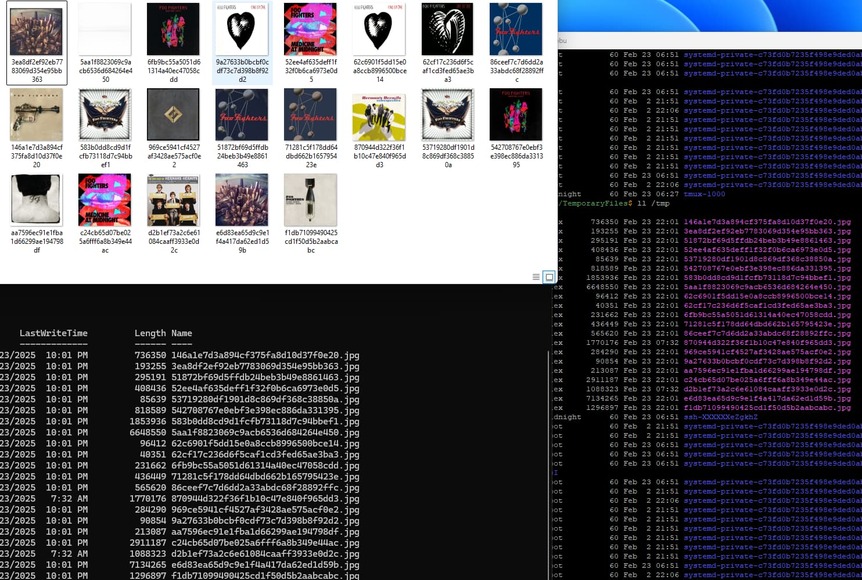
I can confirm that this does indeed extend to Album Artwork in Music libraries.

In example, at 2201, I found another case where the albums under a particular artist had all lost their artwork and were instead defaulting to the artist photo. After scanning, this was the state of /tmp (and, yes, that is with the override in place as described in my last comment).

/var/lib/plexmediaserver/Library/Application Support/Plex Media Server/Logs$ grep '/tmp/' *.log
[...]
Plex Media Scanner Matcher.1.log:Feb 23, 2025 22:01:10.661 [140580210769664] DEBUG - MediaFile: found embedded image, saved to '"/tmp/71281c5f178dd64dbd662b165795423e.jpg"'
Plex Media Scanner Matcher.2.log:Feb 23, 2025 22:01:09.979 [140240451211008] DEBUG - MediaFile: found embedded image, saved to '"/tmp/51872bf69d5ffdb24beb3b49e8861463.jpg"'
Plex Media Scanner Matcher.3.log:Feb 23, 2025 22:01:10.273 [140372576292608] DEBUG - MediaFile: found embedded image, saved to '"/tmp/86ceef7c7d6dd2a33abdc68f28892ffc.jpg"'
Plex Media Scanner Matcher.4.log:Feb 23, 2025 22:01:09.312 [139690970697472] DEBUG - MediaFile: found embedded image, saved to '"/tmp/aa7596ec91e1fba1d66299ae194798df.jpg"'
Plex Media Scanner Matcher.5.log:Feb 23, 2025 22:01:08.232 [140087376162560] DEBUG - MediaFile: found embedded image, saved to '"/tmp/62cf17c236d6f5caf1cd3fed65ae3ba3.jpg"'
Plex Media Scanner Matcher.log:Feb 23, 2025 22:01:11.192 [139844706795264] DEBUG - MediaFile: found embedded image, saved to '"/tmp/146a1e7d3a894cf375fa8d10d37f0e20.jpg"'

Likewise, in /tmp

$ ll /tmp
total 26604
-rw-r--r--. 1 plex     plex      736350 Feb 23 22:01 146a1e7d3a894cf375fa8d10d37f0e20.jpg
-rw-r--r--. 1 plex     plex      193255 Feb 23 22:01 3ea8df2ef92eb7783069d354e95bb363.jpg
-rw-r--r--. 1 plex     plex      295191 Feb 23 22:01 51872bf69d5ffdb24beb3b49e8861463.jpg
-rw-r--r--. 1 plex     plex      408436 Feb 23 22:01 52ee4af635deff1f32f0b6ca6973e0d5.jpg
-rw-r--r--. 1 plex     plex       85639 Feb 23 22:01 53719280df1901d8c869df368c38850a.jpg
-rw-r--r--. 1 plex     plex      818589 Feb 23 22:01 542708767e0ebf3e398ec886da331395.jpg
-rw-r--r--. 1 plex     plex     1853936 Feb 23 22:01 583b0dd8cd9d1fcfb73118d7c94bbef1.jpg
-rw-r--r--. 1 plex     plex     6648550 Feb 23 22:01 5aa1f8823069c9acb6536d684264e450.jpg
-rw-r--r--. 1 plex     plex       96412 Feb 23 22:01 62c6901f5dd15e0a8ccb8996500bce14.jpg
-rw-r--r--. 1 plex     plex       40351 Feb 23 22:01 62cf17c236d6f5caf1cd3fed65ae3ba3.jpg
-rw-r--r--. 1 plex     plex      231662 Feb 23 22:01 6fb9bc55a5051d61314a40ec47058cdd.jpg
-rw-r--r--. 1 plex     plex      436449 Feb 23 22:01 71281c5f178dd64dbd662b165795423e.jpg
-rw-r--r--. 1 plex     plex      565620 Feb 23 22:01 86ceef7c7d6dd2a33abdc68f28892ffc.jpg
-rw-r--r--. 1 plex     plex     1770176 Feb 23 07:32 870944d322f36f1b10c47e840f965dd3.jpg
-rw-r--r--. 1 plex     plex      284290 Feb 23 22:01 969ce5941cf4527af3428ae575acf0e2.jpg
-rw-r--r--. 1 plex     plex       90854 Feb 23 22:01 9a27633b0bcbf0cdf73c7d398b8f92d2.jpg
-rw-r--r--. 1 plex     plex      213087 Feb 23 22:01 aa7596ec91e1fba1d66299ae194798df.jpg
-rw-r--r--. 1 plex     plex     2911187 Feb 23 22:01 c24cb65d07be025a6fff6a8b349e44ac.jpg
-rw-r--r--. 1 plex     plex     1088323 Feb 23 07:32 d2b1ef73a2c6e61084caaff3933e0d2c.jpg
-rw-r--r--. 1 plex     plex     7134265 Feb 23 22:01 e6d83ea65d9c9e1f4a417da62ed1d59b.jpg
-rw-r--r--. 1 plex     plex     1296897 Feb 23 22:01 f1db71099490425cd1f50d5b2aabcabc.jpg

In this particular case, that artist was Foo Fighters. Accordingly, I decided to pull the files this time to actually see what they were:

Good luck, and thanks.

Just a note, as I wondered why the override was not taking effect, for Fedora 41, for me, the correct path was /etc/systemd/system/plexmediaserver.service.d/override.conf.

$ sudo rm -r /etc/systemd/system/plexmediaserver.d/
$ sudo systemctl edit plexmediaserver

[...]

Successfully installed edited file '/etc/systemd/system/plexmediaserver.service.d/override.conf'.

$ cat /etc/systemd/system/plexmediaserver.service.d/override.conf

[Service]
Environment="PLEX_MEDIA_SERVER_TMPDIR=/data/Plex/TemporaryFiles"
Environment="TMPDIR=/data/Plex/TemporaryFiles"

Was there any luck in reproducing this? This behavior continues to persist.

Likewise, as noted, album artwork also continues to randomly disappear.
